Symbol changes when copied from AutoCAD to word.

Symbol changes when copied from AutoCAD to word.

Anonymous
Not applicable
5,181 Views
11 Replies
Message 1 of 12

Symbol changes when copied from AutoCAD to word.

Anonymous
Not applicable

Hello, 

I use small sigma symbol (σ) Unicode :  03c3 in AutoCAD drawing. The used font is Times New Roman. 

The issue is that the sigma symbol turns into the letter "S" when the drawing is copied to Microsoft Word. 

The AutoCAD version is 2019 and Microsoft Word is the latest version. 

The uploaded photo shows the problem. 

Looking for suggestions to solve this issue. 

0 Likes
Accepted solutions (2)
5,182 Views
11 Replies
Replies (11)
Message 2 of 12

pendean
Community Legend
Community Legend
Post your source docx file and your destination DWG file with the problem, let's all touch your files for ourselves.

Thanks.

0 Likes
Message 3 of 12

leeminardi
Mentor
Mentor

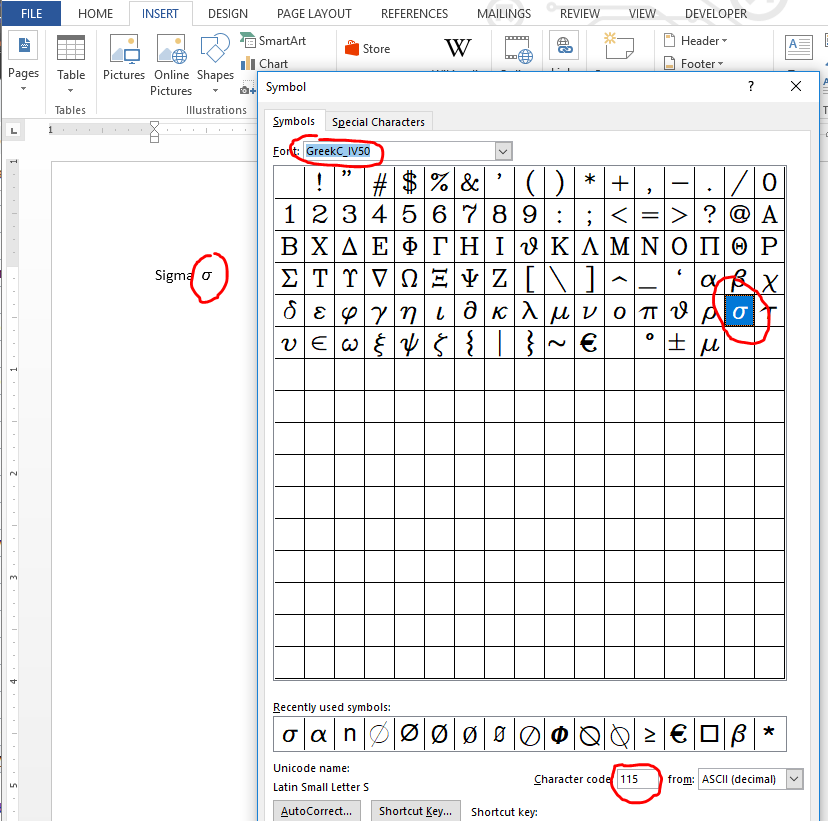
Rather than use the sigma from the upper end unicode option of Times New Roman use a sigma from the normal extended ASCII option in a font like GreekC_IV50 for the sigma (s = ) and other Greek characters. Use New Times Roman otherwise.   It will copy and paste fine. 

BTW, I typically do a Paste Special (Windows Metafile) as the Word file will have less overhead.  In addition you can edit line weights, color, etc. in Word.

image.png

lee.minardi
0 Likes
Message 4 of 12

Anonymous
Not applicable

please find it. 

0 Likes
Message 5 of 12

Anonymous
Not applicable

To be honest, I did not understand what you meant by "normal extended ASCII option in a font like GreekC_IV50". 

The second proposed solution (using special paste) did not solve the problem. please find the word and .dwg files in the previous reply. 

0 Likes
Message 6 of 12

leeminardi
Mentor
Mentor
Accepted solution

ASCII is a standard for representing characters.  When it was first implemented in the 1960's it was limited to 128 different character (e.g., A-Z, a- z, 0-9, and some symbols).  Extended ASCII expanded the range to 256 characters.  The Unicode standard was released much later and it supports up to 1024 characters.

With most ASCII fonts (or extended ASCII) the letter A is 65, B is 66, etc.  Lower case s is 115.  If you use the GreekC_IV50 ASCII code 115 is a lower case sigma character.  

image.pngThe Times New Roman font supports Unicode. Its lower case sigma is character code 03C3 (hexadecimal, base 16) or 963 (base 10).  963 is greater than  the 256 limit of extended ASCII and the cause of your problem.

The simple solution is to just select the s in your AutoCAD text and change the font to one that has a sigma in the range of 0 to 255, for example, Greek_IV50.  It will copy/paste from AutoCAD to Word just fine!

image.png

lee.minardi
Message 7 of 12

Anonymous
Not applicable

Thanks for your helpful and informative reply.  Changing the font to Greek solved the problem. However, I have only "GreekC" and "GreekS" fonts in my fonts library. The character appear slim in those fonts as shown below.

I did not find "GreekC_IV50" in my computer and I did not find it online to download it. Do you have any suggestions? 

Annotation 2019-05-26 132325.png


0 Likes
Message 8 of 12

lequangvinhbkhn
Enthusiast
Enthusiast
Accepted solution

Đây là font geekx IV50 http://matrix-edv.de/fonts/zipdownload.php?file=greekc_IV50.ttf


__________________ Architect at Phuong Vinh Company, chuyen xay nha tron goi, thiet ke noi that Hai Phong, thiet ke nha ong

0 Likes
Message 9 of 12

Anonymous
Not applicable

Thank you. That worked. 

0 Likes
Message 10 of 12

leeminardi
Mentor
Mentor

Greekc is an AutoCAD stick font (fonts with a drawing compass in front of their name).  You should use a True Type (the fonts with a TT in front of their name).  What do you see when you give the style command?


image.png

lee.minardi
0 Likes
Message 11 of 12

Anonymous
Not applicable

I only saw it after installing font file. I downloaded it from the link that  lequangvinhbkhn provided. 

As you can see in the photo, I have only GreekC_IV50, GreekC_IV25 is not there because I did not install it. 

2019-05-26 18_23_13-Text Style.png 


I still have problem that tau does not appear in Greek font as it appears in Times new roman font (As I want to be). Do you have any suggestions ? 2019-05-26 18_32_58-Window.png


0 Likes
Message 12 of 12

BeKirra
Advisor
Advisor

My fonts look the same as what @leeminardi has (I also have "GreekS_IV25" & "GreekS_IV50").


My Windows 10 is "Enterprise" edition. What is your edition?

Your answer might answers your question. Smiley Happy


Please mark "Accept as Solution" and "Like" if my reply resolves the issue and it will help when others need helps.
= ♫ = ♪ = ♫ = ♪ = ♫ = ♪ = ♫ = ♪ = ♫ = ♪ = ♫ = ♪ = ♫ = ♪ = ♫ = ♪ = ♫ = ♪ = ♫ = ♪ = ♫ = ♪ = ♫ = ♪ = ♫ = ♪ = ♫ = ♪ = ♫ = ♪ = ♫ =
A circle is the locus of a cursor, starting and ending at the same point on a plane in model space or in layout such that its distance from a given coordinates (X,Y) is always constant.
X² + Y² = C²
0 Likes