Problem with plot two, overlapping viewports

Problem with plot two, overlapping viewports

robert_chmielewskiUMURG
Observer Observer
670 Views
3 Replies
Message 1 of 4

Problem with plot two, overlapping viewports

robert_chmielewskiUMURG
Observer
Observer

Hello everyone, I got a problem.
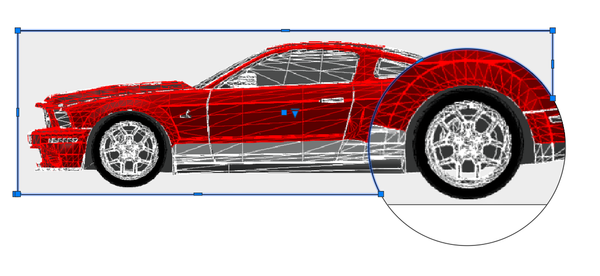
I need to cover a viewport 1 (all plan) with another viewport 2 (detail-circle viewport)
I used region and two viewports.
In plot preview it looks good
In plot is not OK
Why?

0 Likes
671 Views
3 Replies
Replies (3)
Message 2 of 4

pendean
Community Legend
Community Legend
AutoCAD viewports don't work like that, never have. Sorry.

But you can fudge it occasionally if you turn off / uncheck PLOT PAPERSPACE LAST in your PLOT dialog box pop-up.
0 Likes
Message 3 of 4

robert_chmielewskiUMURG
Observer
Observer

AutoCAD viewports  work like that, only circles not working with viewports well. All you need to do is replace the wheel with a poligon and it works. Why print preview work but the print dosen't?

check/uncheck PLOT PAPERSPACE LAST  of course don't work.

Maybe the problem is in the printer drivers.

Thank you for your  tip

0 Likes
Message 4 of 4

Valentin_CAD
Mentor
Mentor

@robert_chmielewskiUMURG ,


In your case, you may want to VPCLIP the viewport (see highlight below) around the circular viewport - created by using MVIEW - Object.


ValentinWSP_0-1695653547939.png


Select the "Mark as Solution" if my post solves your issue or answers your question.

Seleccione "Marcar como solución" si mi publicación resuelve o responde a su pregunta.


Emilio Valentin

0 Likes