Locking all viewports

Locking all viewports

Anonymous
Not applicable
18,135 Views
19 Replies
Message 1 of 20

Locking all viewports

Anonymous
Not applicable

I want to create a lisp that locks all viewports in the current dwg. I work for a firm that not everyone will lock their viewports and so I think this will help eliminate this issue.


I want the command to start by typing "MV" and I want the command to cycle through the entire DWG and lock all viewports.


I can do this manually by typing "MVIEW;L;ON;ALL;" but that only locks the current layout tab.


Any help would eb much appreciated.

0 Likes
Accepted solutions (2)
18,136 Views
19 Replies
Replies (19)
Message 2 of 20

Patchy
Mentor
Mentor
Accepted solution

;lock all mview
(defun c:vpl ( )
(foreach x (layoutlist)
(command "layout" "set" x)
(command "mview" "lock" "on" "all" "")
)
)

Message 4 of 20

Kent1Cooper
Consultant
Consultant

Locked Viewports have the 16384 bit included in the value of the DXF code 90 entry in their entity data, or if you like VLA Properties better, their DisplayLocked Property is -1 [it's 0 for unlocked Viewports].  I believe the DXF code 69 entry [Viewport ID] is always 1 for a Paper Space viewport, and higher numbers for Viewports into Model Space in it.  If that's correct, this seems to do it [minimally tested] without the need to move into each Layout in turn:


(defun C:LAV (/ ss n vp); = Lock All Viewports
  (if (setq ss (ssget "_X" '((0 . "VIEWPORT"))))
    (repeat (setq n (sslength ss))
      (if (> (cdr (assoc 69 (entget (setq vp (ssname ss (setq n (1- n))))))) 1); not the Paper Space Viewport of its Layout
        (vla-put-DisplayLocked (vlax-ename->vla-object vp) -1); lock it
      ); if
    ); repeat
  ); if
); defun

Kent Cooper, AIA
0 Likes
Message 5 of 20

3wood
Advisor
Advisor

What I did is adding these function to S::startup in your acad.lsp so it will run when ever you open a drawing.


Message 6 of 20

Kent1Cooper
Consultant
Consultant

@Kent1Cooper wrote:

....

  (if (setq ss (ssget "_X" '((0 . "VIEWPORT"))))
....


Come to think of it, since that (ssget) finds Paper-Space Viewports [Layouts] in addition to the into-Model-Space Viewports in them, there will never be a question of whether it finds any -- since you can't Purge all Layouts out of a drawing, there must always be at least one.  So that (if) function can be removed:

(defun C:LAV (/ ss n vp); = Lock All Viewports
  (repeat (setq n (sslength (setq ss (ssget "_X" '((0 . "VIEWPORT"))))))
    (if (> (cdr (assoc 69 (entget (setq vp (ssname ss (setq n (1- n))))))) 1); not the Paper Space Viewport of its Layout
      (vla-put-DisplayLocked (vlax-ename->vla-object vp) -1); lock it

    ); if
  ); repeat
); defun


Again, unlike the Mview-based method, the above approach does not require making each Layout current in turn to Lock the Viewports in it, but does them all from wherever you are.

Kent Cooper, AIA
Message 7 of 20

Anonymous
Not applicable

So if I add this to my ACAD.LSP what do I need for it to run? I mean I copied what you wrote and pasted it into the ACAD.LSP but it doesn't seem to work.

0 Likes
Message 8 of 20

rkmcswain
Mentor
Mentor

Put it in your "acadDOC.lsp", not "Acad.lsp".

By default, the latter only loads at application startup, not each time a drawing is loaded. "Acaddoc.lsp" loads each time a drawing is loaded.

If you do not have an "Acaddoc.lsp" file, then just create it using notepad, and save it in the path listed at the TOP of your support file search path.

Ideally, create your own location for your custom files (for example: C:\CADSTUFF) and put this location at the TOP of your support file search path, in front of all of the other directories. This will ensure that AutoCAD finds your custom files first.


Lastly, if the function you put into a startup file includes a defun function [ (defun c:LV...... ] - then your startup file is only loading this code into memory as a function to be manually executed by the user. If you want this code to execute automatically at startup, then include the function inside a S : : Startup function as described here.


(defun-q MYSTARTUP () 
 (c:lv)
 (princ)
)
(setq S::STARTUP (append S::STARTUP MYSTARTUP))


0 Likes
Message 9 of 20

Kent1Cooper
Consultant
Consultant

@Anonymous wrote:

So if I add this to my ACAD.LSP what do I need for it to run? I mean I copied what you wrote and pasted it into the ACAD.LSP but it doesn't seem to work.


If you want it to be run upon opening of every drawing, put it into acaddoc.lsp [as already pointed out], and you can have it run without needing to do the STARTUP thing, in at least two ways:


1)  Include only the (repeat) function in acaddoc.lsp, without the (defun) wrapping, and it will just do it without the defining of, or the need to invoke, a command name.


2)  Put it in with the (defun) wrapping to define it as a command name, and follow it with:


(C:LAV)


to run that command.  That has the advantage that you can also invoke the command at times other than when the drawing is opened, if you want [such as if you have needed to unlock any of the Viewports and want to re-lock them], by typing in the command name, or picking a menu item that contains (C:LAV).

Kent Cooper, AIA
0 Likes
Message 10 of 20

rkmcswain
Mentor
Mentor

Good point Kent. That code should work fine without being inside the S : : Startup (extra spaces in there to prevent auto-smileees)


Although it wouldn't hurt to include it in S : : Startup, if you so choose, right?


0 Likes
Message 11 of 20

Kent1Cooper
Consultant
Consultant

@rkmcswain wrote:

Good point Kent. That code should work fine without being inside the S : : Startup (extra spaces in there to prevent auto-smileees)


Although it wouldn't hurt to include it in S : : Startup, if you so choose, right? 


There are often a variety of ways to skin a given cat -- just don't put it in more than one place, unless you don't mind the same thing being run more than once on you.


[On the auto-smileees issue, you can eliminate that problem for yourself and for anyone else who follows the instructions here.  Others who haven't made that setting change will still see them, and so you will you if you look at a Post that has those character combinations when you are not signed in.]

Kent Cooper, AIA
0 Likes
Message 12 of 20

rkmcswain
Mentor
Mentor
Kent1Cooper wrote:

[On the auto-smileees issue, you can eliminate that problem for yourself and for anyone else who follows the instructions here.  Others who haven't made that setting change will still see them, and so you will you if you look at a Post that has those character combinations when you are not signed in.]

Thanks. I knew about the global on/off switch. You can turn off smilies in individual posts using vBullietin.
hint, hint...
0 Likes
Message 13 of 20

Anonymous
Not applicable

So I am kind of understanding, bare with me on this as I am not really good at programming. So I am going to add it to the acad.lsp because I don't want to create a new file. The less files the better, or so that is what I think. I am going to add this command;


(defun C:LAV (/ ss n vp); = Lock All Viewports
  (repeat (setq n (sslength (setq ss (ssget "_X" '((0 . "VIEWPORT"))))))
    (if (> (cdr (assoc 69 (entget (setq vp (ssname ss (setq n (1- n))))))) 1); not the Paper Space Viewport of its Layout
      (vla-put-DisplayLocked (vlax-ename->vla-object vp) -1); lock it

    ); if
  ); repeat
); defun


All I need to know now is where to add the;


defun-q S::STARTUP 


command so it will be executed automatically ever time I open a drawing.


I am thinking it should look like this;


(defun C:LAV (/ ss n vp); = Lock All Viewports
  (repeat (setq n (sslength (setq ss (ssget "_X" '((0 . "VIEWPORT"))))))
    (if (> (cdr (assoc 69 (entget (setq vp (ssname ss (setq n (1- n))))))) 1); not the Paper Space Viewport of its Layout
      (vla-put-DisplayLocked (vlax-ename->vla-object vp) -1); lock it

    ); if
  ); repeat
); defun-q S::STARTUP


But I need some help with this please.

0 Likes
Message 14 of 20

Kent1Cooper
Consultant
Consultant
Accepted solution

@Anonymous wrote:

So I am kind of understanding, bare with me on this as I am not really good at programming. So I am going to add it to the acad.lsp because I don't want to create a new file. The less files the better, or so that is what I think. ....


If you expect to do more in the way of customization, I would think it will be well worth having an acaddoc.lsp file -- you'll find and make lots of things to put in it.  The acad.lsp file is designed for things that need to be fired up once when AutoCAD is started, and that apply across any number of drawings [such as status-line content using MODEMACRO], not in every drawing.  But defining custom commands is something that needs to be done in every drawing, which is exactly what acaddoc.lsp is meant for [that's what the "doc" part is about].  You can get acad.lsp to run in every drawing by setting the ACADLSPASDOC System Variable appropriately, without the need for S::Startup stuff, but that can cause drawings to take longer to open if it's doing functions upon opening every drawing that it doesn't really need to do more than once per AutoCAD session.


Personally, I would put the command into acaddoc.lsp followed by a function to invoke it:


(defun C:LAV (/ ss n vp); = Lock All Viewports
  (repeat (setq n (sslength (setq ss (ssget "_X" '((0 . "VIEWPORT"))))))
    (if (> (cdr (assoc 69 (entget (setq vp (ssname ss (setq n (1- n))))))) 1); not the Paper Space Viewport of its Layout
      (vla-put-DisplayLocked (vlax-ename->vla-object vp) -1); lock it

    ); if
  ); repeat
); defun

(C:LAV)


Or, if you don't expect to need to use it manually at any time, don't define it as a command, but just put the operative code into acaddoc.lsp:

(repeat (setq n (sslength (setq ss (ssget "_X" '((0 . "VIEWPORT"))))))
  (if (> (cdr (assoc 69 (entget (setq vp (ssname ss (setq n (1- n))))))) 1); not the Paper Space Viewport of its Layout
    (vla-put-DisplayLocked (vlax-ename->vla-object vp) -1); lock it

  ); if
); repeat

Kent Cooper, AIA
Message 15 of 20

rkmcswain
Mentor
Mentor
irishrandy26 wrote:

....as I am not really good at programming. So I am going to add it to the acad.lsp because I don't want to create a new file. The less files the better, or so that is what I think. I am going to add this command;

As @Kent1Cooper said, allow me to reiterate:


"acad.lsp" loads ONCE per session.

"acaddoc.lsp" loads each time a drawing is opened/created.


Presuming you want this code to run for every drawing that opens, add it to "acaddoc.lsp" not "acad.lsp".


Yes, you can hack your way around it by changing ACADLSPASDOC to 1, but don't do that. There is just no reason to. I don't even know why they've left that sysvar in all these years. It had a purpose in 1999 for people upgrading to AutoCAD 2000 who didn't have time to migrate to the new way, but 16 years later, it's obsolete.


0 Likes
Message 16 of 20

braudpat
Mentor
Mentor


Hello from France


Since several years, I am using a nice routine from Patrick_35 (A french developper)


VPLockAll : Lock ALL VPorts in any Layout


VPUnLockAll : UnLock ALL VPorts in any Layout


Thanks to Patrick_35, Regards, Patrice


Patrice ( Supporting Troops ) - Autodesk Expert Elite
If you are happy with my answer please mark "Accept as Solution" and if very happy please give me a Kudos (Felicitations) - Thanks

Patrice BRAUD

EESignature


Message 17 of 20

m_rogoff
Advocate
Advocate

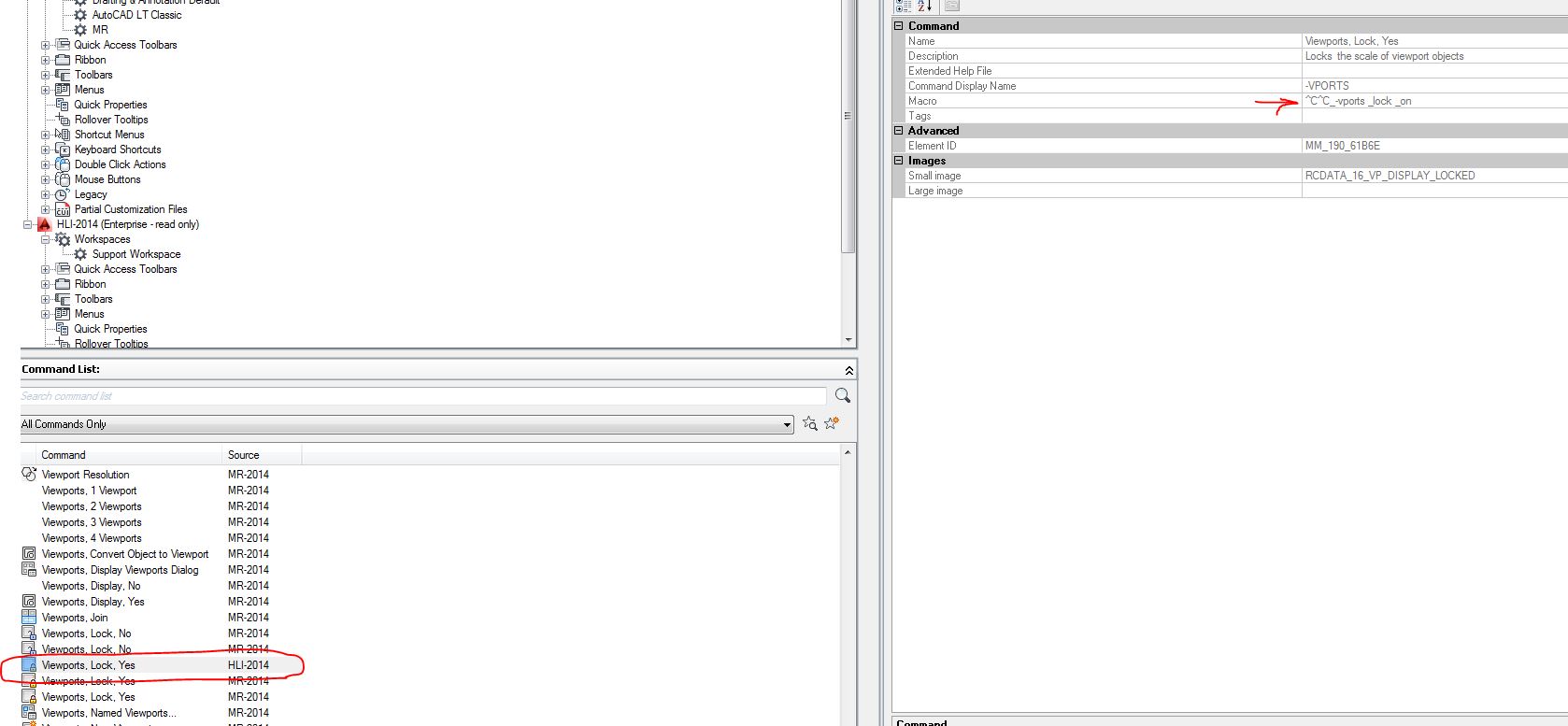
^C^C_-vports _lock _on


This macro is built in with AutoCad, just add the command to the Viewport toolbar

0 Likes
Message 18 of 20

Kent1Cooper
Consultant
Consultant

@m_rogoff wrote:

^C^C_-vports _lock _on

....


But that doesn't lock all Viewports in the drawing, as originally requested.  In older versions, it leaves you with a prompt to select objects, which means not only that you need to do that selection, but that you can lock only those in the current Layout, and you need to get into each Layout separately to do so.  In newer versions [I'm looking at the description in Help, since I don't have a newer version where I am at the moment to confirm it], it says it locks only the current Viewport, and no mention is made of either an On/Off choice [though I expect there must be one, because it doesn't list an Unlock option] or a selection.


The AutoLISP approach, on the other hand, will do it to all Viewports in the drawing at once, no matter how many Layouts there are or how many Viewports there may be in any of them, without the need to get into each Layout, much less do anything in it, such as invoke the command or macro, or select the Viewport(s).

Kent Cooper, AIA
0 Likes
Message 19 of 20

Sandervp
Advocate
Advocate

Hello Irishrandy26,


Maybee this could be helpfull;


http://forums.autodesk.com/t5/autocad-2013-2014-2015-2016/un-locking-the-viewports/m-p/5741345#M8838...


It's a lisp file I use and it locks every viewport in a drawing and also change his color into red or green and his layer into "defpoints" (You could change this offcourse).


Greetings Sander

0 Likes
Message 20 of 20

rflach1
Explorer
Explorer

Best answer. This works great. I appreciate all the Lisp coding suggestions, but for a straight answer this is the best option. I will hopefully get to a point where I can start coding my own items.

0 Likes