- Home
- /
- Architecture, Engineering & Construction
- /
- AutoCAD Forums
- /
- AutoCAD Forum
- /
- Installing font into AutoCAD
Installing font into AutoCAD
Options
- Subscribe to RSS Feed
- Mark Topic as New
- Mark Topic as Read
- Float this Topic for Current User
- Bookmark
- Subscribe
- Mute
- Printer Friendly Page
Installing font into AutoCAD

 Participant
25,922 Views
5 Replies


Replies (5)


Message 3 of 6


- Mark as New
- Bookmark
- Subscribe
- Mute
- Subscribe to RSS Feed
- Permalink
- Report
Accepted solution
HI @hollandarc,
The folder containing your existing SHX font files is included in your Support File Search Path which you can look at in OPTIONS.
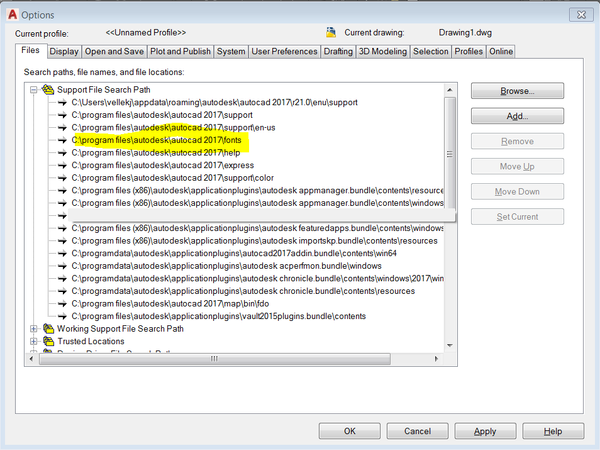
You can add your new SHX to that location or you can put it in your own custom folder and add that folder to the Support File Search Path as well. This can be handy to keep your personal and custom stuff out of the "factory" folders.
Please select the Accept as Solution button if my post fully solves your issue or answers your question.
John Vellek
Join the Autodesk Customer Council - Interact with developers, provide feedback on current and future software releases, and beta test the latest software!
Autodesk Knowledge Network | Autodesk Account | Product Feedback
Message 4 of 6
- Mark as New
- Bookmark
- Subscribe
- Mute
- Subscribe to RSS Feed
- Permalink
- Report
If the font is one that you purchased, keep it in a folder with your other private stuff that is also added to the options support files instead of adding font files to the folder that Autodesk uses for the fonts that it supplies. You should also be aware that AutoCAD also scans the system fonts directory for supported fonts. As long as a folder is on the support files list, AutoCAD will find the fonts.
Architect, Registered NC, VA, SC, & GA.
Message 5 of 6
- Mark as New
- Bookmark
- Subscribe
- Mute
- Subscribe to RSS Feed
- Permalink
- Report
I found the file, went to Security, and allowed the write to option. It
then allowed me to drop the shx file in there and the dwg file I had created
from and AutoCAD lt program then looked right. Was I not supposed to do
that?
then allowed me to drop the shx file in there and the dwg file I had created
from and AutoCAD lt program then looked right. Was I not supposed to do
that?
Message 6 of 6
- Mark as New
- Bookmark
- Subscribe
- Mute
- Subscribe to RSS Feed
- Permalink
- Report
Hi @hollandarc,
It is always a good idea to keep your custom files separate from your application files in case anything gets corrupted or damaged. This can speed recovery.
Are you a local administrator on your workstation? I suggest this is a good thing as it can prevent permissions problems that frequently arise when using AutoCAD.
It is also a good idea to turn off UAC (User Account Control).
Are you on Windows 10 Per chance? Some users have reported problems installing fonts and other things without being in the God-mode (Super Admin permissions).
Please select the Accept as Solution button if my post fully solves your issue or answers your question.
John Vellek
Join the Autodesk Customer Council - Interact with developers, provide feedback on current and future software releases, and beta test the latest software!
Autodesk Knowledge Network | Autodesk Account | Product Feedback
