Imported excel tables - formatting

Imported excel tables - formatting

Anonymous
Not applicable
12,874 Views
8 Replies
Message 1 of 9

Imported excel tables - formatting

Anonymous
Not applicable

Hey guys,


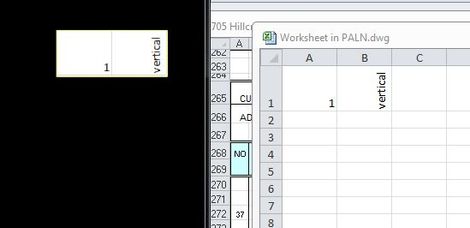
Trying to import an excel table into autocad, but when I do, the vertical text that was in my excel table goes horizontal and throws off the formatting for the table. When I import the data link, I have it set to keep excel formatting, but I'm still getting this problem. Any suggestions?


See attached.


Thanks.

0 Likes
Accepted solutions (2)
12,875 Views
8 Replies
Replies (8)
Message 2 of 9

zalant
Autodesk Support
Autodesk Support

Not quite sure why you're getting that result. It would help to know what the original text looks like when it's in Excel. Is it possible to post your XLS file or show a screen shot of Excel and tell us how you created/formatted the cell in the original spreadsheet?


Zac Travis
0 Likes
Message 3 of 9

Anonymous
Not applicable

Just did a simple rotate text using the alignment tool.

0 Likes
Message 4 of 9

ara_neresesian
Collaborator
Collaborator
Accepted solution

HI

from insert menu select OLE object and choose Excel worksheet ,paste your data to that new excel sheet ,close the excel .

see attached.

insert.JPGexcel.JPG

Message 5 of 9

zalant
Autodesk Support
Autodesk Support
Accepted solution

1. Indeed, that does work (great idea!), though you must do a little bit of dragging in the new Excel spreadsheet in order to make sure that all the column widths/heights are the same as in the original. 


2. Similarly, if you did a data link and inserted a table from it, as the OP is doing, you can drag the column widths/heights around in the AutoCAD table to make them match the original Excel spreadsheet.


3. If you click the dot for "Create from file" when inserting a Microsoft Excel Worksheet object, it will come in just like the original in Excel.


I've attached DWG and XLSX files where 2. and 3. are demonstrated.


Ultimately, AutoCAD does have some difficulty in processing data from Excel where the text is rotated 90 degrees, and it was reported to Development back in 2016. Sorry for the inconvenience.


Zac Travis
Message 6 of 9

ara_neresesian
Collaborator
Collaborator

Hi

You dont need adjustment in the excel , in paste time use keep formatting(p).

But in my opinion, OLE is more better (change color , font ,background,.....) vs autocad  table .

Good luck 

0 Likes
Message 7 of 9

Anonymous
Not applicable

@Anonymous wrote:

Hey guys,


Trying to import an excel table into autocad, but when I do, the vertical text that was in my excel table goes horizontal and throws off the formatting for the table. When I import the data link, I have it set to keep excel formatting, but I'm still getting this problem. Any suggestions?


See attached.


Thanks.


Look into XL2CAD software for linking excel files to AutoCAD. It has a lot more options to keep it updated and formatted correctly.

0 Likes
Message 8 of 9

zalant
Autodesk Support
Autodesk Support

I've seen many others mention that over the years. Apparently does a lot of really cool stuff.


Zac Travis
0 Likes
Message 9 of 9

zalant
Autodesk Support
Autodesk Support

@Anonymous Was your question/concern addressed adequately here? Please mark as solutions any/all replies which helped you to resolve the original issue.


Zac Travis
0 Likes