AutoCad Hangs when accessing the Tool Ribbon

AutoCad Hangs when accessing the Tool Ribbon

Anonymous
Not applicable
1,375 Views
12 Replies
Message 1 of 13

AutoCad Hangs when accessing the Tool Ribbon

Anonymous
Not applicable

AutoCad Hangs when accessing the Tool Ribbon. If you reset AutoCad, then after the first start it works without errors. On the second start, errors appear again. Autocad 2012

0 Likes
1,376 Views
12 Replies
Replies (12)
Message 2 of 13

Alfred.NESWADBA
Consultant
Consultant

Hi,


does only the Ribbon freeze/hang while you can enter commands using keyboard ... or does the whole AutoCAD freeze?

Which operating system are you on?

When you have multiple monitors or a docking station ... does the same happen when you only have one monitor connected to your workstation/your laptop disconnected from the docking station?


- alfred -

------------------------------------------------------------------------------------
Alfred NESWADBA
ISH-Solutions GmbH / Ingenieur Studio HOLLAUS
www.ish-solutions.at ... blog.ish-solutions.at ... LinkedIn ... CDay 2026
------------------------------------------------------------------------------------

(not an Autodesk consultant)
0 Likes
Message 3 of 13

Anonymous
Not applicable

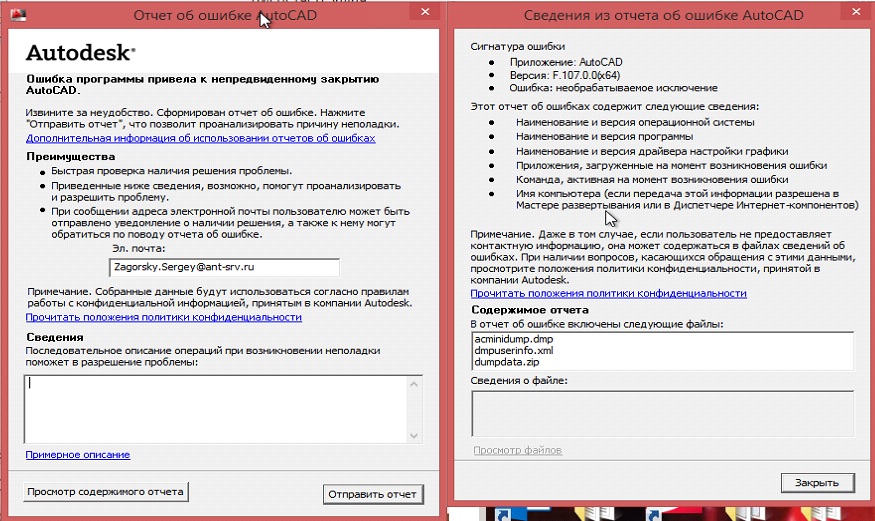
1) All AutoCAD Crashed. Ask me to save changes in the file, after ask to send report to Autodesk, I send it.

2) Windows 8.1 pro it was clear installed two months ago(MDT+WDS image+install app, no one else сomplaining)

3) desktop, 1 monitor


0 Likes
Message 4 of 13

Alfred.NESWADBA
Consultant
Consultant

Hi,


>> it was clear installed two months ago

And it worked well for 2 months now? Or have you had this issue since it's installed?


If it was working well before, what changed on your system? Any updates installed for OS, graphic card driver, other software, ...


When you get the crash please show a screenshot from the message box you get.


- alfred -

------------------------------------------------------------------------------------
Alfred NESWADBA
ISH-Solutions GmbH / Ingenieur Studio HOLLAUS
www.ish-solutions.at ... blog.ish-solutions.at ... LinkedIn ... CDay 2026
------------------------------------------------------------------------------------

(not an Autodesk consultant)
0 Likes
Message 5 of 13

Anonymous
Not applicable

1) no one use AutoCAD in this 2 month on that PC

2) Screen in the Attachment

3) It work well now on other profil. I try to recreate user profil but error did not go away...

0 Likes
Message 6 of 13

Alfred.NESWADBA
Consultant
Consultant

Hi,


>> no one use AutoCAD in this 2 month on that PC

Does that mean that you even have not started AutoCAD after you installed it?


>> Screen in the Attachment

Don't you get a messagebox before this dialog? This screenshot shows the second window after AutoCAD crashes.


- alfred -

------------------------------------------------------------------------------------
Alfred NESWADBA
ISH-Solutions GmbH / Ingenieur Studio HOLLAUS
www.ish-solutions.at ... blog.ish-solutions.at ... LinkedIn ... CDay 2026
------------------------------------------------------------------------------------

(not an Autodesk consultant)
0 Likes
Message 7 of 13

Anonymous
Not applicable

1) Yes. I'am support engineer and user tell me, what she use AutoCAD last time in the September 2019. It means she use it before we reinstall  Winodws 7 pro to Windows 8.1 pro and no one use it on a new OS at that PC, but this OS(from one Image and one application distribution ) installed on another PC's and all fine. AutoCAD license is concurrent.

2) Where is First screen if some file was open, AutoCAD ask me to show place where I can save it, but no more Error messageboxes it shown... AutoCAD just shutdown and I see that messagebox like in last attachment...

0 Likes
Message 8 of 13

Alfred.NESWADBA
Consultant
Consultant

Hi,


>> Where is First screen if some file was open,

So you can open files? Can you also work with these files? When exactly does AutoCAD freeze?


>> It means she use it before we reinstall Winodws 7 pro to Windows 8.1 

You know that AutoCAD 2012 is not supported on Windows 8.1? (>>>details<<<)
Even if it working on another workstation, every single update might stop AutoCAD working.


Can you please try:

create a new Windows user on that system, give that user account admin permissions. Then login with this account, turn off antivirus software. Now start AutoCAD ... does it work?


- alfred -

------------------------------------------------------------------------------------
Alfred NESWADBA
ISH-Solutions GmbH / Ingenieur Studio HOLLAUS
www.ish-solutions.at ... blog.ish-solutions.at ... LinkedIn ... CDay 2026
------------------------------------------------------------------------------------

(not an Autodesk consultant)
0 Likes
Message 9 of 13

pendean
Community Legend
Community Legend
>>>...before we reinstall Winodws 7 pro to Windows 8.1 pro and no one use it ...<<<<
Remove and reinstall ALL Autodesk software, then try test again. Your OS upgrade likely corrupted the software.
0 Likes
Message 10 of 13

Anonymous
Not applicable

Remove and reinstall ALL Autodesk software, then try test again. Your OS upgrade likely corrupted the software.

1) We try to reinstall it, but it is no effect(

And it was not UPGRADE OS it Was Clear install + USMT 

I can try do it again is some Cleanup Tool for full delete AutoCAD? Some trash can be migrated in register from old OS.

2)So you can open files? Can you also work with these files? When exactly does AutoCAD freeze?

Yes I Can open files, I can work with file I think) But then I touch some of the Tool Ribbon it crashed.

If I start AutoCAD with reset options it's work well until next open Autocad...

3)create a new Windows user on that system, give that user account admin permissions. Then login with this account

It work whith some another profile, but when I delete this profill and recreat it autocad crashed(

4)turn off antivirus software

I coordinate it Whith security

0 Likes
Message 11 of 13

Anonymous
Not applicable

1) I uninstall AutoCAD. I Do it like this :

https://knowledge.autodesk.com/customer-service/download-install/remove-products/remove-windows-prod...

I Stop Antivirus and other Programs which one cane damage AutoCAD

Reinstall it Again. I test on a two different User Accounts

First open AutoCAD is fine! But second I get this(attachment)


Second Account Work OK, No Friz etc. But that accont have not internet rights. Please help.


0 Likes
Message 12 of 13

pendean
Community Legend
Community Legend
Second Account is the way to go then, the first is likely corrupt.

Something else to try with the first account:
Right-click the AutoCAD program icon on your desktop
Click "Properties"
Access the "Shortcut" tab
In the "Target" field, after acad.exe" type a space and then /NOHARDWARE
Click "OK" and start the program
Still having trouble?

0 Likes
Message 13 of 13

Anonymous
Not applicable

The problem is resolved. There were two mistakes. 1) it was decided to recreate the profiles 2) disabled the InfoCenter service through the registry. Internet access is limited and AUTOCAD hung on her calls Thank you to everyone who responded!

For disable InfoCenter

(vl-load-com)

(vl-registry-write (strcat "HKEY_CURRENT_USER \\" (vlax-product-key) "\\ InfoCenter") "InfoCenterOn" 0)

0 Likes