api-ms-win-crt-runtime-l1-1-0.dll error in AutoCAD 2017

api-ms-win-crt-runtime-l1-1-0.dll error in AutoCAD 2017

Anonymous
Not applicable
37,107 Views
28 Replies
Message 1 of 29

api-ms-win-crt-runtime-l1-1-0.dll error in AutoCAD 2017

Anonymous
Not applicable

Can anyone help me solve this error. I Installed AutoCAD 2017 on my laptop which is running Windows 7 Professional. Upon launching i encountered this error - api-ms-win-crt-runtime-l1-1-0.dll is missing from your computer. I tried a solution from what I have read from other sites like Windows update etc. but it did not work. Any help will be appreciated.


thanks,


Dennis

Accepted solutions (2)
37,108 Views
28 Replies
Replies (28)
Message 2 of 29

john.vellek
Alumni
Alumni

Good morning @Anonymous,


I have found this article in the AKN: AKN Article. I hope that the steps outlined in it can help to resolve your issue. Please let me know if it does or not. It might help others in the Community.


Please hit the Accept as Solution button if my post fully solves your issue or answers your question.


John Vellek


Join the Autodesk Customer Council - Interact with developers, provide feedback on current and future software releases, and beta test the latest software!

Autodesk Knowledge Network | Autodesk Account | Product Feedback
Message 3 of 29

Anonymous
Not applicable

Hi John,


I tried the solution you posted. The error was gone but when I ran AutoCAD 2017, I encountered an unhandled exception error. Would you also know what's causing this.?


thanks,


Dennis

0 Likes
Message 4 of 29

Alfred.NESWADBA
Consultant
Consultant

Hi,


>> when I ran AutoCAD 2017, I encountered an unhandled exception error

When exactly, and which error?


Does that happen while AutoCAD is initializing, or when AutoCAD is alread started and you do the first click, or AutoCAD is already working and the crash happens during the work (with a specific command, or a specific drawing)? Show us a screenshot so we know where you are.


And "an error" is not very specific, please let is know which one, screenshot would be a good start.


- alfred -

------------------------------------------------------------------------------------
Alfred NESWADBA
ISH-Solutions GmbH / Ingenieur Studio HOLLAUS
www.ish-solutions.at ... blog.ish-solutions.at ... LinkedIn ... CDay 2026
------------------------------------------------------------------------------------

(not an Autodesk consultant)
0 Likes
Message 5 of 29

john.vellek
Alumni
Alumni

Hi @Anonymous,


I am awaiting some more information from you as per Alfred's request.


Please hit the Accept as Solution button if my post fully solves your issue or answers your question.


John Vellek


Join the Autodesk Customer Council - Interact with developers, provide feedback on current and future software releases, and beta test the latest software!

Autodesk Knowledge Network | Autodesk Account | Product Feedback
0 Likes
Message 6 of 29

Anonymous
Not applicable

Hi John and Alfred,


The error happens while AutoCAD is initializing. It takes around 5 mins before the error appears while AutoCAD is initializing. When I clicked OK, a screen appears prompting me to send an error report to Autodesk.  I am attaching the error I encountered.


thanks,


Dennis

0 Likes
Message 7 of 29

Anonymous
Not applicable

Another error.

0 Likes
Message 8 of 29

Anonymous
Not applicable

Hello,

We're receiving the same error on the TrueView 2017 install, computer having troubles is a Windows 7 32 bit version.


a.  Attempted running windows updates, windows is all up to date.

b. Attempted manually copying the files in place from the installs folder, did not try the windows 10 dev kit dlls, as the system is not a windows 10 machine, not sure if the pack is supposed to be compatible.

c. Tried to register the .dll file with windows regsvr32 command, but given dll would not register with windows, reciving error "...DLL entry point not found..."

d.  Eventually rolled back to the TrueView 2015 version, and this version worked as expected.


0 Likes
Message 9 of 29

john.vellek
Alumni
Alumni
Accepted solution

@Anonymous


Update for Universal C Runtime in Windows


Solution

  1. Install Windows Updates:
    Go to Start - Control Panel - Windows Update
    Check for updates
    Install all available updates.
    After the updates are installed, restart your computer.
    After the restart repeat the steps above again until no more updates are available.
     
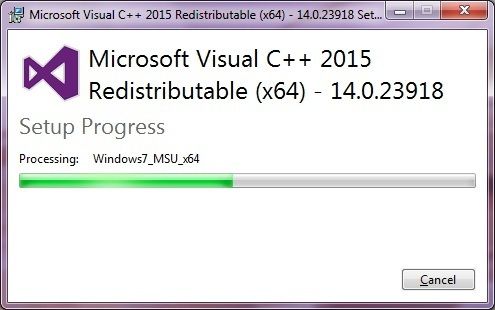
  2. Download the Visual C++ Redistributable:

    For Windows 64-bit
    Visual C++ Redistributable for Visual Studio 2015 (64-bit)
    For Windows 32-bit
    Visual C++ Redistributable for Visual Studio 2015 (32-bit) 

  3. Run the vc_redist.x64.exe (64-bit) or vc_redist.x86.exe (32-bit) and select Uninstall
  4. Run the .exe again and select Install 

Please hit the Accept as Solution button if my post fully solves your issue or answers your question.


John Vellek


Join the Autodesk Customer Council - Interact with developers, provide feedback on current and future software releases, and beta test the latest software!

Autodesk Knowledge Network | Autodesk Account | Product Feedback
Message 10 of 29

john.vellek
Alumni
Alumni

Hi @Anonymous


Just checking back to see if the steps I listed helped resolve your issue.


Please hit the Accept as Solution button if my post fully solves your issue or answers your question.


John Vellek


Join the Autodesk Customer Council - Interact with developers, provide feedback on current and future software releases, and beta test the latest software!

Autodesk Knowledge Network | Autodesk Account | Product Feedback
0 Likes
Message 11 of 29

Anonymous
Not applicable

Hi John,


I am still updating my Windows. Will let you know if this solution works.


thanks,


Dennis

0 Likes
Message 12 of 29

Anonymous
Not applicable

pls disregard last question, info was previously stated.

0 Likes
Message 13 of 29

Anonymous
Not applicable

Just an update, I think that would have fixed it, but now we're stuck with other things on this particular machine.


I did an full uninstall of the V++ 2015 package, rebooted, re-installed, rebooted one more time for good measure.  Then went to go add the TrueView 2017 version back in to test, and now we're getting an error that the PC doesn't meet the minimum requirements.  Found that the requirments for the video card are higher than what this guy has, and it's too old to update, so unfortunately we can't keep moving on the 2017 version for this one.   Most notable thing is that the install wan't picking up on the requirements issue before we did the repairs to the vc++ software, so that may be a good indicator that something more is working now than was previously.   Our users are fine with the 2015 version for now, we're going to replace the computer in the near future anyways due to the age of it.  Also, some further notes about what may have been the root cause - on further inspection, I found that this particular machine has 3 versions of the vc++ runtime libraries, all installed and running in parallel; this one has the 2010 version, 2012 version and also the most current, 2015 version as well.

Thank-you, 

 -Troy


0 Likes
Message 14 of 29

john.vellek
Alumni
Alumni

Hi @Anonymous,


It sounds like you have made some positive progress. I am sorry that the workstation hardware does not meet requirements but at least you should be up and running in a stable environment for your 2015 product.


Please hit the Accept as Solution button if my post fully solves your issue or answers your question.


John Vellek


Join the Autodesk Customer Council - Interact with developers, provide feedback on current and future software releases, and beta test the latest software!

Autodesk Knowledge Network | Autodesk Account | Product Feedback
Message 15 of 29

john.vellek
Alumni
Alumni

Hi @Anonymous,
 I’ve just accepted the response to your post (linked here) as a solution so that others can benefit from the information.
In the future, please click on the ‘Accept as Solution’ button if/when relevant. Please feel free to let me know if you have any questions or concerns!


John Vellek


Join the Autodesk Customer Council - Interact with developers, provide feedback on current and future software releases, and beta test the latest software!

Autodesk Knowledge Network | Autodesk Account | Product Feedback
0 Likes
Message 16 of 29

Anonymous
Not applicable
Accepted solution

HI John,


The solution below worked for me already. Thanks for your assistance.


Update for Universal C Runtime in Windows


Solution

  1. Install Windows Updates:
    Go to Start - Control Panel - Windows Update
    Check for updates
    Install all available updates.
    After the updates are installed, restart your computer.
    After the restart repeat the steps above again until no more updates are available.
     
  2. Download the Visual C++ Redistributable:

    For Windows 64-bit
    Visual C++ Redistributable for Visual Studio 2015 (64-bit)
    For Windows 32-bit
    Visual C++ Redistributable for Visual Studio 2015 (32-bit) 
  3. Run the vc_redist.x64.exe (64-bit) or vc_redist.x86.exe (32-bit) and select Uninstall
  4. Run the .exe again and select Install 


thanks,


Dennis

Message 17 of 29

Anonymous
Not applicable

Hi,


I have the same problem. I use this solution, but the problem persists. This software is not compatible with windows 7 professional edition?


Thanks for your attention.

0 Likes
Message 18 of 29

Anonymous
Not applicable

Same problem, same way tried to solve this .... but it`s not working! I´m using a virtuell machine may this be a problem? (Paralells Windows on Mac)

need help!

looking forward for some good ideas


Benjamin

0 Likes
Message 19 of 29

Anonymous
Not applicable

Hello John, I tried the solution you gave out but it get stuck when the installation is ongoing. updatefailed.jpg

0 Likes
Message 20 of 29

john.vellek
Alumni
Alumni

Hi @Anonymous


If you have downloaded the executable file then perhaps starting up in a Diagnostics mode will allow you to get it to install completely.


Please select the Accept as Solution button if my post solves your issue or answers your question.


John Vellek


Join the Autodesk Customer Council - Interact with developers, provide feedback on current and future software releases, and beta test the latest software!

Autodesk Knowledge Network | Autodesk Account | Product Feedback
0 Likes