Anuncios

The Autodesk Community Forums has a new look. Read more about what's changed on the Community Announcements board.

PRINT

earthsquare
Advocate

PRINT

earthsquare
Advocate
Advocate

Hi,

How to create pdf files, size larger than A3
I have a printer connected, which supports sheets up to A3 size.

Regards
Sreejith.S

Sreejith.S
Landscape Architect
0 Me gusta
Responder
Soluciones aceptadas (1)
608 Vistas
19 Respuestas
Respuestas (19)

maxim_k
Consultant
Consultant
Solución aceptada
Hi,

You can create custom paper size and use it to output to PDF:
http://autodesk.blogs.com/between_the_lines/2011/01/quick-tutorial-plotting-custom-paper-sizes-in-au...

Maxim

Do you find the posts helpful? "LIKE" these posts!
Have your question been answered successfully? Click 'ACCEPT SOLUTION' button.


Maxim Kanaev
Architect
MARSS

MacACAD | Linkedin

Etiquette and Ground Rules of Autodesk Community
0 Me gusta

earthsquare
Advocate
Advocate

Hi,

Thanks.

That was very simple. Not sure how I missed it. 

Regards

Sreejith. S

Sreejith.S
Landscape Architect
0 Me gusta

earthsquare
Advocate
Advocate

Hi

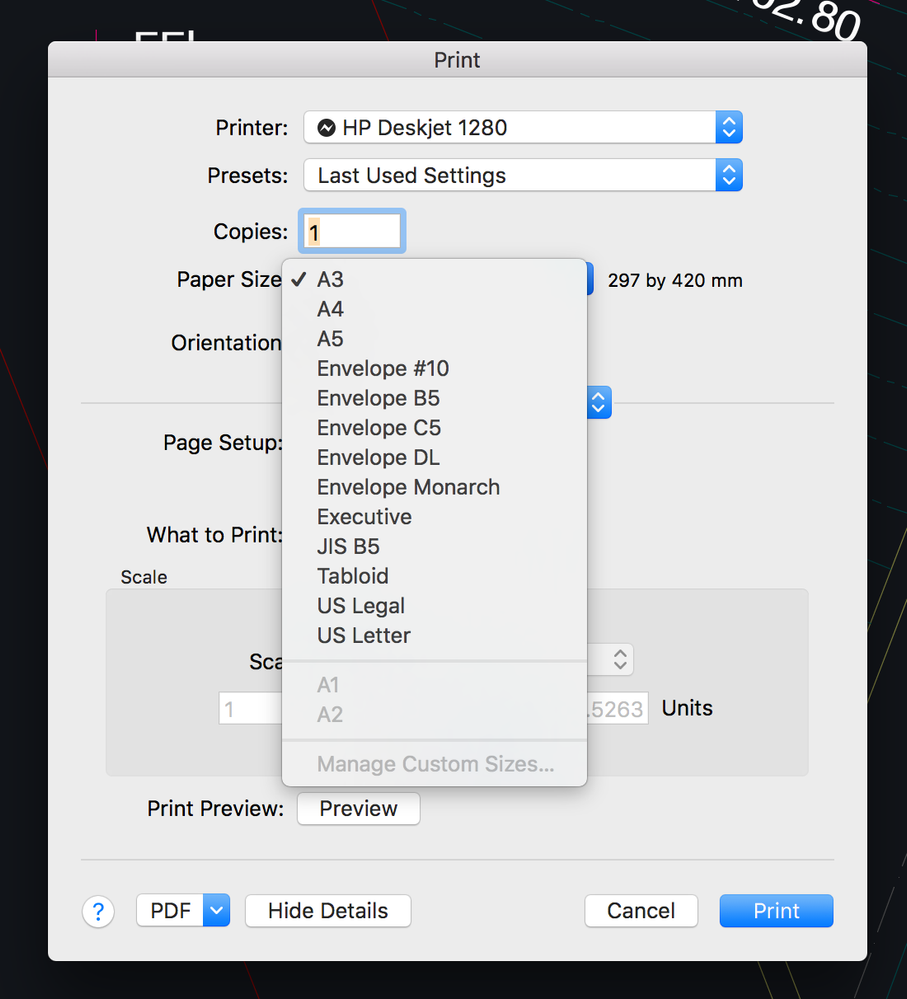
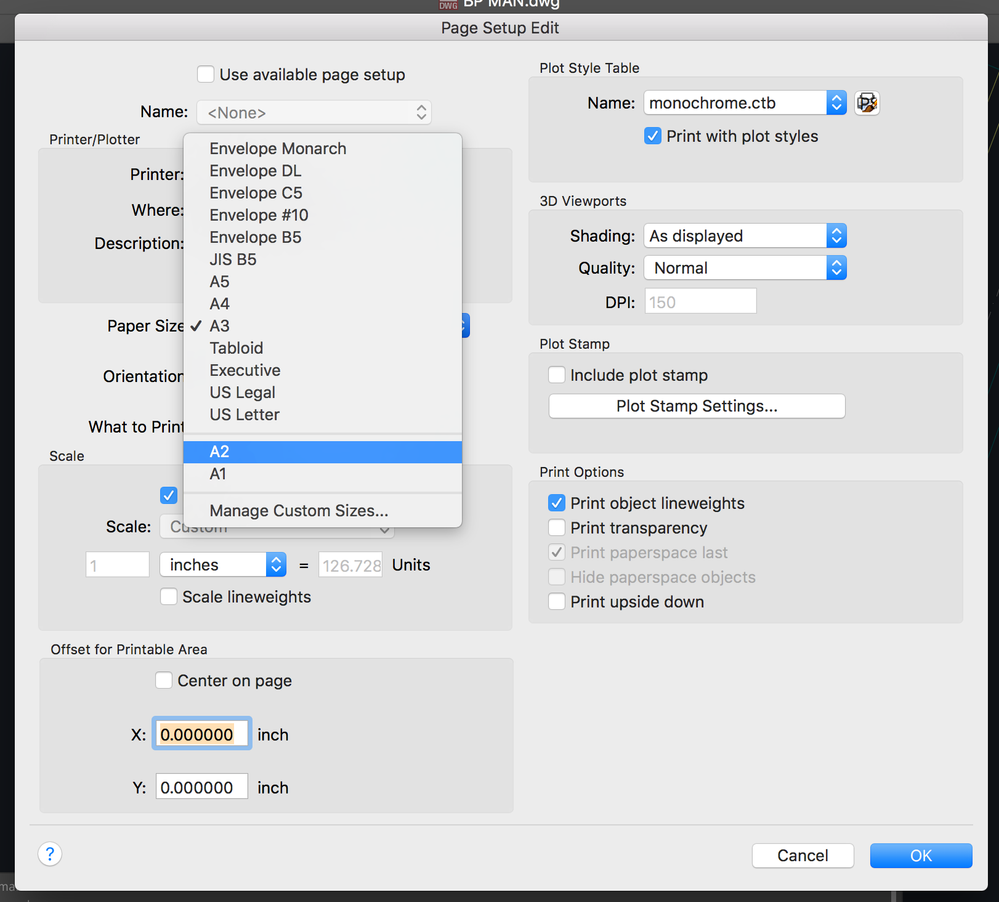
Going back to the issue we discussed few months ago, I am able to add A2 and A1 size pages on the 'edit page setup' box but when I get back to the print dialogue box, the A2 and A1 size appears dim and cannot be selected. A$ gets selected automatically.

Any work around ?

Thanks in advance.

Regards

Sreejith. S

Sreejith.S
Landscape Architect
0 Me gusta

maxim_k
Consultant
Consultant
Hi Sreejith,

Can you post screenshot of the Print dialog?
What if you set Page setup with custom paper size current in Page Setup Manager for the layout you want to print?

Maxim

Do you find the posts helpful? "LIKE" these posts!
Have your question been answered successfully? Click 'ACCEPT SOLUTION' button.


Maxim Kanaev
Architect
MARSS

MacACAD | Linkedin

Etiquette and Ground Rules of Autodesk Community
0 Me gusta

earthsquare
Advocate
Advocate

Hi Maxim,

Sorry for the late reply. Have been travelling.

Please find the attached screen shots.

Screen Shot 2017-03-24 at 11.15.48 AM.pngScreen Shot 2017-03-24 at 11.16.07 AM.png

Regards

Sreejith

Sreejith.S
Landscape Architect
0 Me gusta

earthsquare
Advocate
Advocate

Hi Maxim,

Just bringing to your kind attention about the screenshots I have shared.

Regards

Sreejith.S
Landscape Architect
0 Me gusta

maxim_k
Consultant
Consultant
Hi Sreejith,

I'm not absolutely sure, but maybe custom paper sizes are not available because the "Presets" option in Print dialog selected as "Last used settings" instead of "Default settings".

Maxim

Do you find the posts helpful? "LIKE" these posts!
Have your question been answered successfully? Click 'ACCEPT SOLUTION' button.


Maxim Kanaev
Architect
MARSS

MacACAD | Linkedin

Etiquette and Ground Rules of Autodesk Community
0 Me gusta

earthsquare
Advocate
Advocate

Hi Maxim,

Tried with 'Default settings', still no luck.

Regards

Sreejith.S
Landscape Architect
0 Me gusta

maxim_k
Consultant
Consultant
Do you use Page Setup Manager to change and save Page Setup for the drawing? Or you are using "Edit page setup" button from "Print" dialog?
If latter, than try to edit, save and "Set current" Page Setup with custom paper size in Page Setup Manager at first, than use Print window.

Maxim

Do you find the posts helpful? "LIKE" these posts!
Have your question been answered successfully? Click 'ACCEPT SOLUTION' button.


Maxim Kanaev
Architect
MARSS

MacACAD | Linkedin

Etiquette and Ground Rules of Autodesk Community
0 Me gusta

earthsquare
Advocate
Advocate

Hi,

I used to use 'edit page setup', tried your suggestion it was not working.

Now then I tried the 'page setup manager', it works....

Thanks. 

I hope it works in other drawings too.

Regards

Sreejith. S

Sreejith.S
Landscape Architect
0 Me gusta

maxim_k
Consultant
Consultant
Should work.

Maxim

Do you find the posts helpful? "LIKE" these posts!
Have your question been answered successfully? Click 'ACCEPT SOLUTION' button.


Maxim Kanaev
Architect
MARSS

MacACAD | Linkedin

Etiquette and Ground Rules of Autodesk Community
0 Me gusta

earthsquare
Advocate
Advocate

Not working Emoticono triste

Sreejith.S
Landscape Architect
0 Me gusta

maxim_k
Consultant
Consultant
"Not working" - what?

Maxim

Do you find the posts helpful? "LIKE" these posts!
Have your question been answered successfully? Click 'ACCEPT SOLUTION' button.


Maxim Kanaev
Architect
MARSS

MacACAD | Linkedin

Etiquette and Ground Rules of Autodesk Community
0 Me gusta

earthsquare
Advocate
Advocate
unfortunately no.
I tried with 'new page setup'...
just not able to use it in print dialogue box.

--

Sreejith.S

Principal Landscape Architect


National Executive Council Member Indian Society of Landscape Architects

Secretary Indian Society of Landscape Architects, Kerala Chapter

Associate Member Indian Institute of Architects

Registered Member Council of Architecture


facebook twitter
instagram


“Be a yardstick of quality. Some people aren’t used to an environment where
excellence is expected.” » Steve Jobs
Sreejith.S
Landscape Architect
0 Me gusta

maxim_k
Consultant
Consultant
>>>not able to use it in print dialogue box

Do you mean you don't see the page setup (named, created in Page Setup Manager) in Print window?

Maxim

Do you find the posts helpful? "LIKE" these posts!
Have your question been answered successfully? Click 'ACCEPT SOLUTION' button.


Maxim Kanaev
Architect
MARSS

MacACAD | Linkedin

Etiquette and Ground Rules of Autodesk Community
0 Me gusta

earthsquare
Advocate
Advocate
Hi Maxim,

I am able to use the new page setup in the print dialogue box... but can't
pick the A2 size which i need.

Regards

--

Sreejith.S

Principal Landscape Architect


National Executive Council Member Indian Society of Landscape Architects

Secretary Indian Society of Landscape Architects, Kerala Chapter

Associate Member Indian Institute of Architects

Registered Member Council of Architecture


facebook twitter
instagram


“Be a yardstick of quality. Some people aren’t used to an environment where
excellence is expected.” » Steve Jobs
Sreejith.S
Landscape Architect
0 Me gusta

maxim_k
Consultant
Consultant
So you are not able to pick A2 size in Print dialog (again).
But are you able to select it when you create page setup in Page Setup manager?
If you are able to select it in Page Setup manager and than save this page setup by giving it specific name, than in Print dialog you simply select saved page setup (by its name) and you don't need to change page size as it is already saved with named page setup.

Maxim

Do you find the posts helpful? "LIKE" these posts!
Have your question been answered successfully? Click 'ACCEPT SOLUTION' button.


Maxim Kanaev
Architect
MARSS

MacACAD | Linkedin

Etiquette and Ground Rules of Autodesk Community
0 Me gusta

earthsquare
Advocate
Advocate

Hi Maxim,

I tried setting up a new page, which i have named A2, using the pagesetupmanager.
paper size selected is A2...... 

Now when i comeback to the layout and try to take print.
edit pages up and select A2 page setup......

I am not able to select the paper size A2 :cara_de_decepción:

Regards
Screen Shot 2017-04-10 at 4.56.47 PM.png

Sreejith.S
Landscape Architect
0 Me gusta

earthsquare
Advocate
Advocate

Hi Maxim,

Continuing from the last message. When I select the 'other' option as seen in the image attached, it prints to A2 size even when the A2 size sheets are not displayed.

I think this solves the issue.

Thanks for following it up.

Regards

Sreejith.S

Sreejith.S
Landscape Architect
0 Me gusta