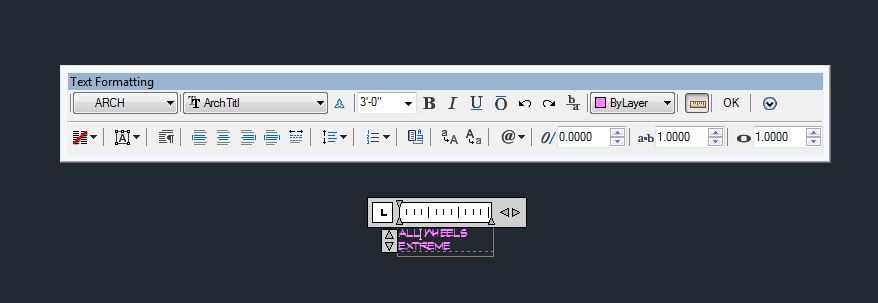
Text Formatting - text height problem in model space

Text Formatting - text height problem in model space

Anonymous
Not applicable
2,162 Views
3 Replies
Message 1 of 4

Text Formatting - text height problem in model space

Anonymous
Not applicable

I am working on Architecture 2011 and When i edit text height in the mtext editor (text formatting) the text inceases more than what it should. for example, see attachments, The Before.jpg indicates the text ht to be 3'-0", but when i change it to 1'-6" it automattically increases the text height to 360'-0" as shown in After.jpg. This started happening after i updated to Architecture 2011. 


Does anyone know how to fix this, its very annoying. there must some setting that needs changed.


PS:  this issue does not happen when i edit text in paper space


Sincerely,


Scott Graybill

0 Likes
Accepted solutions (2)
2,163 Views
3 Replies
Replies (3)
Message 2 of 4

Anonymous
Not applicable
Accepted solution

I've had the same exact problem in plain Autocad 2011 and I'm guessing it's the same bug in Architecture.  Anyway, it seems to be tied to your annotation scale in model space.  My workaround is to set the annotation scale back to 1:1, change the text size (it should change now as expected), and then go back to your original annotation scale.  Kind of a pain in the rear, but I hope that works for you.

0 Likes
Message 3 of 4

Anonymous
Not applicable

Thanks so much that worked.... a little more work but less agrivation

thanks

0 Likes
Message 4 of 4

Anonymous
Not applicable
Accepted solution

AutoCAD's 2011 update 1 fixes this issue.  You can download it here:

http://usa.autodesk.com/adsk/servlet/ps/dl/item?siteID=123112&id=15756945&linkID=9240658


cheers.

0 Likes