Keeping UV Mapping with Multi-Sub Material

Keeping UV Mapping with Multi-Sub Material

Anonymous
Not applicable
8,701 Views
5 Replies
Message 1 of 6

Keeping UV Mapping with Multi-Sub Material

Anonymous
Not applicable

Hi,


Wondering if you could help. I'm fairly new to 3ds, but am fairly confident I'm working my way through it, and have a question about mapping a mesh with a multi/sub-object material. Any help would be appreciated.


Objective: I am trying to texture a single mesh model of a house where I want to texture the walls with a brick texture, and the beams under the windows with a wood beam texture.


Process:

With the mesh as an "Editable Poly" using poly sub-select, I have selected the individual polys that I want to assign as the walls and assigned them as channel id 1. I then unselected the poloys and repeated the process for the polys I wanted to assign as wood beam polys and assigned them to channel 2.


In  the material editor, I then created a multi/sub-object material with 2 channels with ids set to 1 and 2, and then connected 2 standard materials (each with an attached bitmap connected to diffuse for the texture) to its inputs (show material in viewport enabled for both). The multi/sub-object material output was then assigned to the whole object mesh (no sub-select mode enabled).


I then went back to the mesh objects "Editable Poly" modifier, and in poly sub-select mode, selected parameters > material ids > select id > 1, to reselect the channel 1 polys. With these selected I added a "UVW Map" modifier and set its channel to 1. I repeated the process for the channel 2 polys and set the second "UVW Map" modifier to channel 2.


Problem:

The two separate textures are shown on the two sets of polys correctly, but it is when I try to adjust (e.g. rotate) the mappings of each channel that I get problems (i.e. to get the wood texture to run along the length of the beam polygons and the bricks to run along the walls). I am using the UVW Map Gizmo from the modifier stack and the parameters panel text boxes.


Either the gizmo for the UVW Map modifier at the top of the stack does not affect its associated texture, or at some point the gizmo for the first UVW Map at the bottom of the stack starts affecting both. I have tried all combinations that I can think of to rotate the uv maps separately (including trying to transform the gizmo with/without polys selected at the time), but just can't seem to find the answer (note, Show End Result is also enabled in the ribbon).


Has anyone met this before or have any ideas? Any help would be greatly appreciated.


Bruce


Accepted solutions (1)
8,702 Views
5 Replies
Replies (5)
Message 2 of 6

Steve_Curley
Mentor
Mentor
Accepted solution
2 things.

First, you're confusing Map Channels with Material IDs - they are not the same thing. The Material IDs determine 2 things:- which Polys receive the material and which material (within the Multi SubObject Material) is to be used. Bear in mind that although normally the 1st MSO Material has ID1, the 2nd ID2 and so on, they can be changed - their position in the list has no impact, only the ID number against each one.
Whereas the Material IDs determine where a material is to be applied, the Map Channels, in both the bitmap and the UVWMap, determine how they are to be applied. So a Bitmap with a Map Channel of 1 will only by affected by UVs with a matching Map Channel. While it makes sense to have all these consistent, i.e. the 1st MSO material with MatID1 and Map Channel 1, they do not need to be.

Secondly, you cannot just place 2 UVWMap Modifiers in the stack in that way. By selecting Polys (of a specified ID) before applying the UVWMap you are passing that poly selection up the stack to the UVWMap thus telling it to only affect those polys. If you change that selection for a second UVWMap you are also changing it for the 1st one, which is obviously not what is required.
You need to do one of 2 things. Either apply a Poly Select modifer, make the poly selection for the 2nd UVWMap in there and then apply the 2nd UVWMap. Likewise for any further selections. This can get messy and has been known to give Max a headache if you apply too many pairs (Poly Select + UVWMap combinations) therefore it would be advisable to take the alternate approach of selecting the 1st polys (within the base Editable Poly object), applying the UVWMap and then collapsing the stack so you end up with the UVs "baked in" to the object. Keeps the stack smaller and much more manageable. You can get back to any of the UVs by using the UnwrapUVW Modifier, but using that is a whole different, and much more involved, question.

Max 2016 (SP1/EXT1)
Win7Pro x64 (SP1). i5-3570K @ 4.4GHz, 8Gb Ram, DX11.
nVidia GTX760 (2GB) (Driver 430.86).

Message 3 of 6

Anonymous
Not applicable

Genius, thanks that all makes sense now.. Have given it a try and all works.. Give my regards to Max 🙂


As an aside, is it possible to do pretty much the same thing, but use an "Unwrap UV" modifier instead on selections of polys (e.g. use map scalar/UVW map to map & tile a wall), then select the polys that surround for example an arched window and use "Unwrap UV" to create an unwrapped mesh that can then have a hand shaped archway material applied to it in the UV editor?

0 Likes
Message 4 of 6

Steve_Curley
Mentor
Mentor
Probably, but remember that even the UnwrapUVW has a Map Channel - moving between the different channels can be... interesting... if you're not fully conversant with the way it works. If you're trying to end up with a single map applied to the whole object (1 material, 1 set of UVs) then you'd be better off doing it the way I outlined above, then as a final step use the Render to Texture feature which does exactly that - creates a single bitmap with all the different sections (which used to be different maps on different channels) properly aligned. Many game engines, for example, require materials in this way, plus it keeps the size of the scene, and the final render times down because it's all just 1 single bitmap instead of many - much easier for it to evaluate.

Max 2016 (SP1/EXT1)
Win7Pro x64 (SP1). i5-3570K @ 4.4GHz, 8Gb Ram, DX11.
nVidia GTX760 (2GB) (Driver 430.86).

0 Likes
Message 5 of 6

Anonymous
Not applicable

Hi, thanks. Sorry for the late reply, I've been trying out some of the things you mentioned. I'm actually creating resources to be exported to the UDK game engine that supports importing the FBX file format (including standard and multi/sub-object materials, material id's, UV maps, and smoothing groups). So I'm still trying to work out the best method for maximising/optimising mesh and texture reuse.


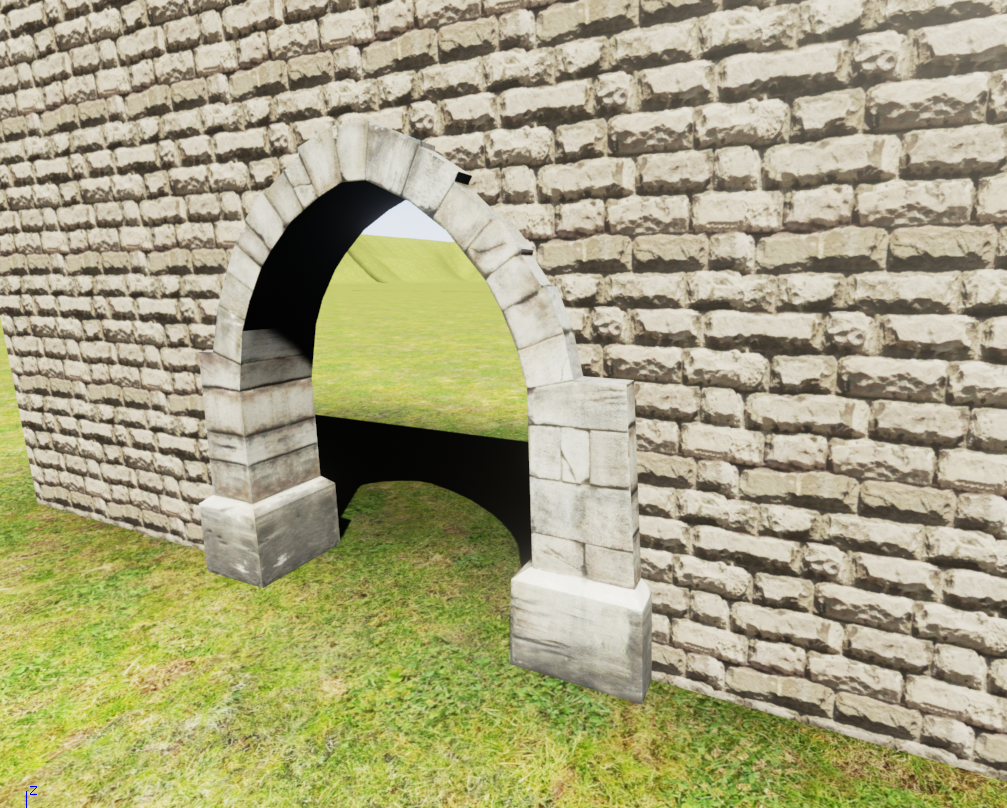
I got a pretty nice arch using the collapse and bake method you mentioned (thanks) (see attached - arch using Unwrap UV and walls using UVW Map tiled) and also tried Rendering to Texture, but am not sure I'd be able to use this as am trying to apply textures to large buildings that may have walls that need tiling, and I guess at the end of the day I need to export my textures at maximum 1024x1024. Think collapse and bake should be exactly whats needed though.


Thanks again for all your help,

Bruce

0 Likes
Message 6 of 6

Steve_Curley
Mentor
Mentor
I did play with UT back in the day - there were bitmaps in there for a dozen different objects all in one big bitmap - it was the UVs which determined which section got used on a specific model, so the image was only loaded once. Of course both PCs and Graphics cards had an awful lot less memory then than is common today, but to coin a phrase "every little helps" 😉

That looks pretty decent for a game asset - keep it up 🙂

Max 2016 (SP1/EXT1)
Win7Pro x64 (SP1). i5-3570K @ 4.4GHz, 8Gb Ram, DX11.
nVidia GTX760 (2GB) (Driver 430.86).

0 Likes