Graphics card not working during 3D max vray rendering

Graphics card not working during 3D max vray rendering

Anonymous
Not applicable
11,011 Views
11 Replies
Message 1 of 12

Graphics card not working during 3D max vray rendering

Anonymous
Not applicable

I have following configurations:


procesor Skylac 6700K

Motherboard Asus MAXIMUS RANGER VIII Republic of Gamer   Z170 chipset

Ram 32 GB 3200 fsb, G skill

SMPS corsair RM 750x

Graphics Card Gigabyte 1070 ti 8Gb windforce 3X

colling Hyper 103 Cooler Master

Cabinet Cooler Master: HAF 912

O/S Windows 7 ultimate 64 bit


When I render in 3D Max using Vray the fan of my graphics card is not rotating and graphics do not take any load.   Please advice to solve the problem.

0 Likes
11,012 Views
11 Replies
Replies (11)
Message 2 of 12

Francisco_Penaloza
Advisor
Advisor

VRay has two render engines, per say.

One only uses CPU for rendering, this is the default, the second one is called VRay RT, this one uses primarily your GPU or video card, but also uses the CPU depending on load.

You may be using the default CPU render.


Message 3 of 12

Anonymous
Not applicable

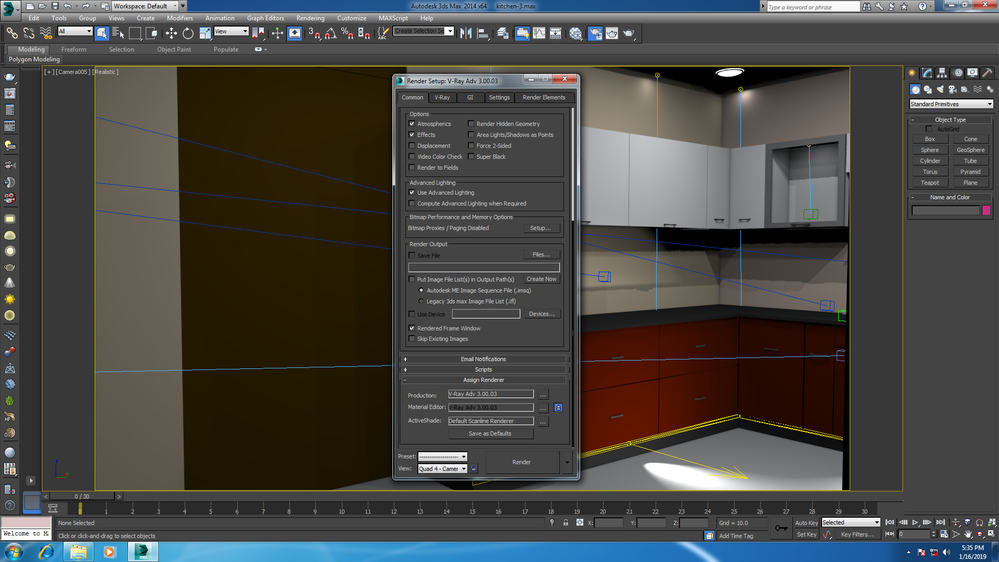
Thank you for your valuable advise. I am using 3D max 2014 and VRay  Adv 3.00.03.  I am sending you VRay settings that I used. Please send me a VRay settings so that I can render with my GPU . vray settings.png

0 Likes
Message 4 of 12

Francisco_Penaloza
Advisor
Advisor

you just need to change your render engine to VRay RT.

on the render window in Production rendering.

0 Likes
Message 5 of 12

Anonymous
Not applicable

Choosing render window in Production rendering I select VRay RT.  During render GPU did not take any load. I am sending you screen short.


v ray.png

0 Likes
Message 6 of 12

Anonymous
Not applicable

In Render window after selecting production rendering  I choose VRay RT.  But it is seen GPU did not take any load. I send you a screen short regarding this. But when I render in after effects GPU is taking load. 

0 Likes
Message 7 of 12

Francisco_Penaloza
Advisor
Advisor

With all the respect you deserve, you should take a look at the help docs for VRay, in there you can find lots of very well explained information for all these features.

It should not take too long or too much read to find out how this system works.

On the VRay RT windows options, there is a drop menu where you need to choose how to render, CPU, GPU, Cuda, ETC.

 Take a look at that, play with the setting to understand how the system works.


Message 8 of 12

Anonymous
Not applicable

Still I do not solve it. In render engine I select VRay RT engine under assign renderer. Under VRay RT I selected CUDA(Single Kernel) as engine type. But GPU did not take any load. In tutorial there are many permutation and combinations. But I want a simple render settings that I can run my graphics card. The persons who are using Nvidea gaming graphics card (CUDA core) or Quadro for, use only Vray RT to run graphics card? But some professionals who are using Quadro graphics card, they use VRay Adv (Not VRay RT) as render settings and getting Quadro graphics card performance also. How is it possible? I really confused.

0 Likes
Message 9 of 12

Francisco_Penaloza
Advisor
Advisor

I think you are confused.

As mentioned, V Ray render engine can be used in two ways, one is the default, using  CPU all the CPU you have in your system, plus distributed rendering or network rendering.

Then you have VRay RT or VRay GPU (the last version of V Ray changed the name) on this one you can use your Video card( needs to be NVidia card).

Depending on your scene this may render faster.

All this is for rendering only, for video performance( What you see on the screen) some people will use GTX series or Quadro series, this won't affect at all while rendering.

Please refer the Help docs for a more in-depth explanation.


If you can't use VRay RT in your machine, you may need to update your Video drivers and be sure you are using an Nvidia video card.


0 Likes
Message 10 of 12

Anonymous
Not applicable

 you can use the supplied GUI tool, which you can find in Start Menu > Programs > V-Ray 4.0 for 3ds Max > Select rendering devices for V-Ray GPU 4.0 for 3ds Max

0 Likes
Message 11 of 12

Anonymous
Not applicable
I am using windows 10. 3D max 2014 and V-Ray 3.0

I am using gtx 1070 ti graphics card. I need gpu rendering. Please advice
how can I get gpu rendering.
0 Likes
Message 12 of 12

ericrahardjoho
Community Visitor
Community Visitor

hi, i also have a problem similar to this, i usually render using CPU, laterly i already use both CPU and GPU... and today i just added another VGA card so now i have 2 GPUs.. however when i try to render, i checked my task manager and only 1 GPU is running.. the other doesnt... any idea?

0 Likes