vray's ambient occlusion

vray's ambient occlusion

Anonymous
No aplicable
17.926 Vistas
5 Respuestas
Mensaje 1 de 6

vray's ambient occlusion

Anonymous
No aplicable

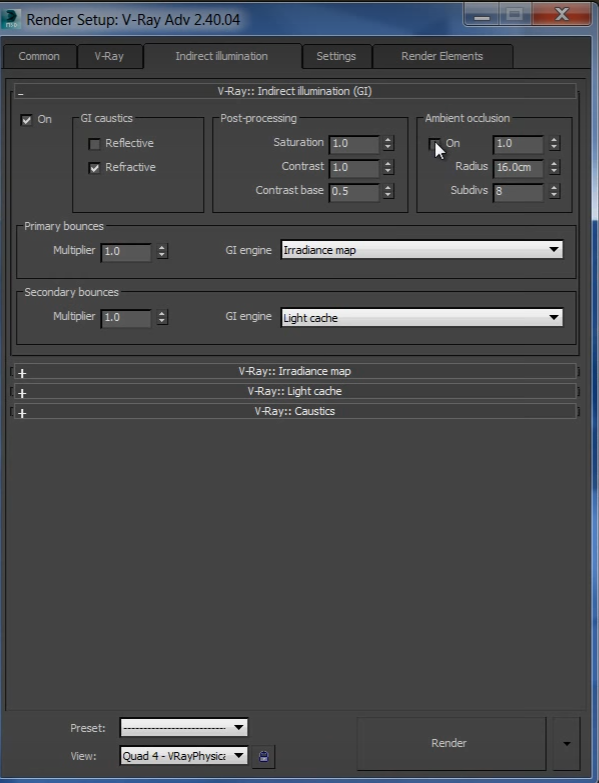
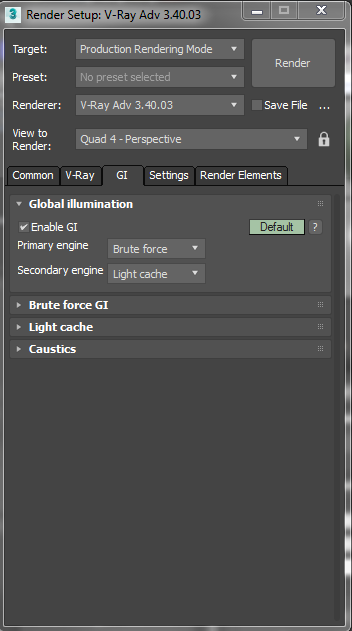
Did they remove ambient occlusion when they went for 3.0 to 3.4?

cant find it here but in a tutorial (second image) its there.


https://gyazo.com/40faf35a93cf7b2afeb92f566ebe44d6
https://gyazo.com/5e7862a14c1951ee66c46df143fdc91e


0 Me gusta
Soluciones aceptadas (1)
17.927 Vistas
5 Respuestas
Respuestas (5)
Mensaje 2 de 6

rendermaster
Advisor
Advisor
Solución aceptada

Under Global Illumination, press the button with word DEFAULT until it change to ADVANCED / EXPERT and you will see Amb. Occlusion parameters


Ronel Katigbak Pabico

3D Generalist / Animator / Renderer/ Graphics Designer

Autodesk Student Ambassador Platinum
YouTube Channel l Linked l Facebook l Blogs

Mensaje 3 de 6

Anonymous
No aplicable

This kind of annoying check this out. I was excited to click on the default and today there is nothing.


https://gyazo.com/33b4c3f9d84e66aa1931a544cc950015


I think i am still have some licence issues. Guess i need to talk to Chaosgroup


0 Me gusta
Mensaje 4 de 6

rendermaster
Advisor
Advisor

you just need some refresh it think, restart 3ds max, create new scene and check

AO.jpg


Ronel Katigbak Pabico

3D Generalist / Animator / Renderer/ Graphics Designer

Autodesk Student Ambassador Platinum
YouTube Channel l Linked l Facebook l Blogs

0 Me gusta
Mensaje 5 de 6

Alfred.DeFlaminis
Alumni
Alumni

That is strange, usually if the license isn't found it stays not found.  I haven't seen it get dropped before... Chaosgroup should be able to help there. 


I went ahead and marked @rendermaster's solution since it is technically correct.  Another method to make some AO (less realistic but renders faster) is:

1) Make a VrayLightMtl

2) Put a VrayDirt in the color

3) Check "Adjust to camera exposure" (or whatever that's called)

4) Set the AO distance in your Vray Dirt

5) Put this VrayLightMtl in your override material slot.  (F10-> Vray->Global Switches-> Check Override MTL.)


Then render this separately, and composite together in post using the AO on top set to Multiply with an opacity of 35-50%.  


However, @rendermaster's is the true AO and it's better because it'll be affected by lights in the scene so you don't have AO running right next to a lamp or something.  Sometimes though time doesn't permit and some masking in photoshop with this method can help.  


Best Regards,

0 Me gusta
Mensaje 6 de 6

Alfred.DeFlaminis
Alumni
Alumni
0 Me gusta