State Sets error and max.NET unhandled exceptions

State Sets error and max.NET unhandled exceptions

Anonymous
Not applicable
7,360 Views
6 Replies
Message 1 of 7

State Sets error and max.NET unhandled exceptions

Anonymous
Not applicable

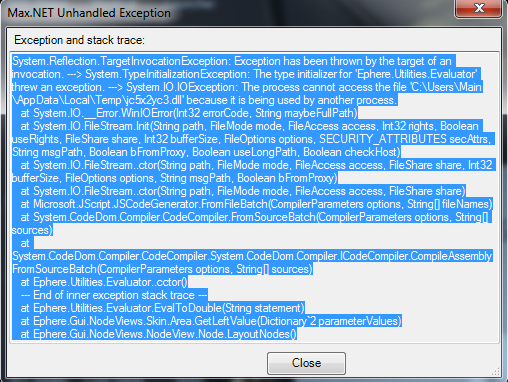
I downloaded max for an online course I am doing and whenever i load it up first I get this error.maxerror2.png


Then when I am in the application whenever I right click I get this error:

maxerror.png


I tried downloading both 2015 and 2016 and they both get the same error is there anyway to fix, thanks.

Accepted solutions (1)
7,361 Views
6 Replies
Replies (6)
Message 2 of 7

Anonymous
Not applicable
Accepted solution

"Find this file …\bin\assemblies\Autodesk.Max.StateSets.dll (example for path –  C:\Program Files\Autodesk\3ds Max 2015\bin\assemblies\Autodesk.Max.StateSets.dll) and Rename it Autodesk.Max.StateSets.dll.back


p.s. before that you have to enable to view the hidden files and file extension"


This worked for me

Message 3 of 7

Anonymous
Not applicable

thanks for the reply I will try this now.

0 Likes
Message 4 of 7

Anonymous
Not applicable

Awesome, this has hit me on a few occasions, had to delete the states or go back a file.

0 Likes
Message 5 of 7

Anonymous
Not applicable

It's work fine! thanks 🙂

0 Likes
Message 6 of 7

Anonymous
Not applicable

****ttt, thank guy so much, it works for me

0 Likes
Message 7 of 7

Anonymous
Not applicable

Genius SAVE MY LIFT

0 Likes