How can I change UI of 3DS max 2017 to look like 2014?

How can I change UI of 3DS max 2017 to look like 2014?

twelin
Explorer Explorer
60,846 Views
213 Replies
Message 1 of 214

How can I change UI of 3DS max 2017 to look like 2014?

twelin
Explorer
Explorer

I've tried unsucessfully to change the UI scheme of 2017 to resemble something I'm used to working in. Posted are screen shots from 2014 & 2017. Is this as close as I can hope to get? Exporting & importing UI theme did not seem to work. Thank you for any insight.

Accepted solutions (2)
60,847 Views
213 Replies
Replies (213)
Message 181 of 214

troyhome
Explorer
Explorer

While I appreciate this work around very much, the icons are only a component of a comprehensive UI. I know some would like that to be a separate topic but they are very much related in this case. And, while icons are my main concern, nevertheless there are other potential issues at play here such as stability, the consistency of sizing and placement of icons within the overall UI and integrated options. Already Max allows for customizing the UI in various ways and even includes themes, because everyone realizes that UI has a significant effect on how the software is understood and how efficiently it is used by individuals. Leaving users to find a hack for customizing the UI for such an essential component as icons seems dismissive of this reality. If this is what it takes to solve the issue here and now, then I am all for it. But I would like to see it acknowledged and implemented in a service pack. I vote for there to be an official and integrated way to select a UI theme within Max that harkens back to previous UIs that are easier to read and understand, including icons. 

Thank you to @zaluski and others for such great work here.  

Message 182 of 214

Alfred.DeFlaminis
Alumni
Alumni

Understood @troyhome, that was my exact conclusion and suggestion as well.  There is a link to that issue on the Feature Request somewhere in this thread.  The best I can do is try to get people to vote on that issue as the Feature Request board is the place to get that heard.  


Best Regards,

Message 183 of 214

Anonymous
Not applicable

Hi, I'll jump in here for a mo - as I had trouble voting on this subject...

I posted about problems with the dual login - which I spent some time getting around.

When I did, all 4 of the links are dead - they just take you to the main voting page, where you can try to find the voting subject. I could not find it - only one similar(ish) so I voted on that.


It's my opinion that this won't get many votes as it isn't a flashy new feature - and that newer users will just accept that the UI is like this as they wouldn't know any different.

0 Likes
Message 184 of 214

kris
Collaborator
Collaborator
Message 185 of 214

Anonymous
Not applicable

Thanks Kris, got my vote, wish it had more....

0 Likes
Message 186 of 214

Alfred.DeFlaminis
Alumni
Alumni

All it takes is increased awareness, I have bookmarked it and I'll suggest it in other threads that bring this up.  Thanks @kris for posting the link again. 


Best Regards,

0 Likes
Message 187 of 214

kris
Collaborator
Collaborator

Good news! 2018 broke the naming convention again so that the icon set in this thread doesn't work plug & play.  (facepalm)


Some do, but most don't.


Kris.

0 Likes
Message 188 of 214

Anonymous
Not applicable

No problem 😉 ... That which does not kill us makes us stronger.


Best Regards

Message 189 of 214

kris
Collaborator
Collaborator

@Anonymous that means we must all sign up for Olympic weight lifting.  We'll be champions. 😄


Kris.

0 Likes
Message 190 of 214

Anonymous
Not applicable
Accepted solution

Hi @kris it will not necessary 🙂 ... this is how it looks after small correction.


3ds max 2018 old icons.png


I haven't tested all places but i think that it will work... Folder with name MainToolbar has been changed to MainUI... that's all. Unfortunately problem for Scene Explorer still exist. And something is wrong with State Set Toolbar icons.


Below Light.zip for 3ds max 2018


Best Regards

Message 191 of 214

Anonymous
Not applicable

@Anonymous


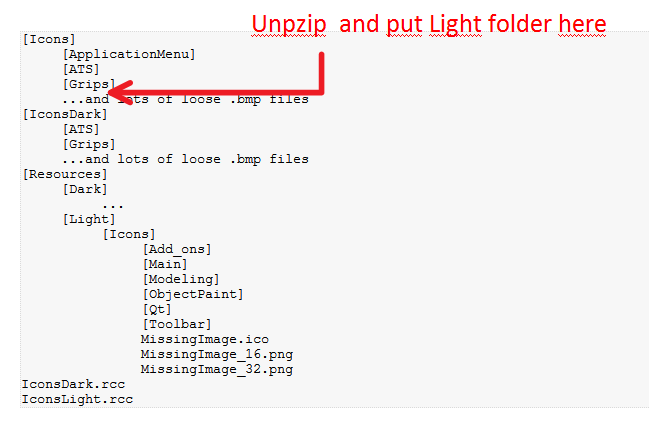
Can you please write down a quick instruction how to use your linked file Below Light.zip for 3ds max 2018 within a Max2018? in my …\3ds Max 2018\UI_ln\ folder I have totally different folder structure:


[Icons]
     [ApplicationMenu]
     [ATS]
     [Grips]
     ...and lots of loose .bmp files
[IconsDark]
     [ATS]
     [Grips]
     ...and lots of loose .bmp files
[Resources]
     [Dark]
...      [Light]           [Icons]                [Add_ons]                [Main]                [Modeling]                [ObjectPaint]                [Qt]                [Toolbar]                MissingImage.ico                MissingImage_16.png                MissingImage_32.png IconsDark.rcc IconsLight.rcc
0 Likes
Message 192 of 214

Anonymous
Not applicable
Accepted solution


Unzip Light.png


Message 193 of 214

Anonymous
Not applicable

it works, thanks zaluski!

0 Likes
Message 194 of 214

Anonymous
Not applicable

Just another reason for me to switch to blender for my main 3d solution. 🙂


Pretty sad considering im using 3ds Max since 2001.

0 Likes
Message 195 of 214

3d-labor
Collaborator
Collaborator

Again: Thank you very much for the 2018 Version of Light.zip. Great work! You are the AutoDESK emloyee of the year, but the CEO doesn´t know it yet. Where is your "Donate" button?

Best regards,

Holger


Workstation: Ryzen 9 5950x@ 4,20GHz 64 GB RAM, Nvidia RTX 4090, Win11 Prof. 24H2
Rendernode: AMD Threadripper 2990wx@ 3,20 GHz 64 GB RAM, Win 10 Prof.
Autodesk AutoCAD 2026, Revit 2026.1, 3dsMAX 2026.2, VRay 7, ForestPack, RailClone, KStudio ProjectManager, Miauu´s Tools....
0 Likes
Message 196 of 214

berislav_curic
Explorer
Explorer

You are a truly hero here. Thank you for making max 2017 usable. I was on a verge of abandoning it and continuing work in 2015. I can't believe after the caddy fiasco Autodesk did it again, this time with icons. 

Man, come to Croatia for vacations and I'll take you to dinner. That's the least I can do for you after what you did for us.


cheers
Bero

0 Likes
Message 197 of 214

cabonator
Contributor
Contributor

Man.. Therefore the forum exist. -1 Kudo for you please.

Message 198 of 214

Anonymous
Not applicable

HiSmiley Happy Thank You for great job! Would you be so kind and make adaptation Dark icons for 2018?


0 Likes
Message 199 of 214

Anonymous
Not applicable

Hi,

thanks @berislav_curic for your offer :). I was in Croatia during my honeymoon (Dubrovnik, Sibenik, Popovici), it was perfect. If I'll come back someday to Croatia I'll let you know 😉


Thanks @3d-labor, @cabonator I'm glad I could help.


I hope that when "CustomControlsOptions.PrintIconPaths=true" function will be extended for the missing icons (e.g. Scene explorer) ,

I'll be able to finish it. I think this is important. To this day, this thread has been watched over 11000 times.


Best Regards

Message 200 of 214

mitviz
Advocate
Advocate

ahh too bad you didnt stop in split!