How to linear trajectory for robotic arm?

How to linear trajectory for robotic arm?

Anonymous
Not applicable
3,925 Views
27 Replies
Message 1 of 28

How to linear trajectory for robotic arm?

Anonymous
Not applicable
PLease help! When the animation starts the end point makes arc trajectory. How can I make it to do a linear trajectory? (Mechanical arm is interconnected and all joints function and hold together
0 Likes
Accepted solutions (2)
3,926 Views
27 Replies
Replies (27)
Message 21 of 28

ads_royje
Alumni
Alumni
Accepted solution

Ha! Thanks! 🙂


Yes, welcome to advanced rigging!

This is a very complex problem, if you're into very advanced rigging, you can get yourself a pretty cool set up with constraints...

That said, this would take a while to get to this type of set up.

Why do I say advanced rigging, because you're expected the fold to be opposite from to the end direction, changing half way (when straight).

As you saw, regular Ik cannot do so.


What I could suggest, would be to define a goal for the folding side.

You can set an object to be the goal when the 'elbow' of the chain will aim while folding.

I've attached a video showing how to set it up.


Create your bone chain as usual

Selecting the Ik chain, in the Solver properties you can pick a goal object.

In this example, I'm using two (2) external point helpers, and using Wire parameters, I'm inverting their position Y axis, when one goes in positive Y , the other goes in negative Y, and vice-versa. The wire parameter works with local values. Set Y_Position*-1, this negates the Y position in local space.

One is the master of the other; so we have a Master point and a Slave point.

The Master will be the end of the chain and the slave will be the 'elbow'.

A 3rd point helper will be the top parent of all those, so the set up can be moved in space.

Parent the Ik chain and link to Master.

Parent Master, Slave and the root bone to the 3rd point helper.


Attaching your meshes to bones, you'll see a 180 flip when the Ik switches folding sides, this is normal.

To avoid your meshes to do so, you should use Position constraint and lookAt constraint to the meshes don't flip.


Hopefully the videos are clearer than the text explanation...


I've also included the max scene that you see in the video.


I hope this can help you continue!

0 Likes
Message 22 of 28

Anonymous
Not applicable

Thanks but 3ds Max 2016 is not IKFK solver. That is the problem?
2015 problem.JPG

0 Likes
Message 23 of 28

Anonymous
Not applicable
Thanks very much! one question. please see http://www.designall.sk/wp-content/uploads/2016/07/new-way.mp4 This way it is not possible to set in animations linear motion of end point(bones)? This way you can set the animation - end point of linear movement?
0 Likes
Message 24 of 28

ads_royje
Alumni
Alumni

Unfortunately not 😕

The Interactive Ik is only Ik for manipulation and placement in the view port, the animation is keyed on bones rotation.

The Ik Solver is not on the bones, so bones can only do rotations for that move.


I've attached a 2015 version of that max scene if you'd like to see it.

0 Likes
Message 25 of 28

Anonymous
Not applicable

HI
Pls, can you help me?
How to create a movement of the cylinder and strings up and down? (According to the shape key)
https://www.youtube.com/watch?v=Wtl2hmHZCLw
Thank you!

0 Likes
Message 26 of 28

ads_royje
Alumni
Alumni

Hi again! 🙂


Sure thing! With your video reference, it makes it so simple to answer!

Hopefully, you are using Max 2016 or 2017, as the feature I am proposing exists since Max 2016.


In Max main menu bar > Animation > MCG Controllers > MCG Ray to Surface Position.

That is the tool you are looking for.

This controller needs a minimum of two external objects ; a surface to collide to and a ray caster to determine the director to go to.

In the attached video, I do a step by step set up.


The MCG Ray to surface controllers uses the Ray caster Pivot to cast a ray until it collides to a surface and stops on it.

There is a float field to set an 'offset' from the surface for a maximum of control.

It needs a minimum of 1 surface to collide to, but can have many of them.


In the attached video, I use 2 colliders, a key and a plane.

The plane is the 'rest' position collider, where the internal cylinders are resting before the key goes in.


I hope this can be as clear to use as possible! 🙂


*edit:* oops crap I just realized that the audio did not record in the video. If you don't get to understand with the visuals, let me know. I'll create a new one ... terribly sorry for that 😞

0 Likes
Message 27 of 28

Anonymous
Not applicable

Thank you!!
Very help me! You are awesome 🙂
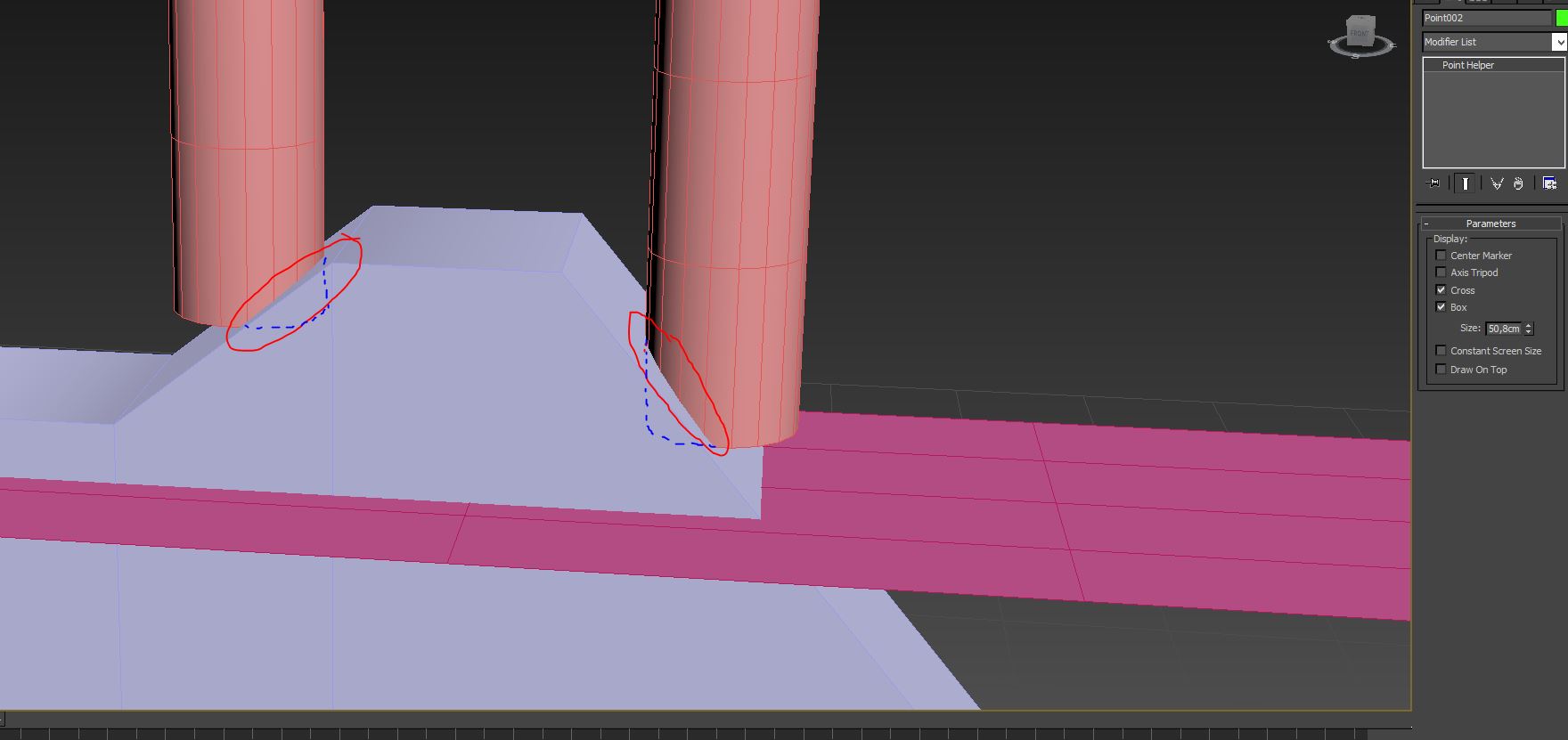
However, when the animations have to be a perfectionist. Now it starts to rise up from the axis. Not since the first contact. pls help. I appreciate it. Thank you very much.

0 Likes
Message 28 of 28

Anonymous
Not applicable

Hi, Royje
please, have you noticed my question?
However, when the animations have to be a perfectionist. Now it starts to rise up from the axis. Not since the first contact. pls help. I appreciate it. Thank you very much.

0 Likes