Right click command doesn't pop up.

Right click command doesn't pop up.

Anonymous
Not applicable
3,055 Views
9 Replies
Message 1 of 10

Right click command doesn't pop up.

Anonymous
Not applicable

We just installed the New AutoCAD 2017 on all the computers and everything works in all of them except for one computer. We normally just go to the CUI file and transfer our custom menu into the shortcuts menus and that usually works fine. This time when I do a right click command it tries to do the P0P menu aliases in the command window then makes an error then repeats the last regular command. I have tried changing the aliases a bit to see if it works but that didn't do anything The shortcut menu in the options is unchecked but this is the same with all other computers. Also, I tried deleting the whole cui and cuix files and replacing them with the ones from a working computer, but that did not work. I attached two pictures, one is of the cui file with our custom menu and the other is for what the command window shows after I try to use the command.

0 Likes
3,056 Views
9 Replies
Replies (9)
Message 2 of 10

ambrosl
Autodesk
Autodesk

Without seeing how your main CUIx file is setup, which isn't the ACAD CUIx file based on the image you posted, it can be hard to determine what the problem might be.  POP0 is typically the ALIAS that is assigned to the Object Snap Cursor Menu, but your image shows it as POP504 which could cause some problems.  From the sound of the last command repeating though, I'm wondering if the problem isn't related to the SHORTCUTMENU system variable in which when disabled just acts like an Enter.  Check to see if the SHORTCUTMENU system variable is set differently on the computers, by default it should be 11.


Another thing to try is to load the AutoCAD menu that comes with the product as the main CUIx file and see if the problem persists.


Lee Ambrosius
Senior Principal Content Experience Designer
For additional help, check out the AutoCAD Developer Documentation
0 Likes
Message 3 of 10

Anonymous
Not applicable

I tried changing the POP to be POP0 but that did not work. I also tried deleting the CUIX files and replacing them with new ones but also that did not work. i had to change the CUIX files names to pdf to attach them. Just change them back to CUIX and you can see my set-up

0 Likes
Message 4 of 10

ambrosl
Autodesk
Autodesk

What process and order are you using to load the CUIx files you attached to this thread?  Also, did you check to see what the current value of the SHORTCUTMENU system variable is on both computers to make sure it is set the same.


Lee Ambrosius
Senior Principal Content Experience Designer
For additional help, check out the AutoCAD Developer Documentation
0 Likes
Message 5 of 10

Anonymous
Not applicable

And yes I did check the SHORTCUTMENU variable. We have it set up to 0 on all of the computers.

0 Likes
Message 6 of 10

Anonymous
Not applicable

I posted about the process earlier but somehow it didn't post. We typically just open the CUI interface then user the transfer tab to open the main CUIX file and one that has our custom menur then just drag it and drop it to the main CUIX file. Sometimes we remove the Existing Objetc Snap Cursor Menu since it shares the same name as ours, but sometimes I remove all shortcut menus except for ours since we don't use any of the other ones.

0 Likes
Message 7 of 10

ambrosl
Autodesk
Autodesk

Thanks... Let me look a bit further at this, so you typically just load chascad.cuix and don't have acad.cuix loaded at all.  Is that what you are stating?  When you right-click on the one computer that is working correctly and no command is active, is when your custom shortcut menu appears?


Lee Ambrosius
Senior Principal Content Experience Designer
For additional help, check out the AutoCAD Developer Documentation
0 Likes
Message 8 of 10

Anonymous
Not applicable

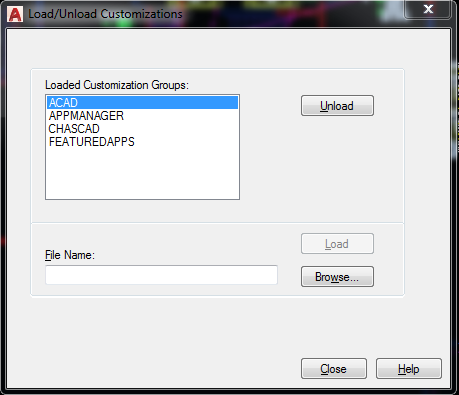
They are both loaded I attached pictures of the cuix menus pull down as well as an image our the loaded menus

0 Likes
Message 9 of 10

Anonymous
Not applicable

They are both loaded I attached an image our the loaded menus.

0 Likes
Message 10 of 10

ambrosl
Autodesk
Autodesk

Okay... I think I know what the problem might be, but it is hard for me to verify. Since the SHORTCUTMENU values are the same between the two computers and set to a value of 0, the Mouse Buttons sections of the CUIx files control the behavior of the right-click button. Since the behavior is different, it seems like AutoCAD is locating two different versions of the ACAD.CUIx file which has the Mouse Buttons definitions in it as your CHASCAD.CUIx doesn't.


You can use the following statements, one at a time to see where AutoCAD is locating the two files and make sure they are truly the same files in the expected locations on the two computers:


(findfile "acad.cuix")

(findfile "chascad.cuix")


When the statements are pasted at the Command prompt, the locations in which the files are located by AutoCAD will be displayed in the Command window.


From what I can tell, the Click - Button 2 macro is set incorrectly in ACAD.CUIx for the computer that isn't displaying the custom right-click menu. However, that doesn't explain why POP0 is displaying in the Command window unless you are using some sort of custom MNL/LSP/ARX file that defines a POP0 command and possibly redefines the macro for AUX1, and AutoCAD can't locate that MNL/LSP/ARX program.  the other possibility seems that the Macro for Button 2 is wrong in a version of the ACAD.CUIx file that AutoCAD might be loading and when you are right-clicking AutoCAd is interpreting the macro wrong.


The Macro for Click - Button 2 from what I can tell should be the following which displays the GRIPS menu when a grip is active or your custom right-click menu when no command is active instead of the default Enter/Return:
$M=$(if,$(eq,$(substr,$(getvar,cmdnames),1,5),GRIP_),$P0=ACAD.GRIPS $P0=*,$P0=CHASCAD.POP0 $P0=*)


Customer CUIx file.png


Lee Ambrosius
Senior Principal Content Experience Designer
For additional help, check out the AutoCAD Developer Documentation
0 Likes