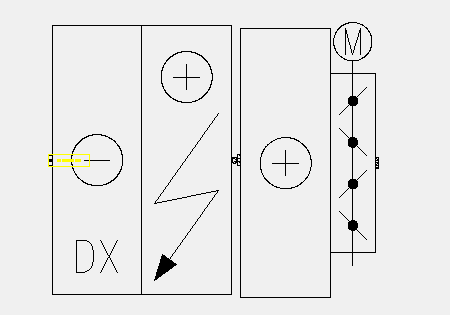
PROGRAM symbol for AHU with various different combination

PROGRAM symbol for AHU with various different combination

sendtopeter
Contributor Contributor
3,969 Views
16 Replies
Message 1 of 17

PROGRAM symbol for AHU with various different combination

sendtopeter
Contributor
Contributor

I am new to lisp program. I have to create symbol for AHU, with various different combination of sections. But the final output shall be one block diagram. I have created dynamic block wherein all the sections are present. We had created different types of AHU, the combinations become vast. So to make it simple, we would like to create command or menu, "AHU", on clicking, it should Pop Up TAB, wherein we could select the checkbox which sections we need and hit ok to generate block diagram. Is it possible? I have attached one Dynamic block.


Thanks & Regards,

K. Peter

0 Likes
3,970 Views
16 Replies
Replies (16)
Message 2 of 17

pbejse
Mentor
Mentor

Why not use Tool Palettes?

Drag the block to a tool palette,

Right click the item

select properties

Change the Name and Custom value of the visiblity


Do the same for how many visibility sates you have


Simple right? We can always write a code for you if that is not an option. Try it


HTH


 Oops. I think you are asking more than just dragging the block in model space. Give us an example and lets see what we can do.


0 Likes
Message 3 of 17

sendtopeter
Contributor
Contributor

Please refer the attachment. Hope that explains!


Thanks in advance 🙂

K. Peter

0 Likes
Message 4 of 17

pbejse
Mentor
Mentor

@sendtopeter wrote:

Please refer the attachment. Hope that explains!


Thanks in advance 🙂

K. Peter


Yes it is possible K. Peter

0 Likes
Message 5 of 17

pbejse
Mentor
Mentor

Peter,


Show us a couple of samples of what a Combination of block A,B, C, D, E,  or Combination of block A,B, C, E, looks like

pBe

0 Likes
Message 6 of 17

sendtopeter
Contributor
Contributor
Dear pbejse,
 
What's your good name? in order to address you again.
 
The examples are indicated in the MS word file, various sections were Section A, Section B, Section C, Section D & Section E.
and Various block to be generate were the 5 different Combination images indicated in MS word file. I have attached the Ms word file.
 
 
Thanks & Regards,
K. Peter
0 Likes
Message 7 of 17

pbejse
Mentor
Mentor

@sendtopeter wrote:
Dear pbejse,
 
What's your good name? in order to address you again.
 
The examples are indicated in the MS word file,....

Call me Patrick, I got that K. Peter, What I'm asking for is an actual drawing file of what you described as "the output shall be one Block object" . 


  • Like how is it aligned?
  • is there a specific distance between the blocks?
  • will they be inside a box/frame?  
  • Rotated 90 deg?
  • Does it come with a description?
  • What will be the eventual blocks names for the group? or having it Grouped is enough?

This Q&A will all be avoided or lessen at the least by providing a sample of the end result in CAD format , i.e the finish product.


0 Likes
Message 8 of 17

sendtopeter
Contributor
Contributor

Dear Patrick,

Please find the my reply in blue

  • Like how is it aligned? Horizontal to ground level.
  • is there a specific distance between the blocks? if  you are asking the size of each section consider 8mm x 22mm, if your asking about overall size of block then it will differ as per which combination we use, as indicated in word file.
  • will they be inside a box/frame?  Refer the Attachment 1, dynamic block after selecting anyone of the block, it should be seen similar, but for the example you will be creating it shall look like either of combinations shown in ms word file.
  • Rotated 90 deg? for now I am not interested in rotating or mirror, but if you can do it, it will be of more information for me.


  • Does it come with a description?
  • What will be the eventual blocks names for the group? or having it Grouped is enough?
  • one block without any description Good enough, name ahu.


This Q&A will all be avoided or lessen at the least by providing a sample of the end result in CAD format , i.e the finish product.


Thanks & Regards,

K. Peter


0 Likes
Message 9 of 17

pbejse
Mentor
Mentor

@sendtopeter wrote:


 Refer the Attachment 1, dynamic block after selecting anyone of the block, it should be seen similar, but for the example you will be creating it shall look like either of combinations shown in ms word file.


Thanks & Regards,

K. Peter


I realized that the "AHU" block drawing attached at post#1 is different from the "AHU" block at post#3.


COMBINATION.PNG

 We will call them by different name here as SB ( SETBLOCK ) and CB ( Comination ).


On some of the CBl , there is some kind of a filler between SBl's. 


For the first Cblock , will that be

A | Filler | A | Filler | A | B | C | D  |


and the one on the right  as 

| A | B | C | Filler | A | B | C | D | E |


A = a SB selected for spot A

B = a SB selected for spot B

Filler =  not a block included on the SB collection


Also need to account for the SB at the bottom ( Motorized Damper ). which is out of sequence. 


It is indeed a daunting task from a programmers POV.


Message 10 of 17

devitg
Advisor
Advisor
Hi Peter K , browsing your DWG , I notice that the blocks have different scale units . As to be easy to arrange, it shall be with the same SCALE UNITS and UNITS some are millimeters others inches . a simple way to what you want to , use the DESIGNCENTER or Ctrl+2 shor-tkey
Message 11 of 17

devitg
Advisor
Advisor
find attached a DWT , to use as blank dwg , and ahu-blocks-00 to use at designcenter all blocks are at same scale and units , milimeters Insert point at middle left
0 Likes
Message 12 of 17

sendtopeter
Contributor
Contributor

Dear Patrick,

We believe you will do it, coz you know what we are asking for, yes! its daunting task, but nothings impossible for you, Right?

Have you come across similar programing in this forums or other, could you give the reference to that page?

Have you got some book or notes on lisp for my reference? Could you share it, please.


Regards,

K. Peter

0 Likes
Message 13 of 17

sendtopeter
Contributor
Contributor

Dear Dev, Thank you.

0 Likes
Message 14 of 17

pbejse
Mentor
Mentor

@sendtopeter wrote:

Dear Patrick,

We believe you will do it, coz you know what we are asking for, yes! its daunting task, but nothings impossible for you, Right?


Regards,

K. Peter


Haha! Flattery will get you nowhere K. Peter, Like i said from the the start its doable, Its only a matter of "when". 


@sendtopeter wrote:


Have you come across similar programing in this forums or other, could you give the reference to that page?

Have you got some book or notes on lisp for my reference? Could you share it, please.


You mean a program similar to your request? No, not really.  


Hang in there.


0 Likes
Message 15 of 17

sendtopeter
Contributor
Contributor

hahaha, 

Dear Patrick could you guide me, which book to read for lisp, for the basics, inorder to understand how to begin etc.


Regards,

K. Peter

0 Likes
Message 16 of 17

devitg
Advisor
Advisor
find attached some courses
0 Likes
Message 17 of 17

sendtopeter
Contributor
Contributor

Thank you Dev 🙂


0 Likes