Message 1 of 12
EXCEL VBA TO OPEN AUTOCAD 2020

Not applicable
01-12-2020
05:11 PM
- Mark as New
- Bookmark
- Subscribe
- Mute
- Subscribe to RSS Feed
- Permalink
- Report
Hi everybody,
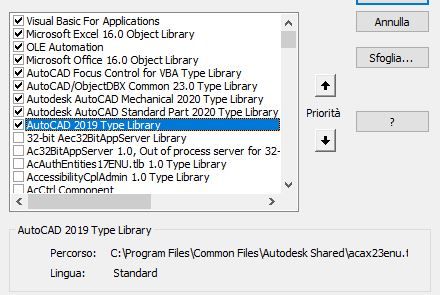
I found this code in the web to open AutoCAD using Excel VBA, but it does not work. I have looked for some alternatives but no one seems to work. I get the error message " 429 ActiveX component can't create object". I have already turned on the AutoCAD Type Library (which says 2019 instead of 2020). I am using Windows 10, MS Office 365 Excel and AutoCAD 2020. Any suggestions?
Dim ACAD As AcadApplication
On Error Resume Next
Set ACAD = GetObject(, "AutoCAD.Application")
If (Err <> 0) Then
Err.Clear
Set ACAD = New AcadApplication
If (Err <> 0) Then
MsgBox Err.Number & " " & Err.Description
End
End If
End If
Set ACAD = GetObject(, "AutoCAD.Application")
If (Err <> 0) Then
Err.Clear
Set ACAD = New AcadApplication
If (Err <> 0) Then
MsgBox Err.Number & " " & Err.Description
End
End If
End If