DWF job proccessor`

DWF job proccessor`

Anonymous
Not applicable
1,490 Views
4 Replies
Message 1 of 5

DWF job proccessor`

Anonymous
Not applicable

Hello guys,


Wondering if anyone can help me. One of our hdd`s in the company crashed and IT had to install new one and changed the \\path for the DWF folder/storage.


So what we did is we updated designs.ipj  to reflect the new folder. At the same time we started getting errors when we check in files. There is an option , we can create dwf file while checking the files in or we can send it to a job server. Either or doesnt work. If we create dwf`s while checking in it gives us the following message:

dwf-manual dwf creation.PNG


If we send it to the job server - server gives an error :

dwf-job server error.PNG


We also checked the machine that runs Job Processor.exe. Exited out and restarted it again, same result. 

For some reason the Settings menu is grayed out. We logged in as an Admin. See below:
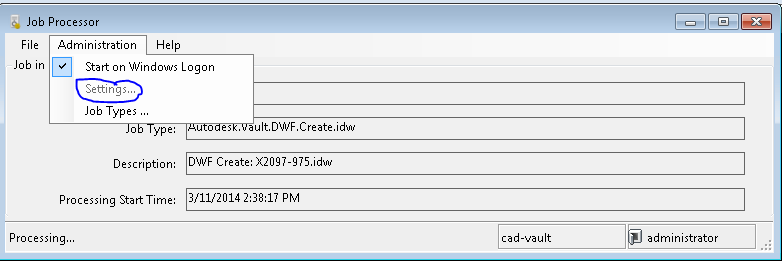
 

Dwf-process server problems.PNG


I`m wondering if there is an option in Settings above where you can change the publish folder or not?


Is there anything else I can check/change?


Any help is appreciated.


p.s.: no other problems, just problems with publishing DWF`s.


Alex.


0 Likes
Accepted solutions (1)
1,491 Views
4 Replies
Replies (4)
Message 2 of 5

chearhuat
Alumni
Alumni
Accepted solution

Hi Alex,


The setting option in Job Processor does not keep the publishing folder, in facts it is the same login dialog that get prompted when you start Job Processor. This settings can be edited once Job Processor is halted (thru File > Pause).


The Visualisation Publish Folder location can be set via

1. Vault Explorer > Tools > Administration > Vault Settings

2. Visualisation [tab] > Define... > change the value of the 'path'


Regards,
Chear Huat.


Chear Huat
SQA Analyst
DLS- Data Management
Autodesk, Inc.


Be sure to check out the Vault Help Wiki!
0 Likes
Message 3 of 5

Anonymous
Not applicable

Thank you. I changed the value for the path in Visualisations.

Now manual dwf creation is working, it creates dwf file during check in.


But not when it sent to the job server. It gives as a Result: Unknown error during publish.


Information 3/12/2014 9:03:04 AM
Application logging subsystem initialized 
----------------------------------------
Information 3/12/2014 9:03:04 AM
Job 16989 Autodesk.Vault.DWF.Create.iam : Started executing 
----------------------------------------
Error 3/12/2014 9:07:08 AM
Job 16989 Autodesk.Vault.DWF.Create.iam : Unknown error during publish. 
----------------------------------------
Information 3/12/2014 9:07:09 AM
Job 16989 Autodesk.Vault.DWF.Create.iam : Completed executing 
----------------------------------------


Is there anything else I can check?


Thank you very much!

Alex.

0 Likes
Message 4 of 5

Anonymous
Not applicable

Well, I`m not sure what exctly happen but it is working now... It appears that job processor is not a service and Admin has to be logged in on the computer in order for job processor to process jobs....


Thank you,

Alex.

0 Likes
Message 5 of 5

chearhuat
Alumni
Alumni

Glad to hear that, Alex!


Regards,
Chear Huat.


Chear Huat
SQA Analyst
DLS- Data Management
Autodesk, Inc.


Be sure to check out the Vault Help Wiki!
0 Likes
