- Mark as New
- Bookmark
- Subscribe
- Mute
- Subscribe to RSS Feed
- Permalink
- Report
I have code that uses the Inventor API to generate a wireframe image of a part. Below is a snippet of the code that uses the Inventor.Application object from a stand-alone application the uses the Inventor API.
Inventor.Application inventorApplication = null;

Type inventorAppType = System.Type.GetTypeFromProgID("Inventor.Application");
inventorApplication = System.Activator.CreateInstance(inventorAppType) as Inventor.Application;

inventorApplication.DisplayOptions.Show3DIndicator = false;
inventorApplication.ColorSchemes["Presentation"].Activate();
inventorApplication.ColorSchemes.BackgroundType = BackgroundTypeEnum.kOneColorBackgroundType;

...

Document document = inventorApplication.Documents.Open(inventorFile, true);

...

View view = inventorApplication.ActiveView;

int width = view.Width;
int height = view.Height;
if (width > height) view.Width = height;
else if (height > width) view.Height = width;

view.DisplayMode = DisplayModeEnum.kWireframeNoHiddenEdges;
view.ShowGroundReflections = false;
view.ShowGroundShadows = false;
view.ShowAmbientShadows = false;
view.ShowObjectShadows = false;
view.RayTracingQuality = Inventor.RayTracingQualityEnum.kInteractiveRayTracingQuality;

Camera camera = view.Camera;
camera.Fit();
camera.Apply();

Thread.Sleep(1000);
TransientObjects transientObject = inventorApplication.TransientObjects;
Color top = transientObject.CreateColor(255, 255, 255);
Color bottom = transientObject.CreateColor(255, 255, 255);

view.SaveAsBitmap(outputFileName, 175, 175);

document.Close(true);

...
Here is a sample image the above code produces.
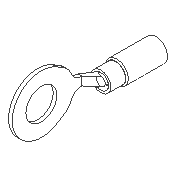
I am trying to run this same logic in a custom job. The custom job uses the Inventor.InventorServer object rather than the Inventor.Application object. The InventorServer apparently does not have access to "Views".
I have an implementation that creates a thumbnail image. Without access to "View", I do not have access to "DisplayMode" and other properties needed to format the view for a wireframe image.
Here is a code snippet of the custom job processor without the wireframe formatting.
Inventor.InventorServer inventorServer = context.InventorObject as Inventor.InventorServer;

Inventor.Document inventorDocument = inventorServer.Documents.Open(sourceDocumentPath);


Inventor.PartDocument partDocument = (Inventor.PartDocument)inventorDocument;

// Is there a way to apply these "View" settings to a PartDocument or to the Camera?
//    Inventor.View view = ...
//    view.DisplayMode = Inventor.DisplayModeEnum.kWireframeNoHiddenEdges;
//    view.ShowGroundReflections = false;
//    view.ShowGroundShadows = false;
//    view.ShowAmbientShadows = false;
//    view.ShowObjectShadows = false;
//    view.RayTracingQuality = Inventor.RayTracingQualityEnum.kInteractiveRayTracingQuality;

Inventor.Camera camera = inventorServer.TransientObjects.CreateCamera();
camera.SceneObject = partDocument.ComponentDefinition;
camera.ViewOrientationType = Inventor.ViewOrientationTypeEnum.kIsoTopRightViewOrientation;
camera.Fit();
camera.ApplyWithoutTransition();

Inventor.Color bottomColor = inventorServer.TransientObjects.CreateColor(255, 255, 255, 1); //white

camera.SaveAsBitmap(exportImageFileName, 175, 175, topColor, bottomColor);

inventorDocument.Close(true);
Below is a sample image generated from the above snippet.
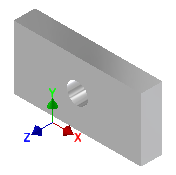
Does anyone know how to apply "DisplayMode"- and "RayTracingQuality"-type properties inside a custom job using the Inventor.InventorServer object?
Thanks in advance for your help!
Solved! Go to Solution.