Hi John,
You are almost right in your understanding of my program.
To be more precise, my model is made by 11 parts. Parts 1 to 7 are orthotropic with material axis parallel to the local directors of a cylindrical coordinate system ( a different one for each part) and need a special treatment. Parts 8 to 11 are orthotropic, too but the material axes are parallel to the global system of coordinates and thus they do not need further manipulation.
The original model was generated by the Autodesk mech sym 2017 IDE, with materials 1-7 of anisotropic type (and casual elastic coefficients) while for materials 8-11 the real coefficients were prescribed.
In the c++ program, I defined 7 cylindrical systems of coordinates, one for each part 1-7, and for every system I inserted in model.dbf 40 new materials numbered with progressive ID starting from the last material already present (11) plus one (12) to avoid numbering overlapping. The original materials 1 to 11 remained in the table but materials 1-7 were not used.
The 7* 40 new materials are of anisotropic type and, at least at my best knowledge, there is not the possibility to define something like
"Material(m).Mat_Axis(1).N1"
and so on.
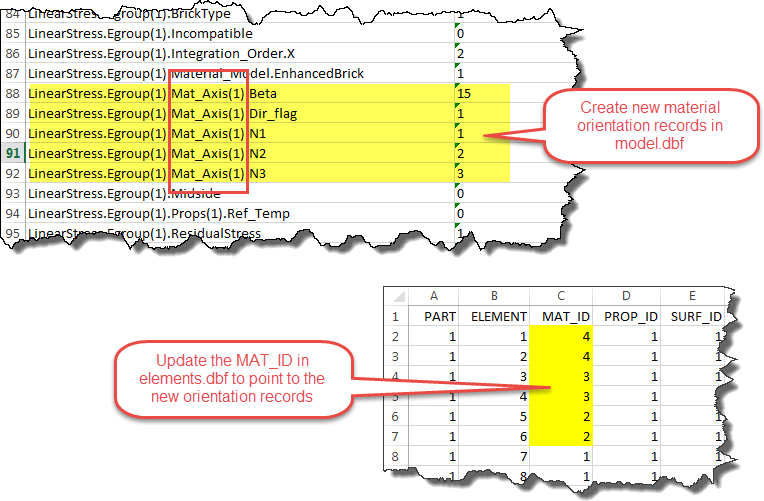
I think that the material axis can be prescribed only in the "Egroup(e)" records, as, for instance
"LinearStress.Egroup(7).Mat_Axis(1).N1"
"LinearStress.Egroup(7).Mat_Axis(1).N2"
"LinearStress.Egroup(7).Mat_Axis(1).N2"
Thus the 40 materials per group (part) have all different elastic coefficients Cij calculated (by the program) by rotating the orthotropic elastic matrix from the local cilindrical directors (determined for each element by the mean coordinate values) to the global system X,Y,Z.
After the c++ program run , the model table contains 11 groups of elements and 291 different materials (11 + 7*40).
At this point my program can handle only materials whose axes are aligned to the local directors of a cylindical system of coordinates, but can be easily adapted to different situations provided that the material axis depend only by the element group and element coordinates. For instance it would be very easy to generate spherical coordinates aligned materials.


 ) In other words, the material properties for all elements are the same; only the orientation of the elements are different. But since changing the "MAT_ID" says that the element has "different" material properties, you need to copy the material property records.