Panel Edge Modification

Panel Edge Modification

stroxy
Advocate Advocate
5,111 Views
13 Replies
Message 1 of 14

Panel Edge Modification

stroxy
Advocate
Advocate

Is there a way to divide a panel edge without dividing the edge on the opposite side of the panel?


Is there a way to join panel edges that have been divided?

0 Likes
Accepted solutions (1)
5,112 Views
13 Replies
Replies (13)
Message 2 of 14

Artur.Kosakowski
Autodesk Support
Autodesk Support
Accepted solution

Here you are.


See also: http://forums.autodesk.com/t5/Autodesk-Robot-Structural/editing-slab-contour-geometry/m-p/3223160/hi...


If you find your post answered press the Accept as Solution button please. This will help other users to find solutions much faster. Thank you.


Artur Kosakowski
Message 3 of 14

Anonymous
Not applicable

How to select panel edge? When I click on edge, only whole panel selected

0 Likes
Message 4 of 14

Artur.Kosakowski
Autodesk Support
Autodesk Support

Hi @Anonymous


Try these steps:


If you find your post answered press the Accept as Solution button please. This will help other users to find solutions much faster. Thank you.


Artur Kosakowski
Message 5 of 14

Rafal.Gaweda
Autodesk Support
Autodesk Support
Hi @stroxy


Is there a way to join panel edges that have been divided?


Here you can find the macro to delete intermediate points automatically.


Rafal Gaweda
Message 6 of 14

Anonymous
Not applicable

Please try to divide top edge for this one in atteched file

Clip2net_170817141416.png

0 Likes
Message 7 of 14

Artur.Kosakowski
Autodesk Support
Autodesk Support

H @Anonymous


I assume that what you really want is the control over meshing. If so try these steps:


If you find your post answered press the Accept as Solution button please. This will help other users to find solutions much faster. Thank you.


Artur Kosakowski
Message 8 of 14

Rafacascudo
Mentor
Mentor

I am not sure you can do that because that edge is an arc segment.

What you can do is redo the panel increasing the numer of sides on arc discretization.


Rafael Medeiros
Did you find this post helpful? Feel free to Like this post.
Did your question get successfully answered? Then click on the ACCEPT SOLUTION button.

EESignature

0 Likes
Message 9 of 14

Artur.Kosakowski
Autodesk Support
Autodesk Support

Hi @Rafacascudo


The similar effect can be obtained in this way:


arc divisions.PNG


If you find your post answered press the Accept as Solution button please. This will help other users to find solutions much faster. Thank you.


Artur Kosakowski
Message 10 of 14

Rafacascudo
Mentor
Mentor

Yes , sure , That´s what I meant by "redo" Smiley Happy

Rafael Medeiros
Did you find this post helpful? Feel free to Like this post.
Did your question get successfully answered? Then click on the ACCEPT SOLUTION button.

EESignature

0 Likes
Message 11 of 14

Anonymous
Not applicable

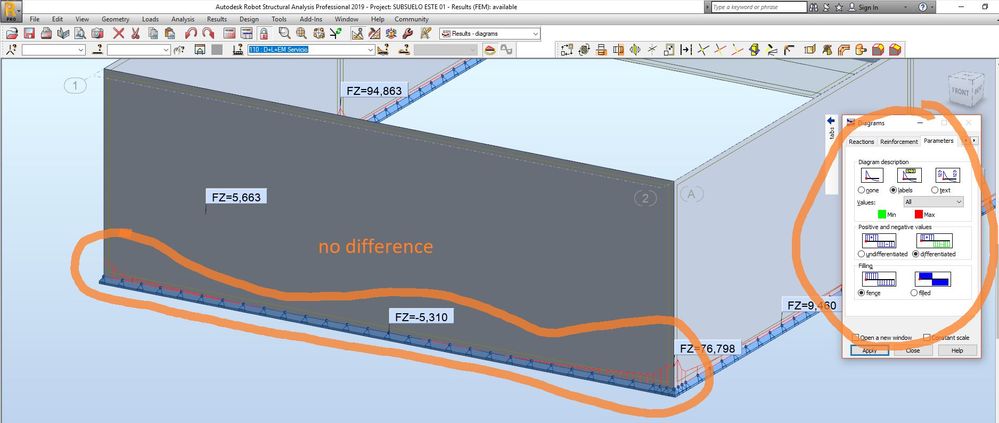
Hi, i tried dividing a wall in order to obtain better discretization of linear reactions, but it´s not working:

After aplying the Divide Tool to the edge and assigninn distance = 1m, nothing changes. I´m using a Wall with Shell model calculation.

C1.JPGC2.JPG

Please i would appreciatte some help, my posts generally are not answered.

Thanks!.


0 Likes
Message 12 of 14

Rafacascudo
Mentor
Mentor

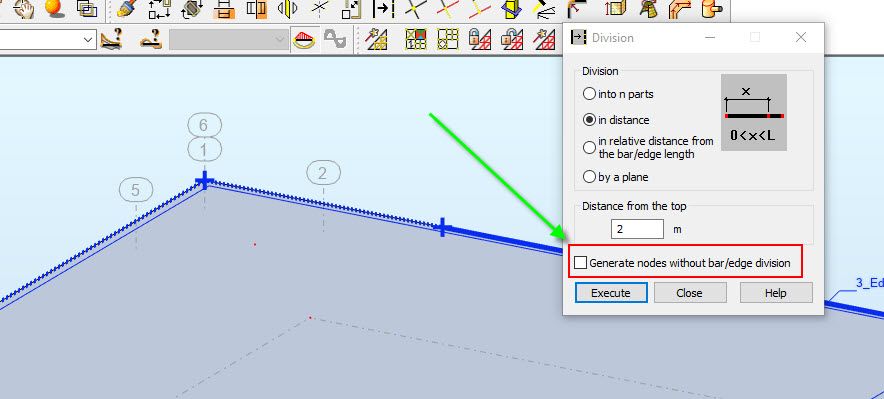
unmark "generate... "


dividing edges.jpg

Rafael Medeiros
Did you find this post helpful? Feel free to Like this post.
Did your question get successfully answered? Then click on the ACCEPT SOLUTION button.

EESignature

0 Likes
Message 13 of 14

Anonymous
Not applicable

I did, but dindn´t succeed. Model atacched in case you wanna check.

Thanks.

0 Likes
Message 14 of 14

Rafacascudo
Mentor
Mentor

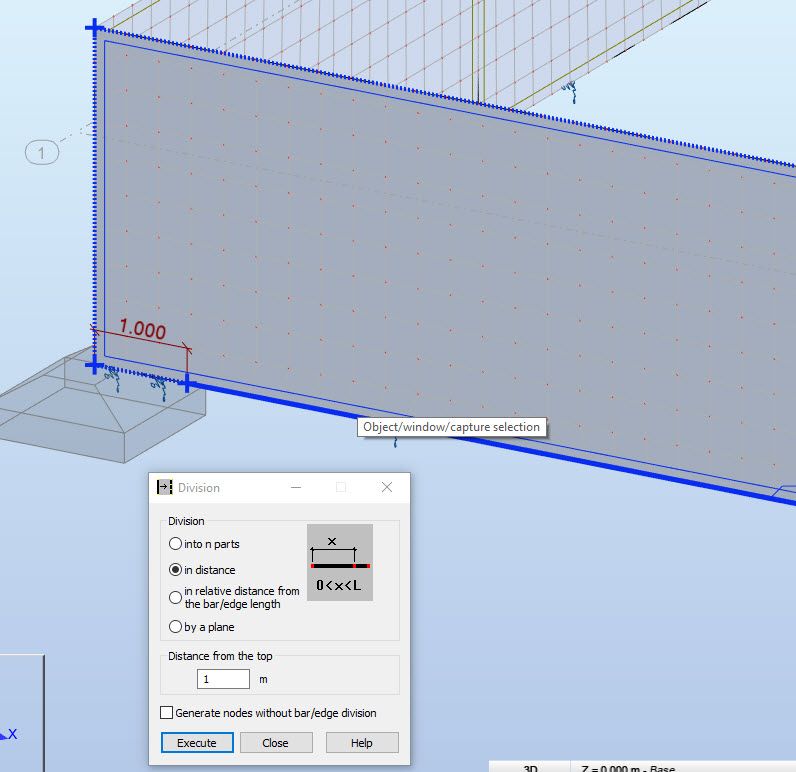
set the "divide" dialog as shown,select/click the desired edge to be designed and it will ask you if it is the edge or the whole panel(all edges) to be divided . select the edge and click OK.

dividing edges 2.jpg

Rafael Medeiros
Did you find this post helpful? Feel free to Like this post.
Did your question get successfully answered? Then click on the ACCEPT SOLUTION button.

EESignature

0 Likes