How to graphically delete loads

How to graphically delete loads

Anonymous
Not applicable
3,314 Views
6 Replies
Message 1 of 7

How to graphically delete loads

Anonymous
Not applicable

Also in "Geometry" menu and in all other menus, then I click "load definition", doasn't matter what I will choose node / bar / surface, when I clck "delete the selected load type" and click on the element or writing elements number in "apply to" section and clicking "apply" doesn't do anything. This happens on all my projects since I have started using Robot.

Analogical function (delete) for deleting supports or releases working without problems....

Anyone else hasthis problem? Maybe there is a solution for this?

0 Likes
Accepted solutions (1)
3,315 Views
6 Replies
Replies (6)
Message 2 of 7

Rafal.Gaweda
Autodesk Support
Autodesk Support
Accepted solution
Message 3 of 7

engenharia5EZVM9
Contributor
Contributor

Adobe and recent browsers no longer suports Flash PLayer. If anyone can post the video in other formats.

0 Likes
Message 4 of 7

Romanich
Mentor
Mentor

Hi @engenharia5EZVM9 ,

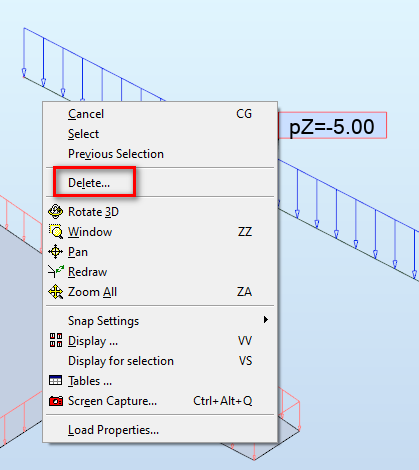
Click the right mouse button on load and select Delete:

Romanich_0-1619155466062.png


Do you find the posts helpful? "LIKE" these posts!
Have your question been answered successfully? Click 'ACCEPT SOLUTION' button.

Roman Zhelezniak

Robot Evangelist & Passionate Civil Structural Engineer

LinkedIn | Robot & Хобот | App Store for Robot
EESignature


Message 5 of 7

MarkNguyen...
Advocate
Advocate

hi @Rafal.Gaweda  i cant see your video. Could you post again? thanks

0 Likes
Message 6 of 7

miguelmachadoecosta
Advocate
Advocate

Hi @Romanich,


Is there a way to delete many loads? I cannot select them, so I can't filter them in the table. Do I have to delete them one by one?


Thanks.

0 Likes
Message 7 of 7

Romanich
Mentor
Mentor

Hi @miguelmachadoecosta.

Graphically one by one. In the load table you can use Shift or Ctrl buttons to select more than one row.

Do you find the posts helpful? "LIKE" these posts!
Have your question been answered successfully? Click 'ACCEPT SOLUTION' button.

Roman Zhelezniak

Robot Evangelist & Passionate Civil Structural Engineer

LinkedIn | Robot & Хобот | App Store for Robot
EESignature