Beam offsets

Beam offsets

Anonymous
Not applicable
26,722 Views
28 Replies
Message 1 of 29

Beam offsets

Anonymous
Not applicable

Hi,


When defining a beam cast integrally with a slab I had initially thought the best way to do it would be to offset the beam down to correctly represent the true stiffness of the system.  However upon seeing the results, I was puzzled as to the "saw tooth" shape of the bending moment diagram in the beams, and alot of membrane force in the slab.  


After reading the following post  http://forums.autodesk.com/t5/Autodesk-Robot-Structural/T-slab/m-p/3185418#M915 I thought I would try to follow the solution offered, ie no beam offset.  The bending moment in the beam now looks like I expect.  I created a trial model, a cantilever beam and slab with 2 back spans, all equal length. The only load case is self weight.  See pictures for comparison;


Left is no offset, right is offset to match slab level.  Note saw tooth bending diagram on right.
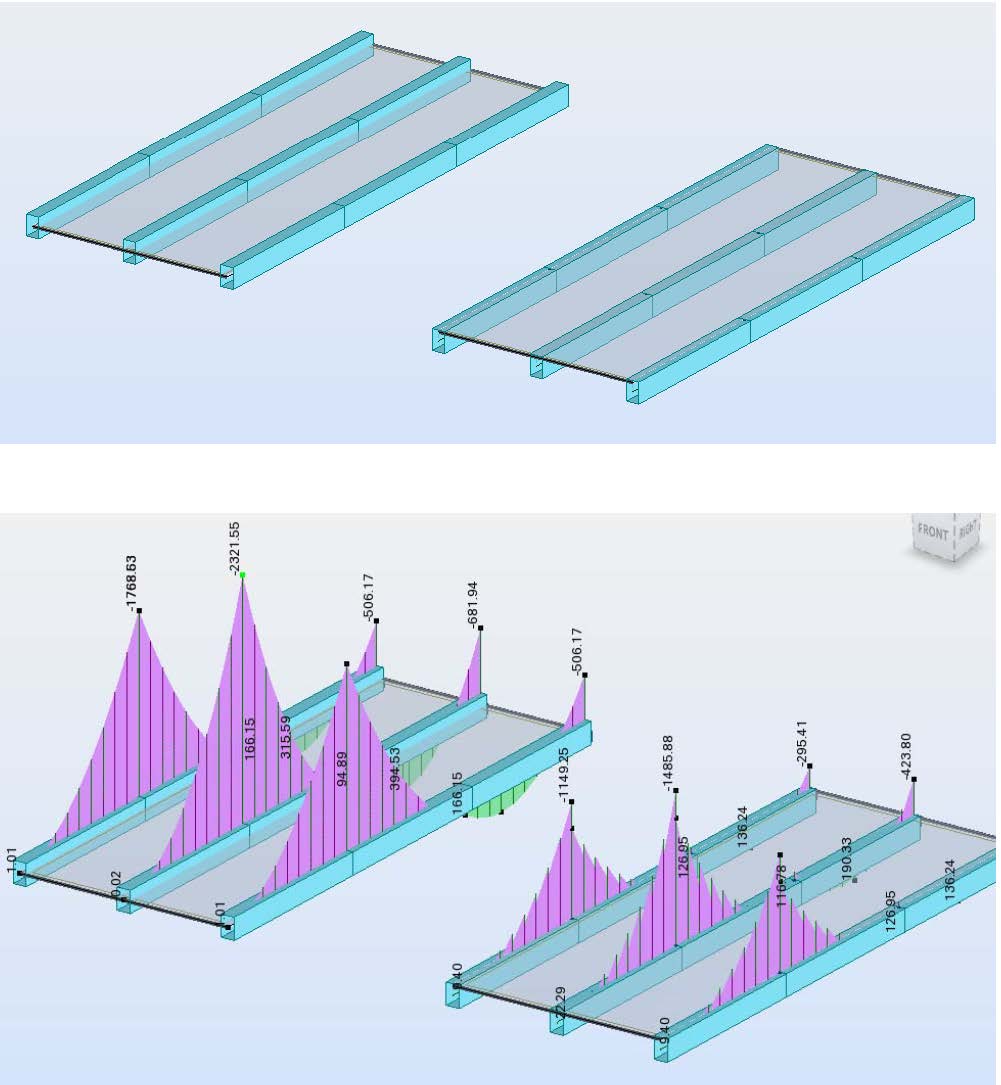
Document1_Page_1.jpg


Membrane force in local x, and panel cut of bending in x direction, overlaid on bending map.

Document1_Page_2.jpg


So in the "no offset model" (left), I get peak beam hogging over the first support of 2320kNm, versus only 1485kNm in the centre beam on the right model with offsets.


My question is, which method of modelling produces results which are closer to "reality".  I'm running the same system as a monolithic 3D volumatric element in the background as a comparison.  I'll post stress maps when it finishes running.  


Tony


Accepted solutions (1)
26,723 Views
28 Replies
Replies (28)
Message 21 of 29

Artur.Kosakowski
Autodesk Support
Autodesk Support

If there was no computer 'our' hand calculations would be like this:


- assuming beams as rigid supports we calculate reinforcement of slab

- applying load from slabs to beams (tributary areas) we calculate reinforcement of beams


No check of 'common' displacements at all

----

Having a computer we can model the whole structure (beams and slab) with increased of IY for T beams and run static analysis of the model assuming elastic E value. At this stage the displacements are coherent and load 'distribution' is more realistic than above.


Usually this is followed by design of slabs and beam reinforcement is the RC Design modules of Robot.

----


Assuming that you want to be more accurate you can determine what is the reduced stiffness of beams and slabs and change your model replacing the original values of IY (or E) by the reduced ones. If you recalculate the model the displacements in the static analysis will be even more realistic and still coherent for beams and slabs.


Then you may repeat the design of reinforcement for new set of forces.


-----

If you are still uneasy you can repeat this procedure till the moment the displacements obtained in static analysis are 'within the acceptable' tolerance with the values obtained in the RC Design modules.


Artur Kosakowski
0 Likes
Message 22 of 29

antoine.carimalo
Contributor
Contributor

Hi Artur


I spent 2 days to understand your explanation. Now it is clear.

I will open a new topic to illustrate your proposal. I did not understand that real displacements must be read in elastic cartography, not in the reinforcement one


Could we expect that robot will be more accurate in cracked displacements in the future ? Why does not robot adjust automatically displacement map of the deflection, in the elastic analysis after reinforcement of slabs+beam achievement ?


regards


antoine

0 Likes
Message 23 of 29

antoine.carimalo
Contributor
Contributor

Regarding the original topic : offset

This option don't have any effect in the elastic bending.


I rode somewhere offset control changed in the new version of robot. I run on 2012 only.


But regarding result given by Tony Ridley. I think it is more accurate to follow Artur proposal : design a T shape and not design offset (to optimize). One reason is to control sliding shear reinforcement design according to RC codes


In all cases deflection must be control with manual input of the real stiffness to be more precise


Why does not robot adjust automatically displacement map of the deflection, in the elastic analysis after reinforcement of slabs+beam achievement ?

Because bars EF does not give the possibility to vary rigidity along the lenght for now?

0 Likes
Message 24 of 29

Anonymous
Not applicable

Acarimalo,


Strange, I don't recall proposing a "solution" anywhere, and in fact the original point of my post was to say "be careful / don't use offsets for beams and slabs". 


I was merely asking what a good workaround would be to accurately model the beam / slab system, without resorting to a full 3D model. 


Tony


0 Likes
Message 25 of 29

antoine.carimalo
Contributor
Contributor

Sorry Tony, my Engish is strange that all, i am a frenchy who didn't go at english classroom so much

You ve underline an interesting point

thanks


0 Likes
Message 26 of 29

Anonymous
Not applicable
It's OK. You're English is much better than my French!

Thanks for your feedback too.
0 Likes
Message 27 of 29

Artur.Kosakowski
Autodesk Support
Autodesk Support

Why does not robot adjust automatically displacement map of the deflection, in the elastic analysis after reinforcement of slabs+beam achievement ?


Because the results are displayed for the model that has actually been calculated. This is IMHO as it should be. On the other hand you can run the verification of deflections with the stiffness update method which actually runs model calculations for selected load combination with changed stiffness of surface elements according to the results from the RC Slab Required module. This is the more accurate approach comparing to the elastic method.


bars EF does not give the possibility to vary rigidity along the lenght for now?


Correct. You would need to create a chain of bars instead.


Regarding the original topic : offset

This option don't have any effect in the elastic bending.


Mind that you have to  work with a shell module rather than a plate one.


Artur Kosakowski
0 Likes
Message 28 of 29

Anonymous
Not applicable
It seems to be one of the perfect idea. Applying this would be beneficial.

But It seems to be confusing, how to fix all while you have not any idea of fixing it.

Thanks!
steelandsite.com
0 Likes
Message 29 of 29

miguel_serraTTQEY
Explorer
Explorer

What we seem to be truly lacking in robot is the concept of integration strip. This issue with the offset becomes a true issue because we cannot convert panel internal forces (kNm/m or kN/m) to a beam like forces (kNm or kN). If you have the integration in the slab, you could combine the offset axial forces with the beam and slab bending moments, at least in excel or whichever other post processing tool. The funny thing is that Robot developers already created a “similar” tool for core walls integration but never opted to do this for slabs (we only have sections on panels). It would only need to create a selectable axis for longitudinal local axis and a normal vector.

0 Likes
