Line Based Array w/ formula

Line Based Array w/ formula

irisolvohrc
Participant Participant
2,839 Views
7 Replies
Message 1 of 8

Line Based Array w/ formula

irisolvohrc
Participant
Participant

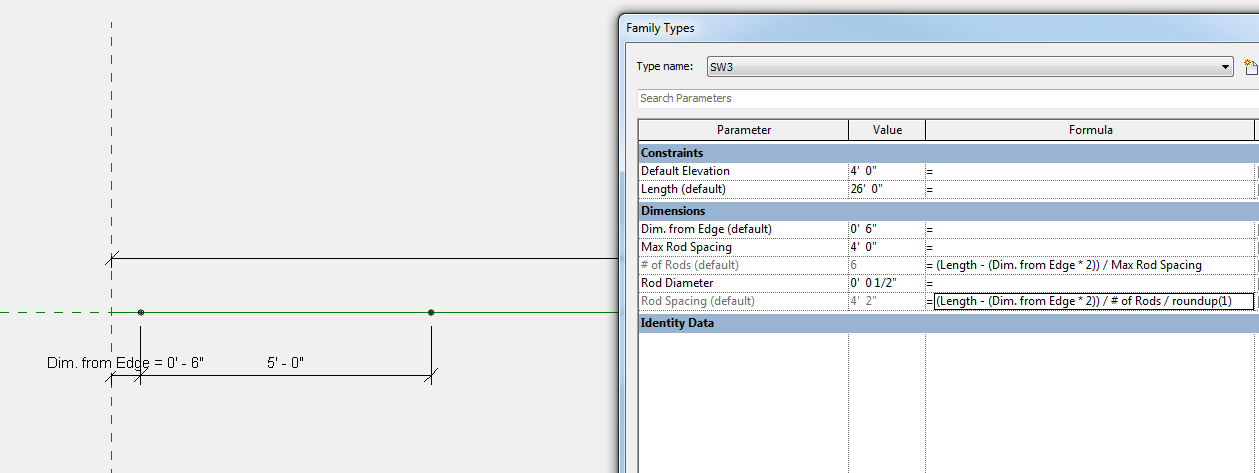
I am trying to create an anchor bolt array that has fixed end and then spaced evenly with a given max spacing number by type and the length that varies.  The problems I am having are:


1) the Max Number sometimes goes over

2) the dimension I physically dimension is different that the one on the properties


Please see attached highlighted numbers.  What's wrong with the formula?


Thank you very much

0 Likes
Accepted solutions (1)
2,840 Views
7 Replies
Replies (7)
Message 2 of 8

L.Maas
Mentor
Mentor

The issue is rounding. The length can be different and the amount of rods is always integer. So when you start to divide the length by the max rod spacing you will end up with a non-integer number of rods. Revit will round it off. So sometimes the rod spacing will be above 'max rod spacing' or the amount of rods will increase

Louis

EESignature

Please mention Revit version, especially when uploading Revit files.

0 Likes
Message 3 of 8

N.Oomen
Advocate
Advocate

@irisolvohrc,


@L.Maas, You are right about the rounding in revit.


Irisolvohrc, You could solve this problem by using the round function within revit formulas.


ROUND(x)
The round function returns a number rounded nearest to a whole number. It doesn’t take into consideration rounding direction (round up or down). If the number is (for example) from 24.5 to 24.9, the function rounds it to 25. If it is from 23.1 to 23.4, the function rounds it to 23. 

The syntax for the round function is: round( number)
number is the number to round.


ROUNDDOWN(x)
“x” is a unitless value that should return the smallest integral value less than or equal to x. 

The syntax for the rounddown function is: rounddown (number)
number is the number to round down.


ROUNDUP(x)
“x” is a unitless value that should return the largest integral value greater than or equal to x. 

The syntax for the roundup function is: roundup (number)
number is the number to round up.


Note that when numbers such as 23.5 are rounded, they can result in either 23 or 24. To produce a stable result, for all the .5 cases, we round to the larger integer. That means that 23.5 is rounded to 24, while -23.5 to -23.


Credits go to Revit Formulas for "Everyday Use" website revit-formulas-everyday-usage


I use this website a lot when I have to handle formulas in Revit.


If my post answers your question, please click the "Accept as Solution" button. This helps everyone find answers more quickly!


Best regards,
Niels Oomen
Cadac Group BV
Sr Consultant AEC


0 Likes
Message 4 of 8

irisolvohrc
Participant
Participant

Thank you both, but it didn't work.  Please check the attachments to make sure  I put the roundup in the right place. I have tried putting it on the "# of Rods" field and it didn't work either.

Also, do you think by fixing the spacing issue is going to fix the dimensioning issue as well? (notice the 4'2" in the value and the 5' in the string.


Thanks again.

0 Likes
Message 5 of 8

N.Oomen
Advocate
Advocate

@irisolvohrc,


See if this will work for you, is a bit of workaround I think, but it does work.


Basically what you need is an if statement when the calculated spacing is bigger then your condition it needs to add a rod.


Good luck with it.


If my post answers your question, please click the "Accept as Solution" button. This helps everyone find answers more quickly!

Best regards,
Niels Oomen
Cadac Group BV
Sr Consultant AEC


0 Likes
Message 6 of 8

irisolvohrc
Participant
Participant

Hi, it's still not working right.  it looks like it's calculating the right numbers but it's not reflecting it in the model.  I think the problem lies on how I am connecting the end of the array to the "Dim from edge", I am not sure I am doing it right.  When I click on the array it looks like it's going to the right place, but not sure. 


Suggestions?


Thanks,

0 Likes
Message 7 of 8

N.Oomen
Advocate
Advocate
Accepted solution

Hi @irisolvohrc,


Found the problem. When you divide a certain length by a spacing it should be rounded up and also need a start rod, so plus 1 at the start.


added the new family that works.


If my post answers your question, please click the "Accept as Solution" button. This helps everyone find answers more quickly!


Best regards,
Niels Oomen
Cadac Group BV
Sr Consultant AEC


Message 8 of 8

irisolvohrc
Participant
Participant

Woo Hoo!!!!


That worked...thank you so much!


I need to live with the fact that the number on the schedule is different than the linear dimension in the model.  What it's doing, on the schedule/family types, is dividing the interior length by the number of rods not taking into consideration that the first and last are at different dimensions.

But as long as linear dimension is correct, I guess that's all I care about.


thank you, thank you, thank you


If anyone wants this family, let me know.


0 Likes