Chamfer on structural slabs

Chamfer on structural slabs

Anonymous
Not applicable
5,437 Views
11 Replies
Message 1 of 12

Chamfer on structural slabs

Anonymous
Not applicable

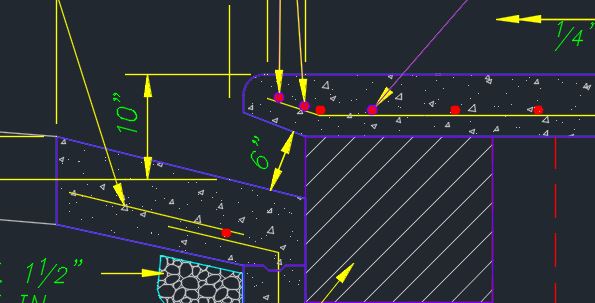
I am trying to chamfer structural slabs. The void/solid cut method doesn't work on structural slabs and masses/objects don't calculate concrete volume, rebar weight, etc. etc.. Any ideas for a quick solution? If I just needed to draw something that looked correct, that would be easy. But I need to actually design and calculate off the model.


Thanks

0 Likes
Accepted solutions (1)
5,438 Views
11 Replies
Replies (11)
Message 2 of 12

ToanDN
Consultant
Consultant

Wonder why a void doesn't work for you?  See attached Revit 2019 fie.


Another method, draw the slab boundary offset inward the width of the chamfer, then add slab edges with the chamfer profile to the slab.

0 Likes
Message 3 of 12

Anonymous
Not applicable

No idea. I can use the method on roofs, architectural floors, walls, etc. But it just wont work on a structural slab edge. I can use it for the middle of the slab. Like a hole or square. But anything to do with the edges doesn't work.

0 Likes
Message 4 of 12

christian.riley
Autodesk Support
Autodesk Support

@Anonymous  - 


I understand you're having a bit of an issue with voids not being able to cut Structural Slabs. Is this issue just happening on this file? Would you be able to attach the file to the forum post?


Christian Riley
Technical Support Specialist
0 Likes
Message 5 of 12

Anonymous
Not applicable

I copied the basic structure into it's own file. It is attached along with a capture of what i'm trying to achieve. I already did the project in CAD and RISA. So no hurry.


Thanks,

Jason

0 Likes
Message 6 of 12

ToanDN
Consultant
Consultant

Like this?

0 Likes
Message 7 of 12

ToanDN
Consultant
Consultant

@Anonymous wrote:

I copied the basic structure into it's own file. It is attached along with a capture of what i'm trying to achieve. I already did the project in CAD and RISA. So no hurry.


Thanks,

Jason


Didn't realize you included an image.  See attached.

0 Likes
Message 8 of 12

Anonymous
Not applicable

That's it. How did you get it to work? 


Thanks, 

Jason

0 Likes
Message 9 of 12

ToanDN
Consultant
Consultant
Accepted solution

@Anonymous wrote:

That's it. How did you get it to work? 


Thanks, 

Jason


It always works the same way:


- Structural tab > Component drop-down > Model In-place > Generic Models > Give it some name

- Void Forms drop-down > Void Sweep

- Pick Path > pick the edge(s) of the floor, the path must be continuous or a closed loop > Green button to Finish path

- Edit Profile > Draw profile(s) of the void, a profile must be a closed loop  > Green button to Finish profile(s)

- Green button to Finish form

- Modify tab > Cut geometry > Use the void form to cut the floor

- Green button to Finish Model

-

0 Likes
Message 10 of 12

Anonymous
Not applicable

I was trying to put the chamfer on the bottom edge, as you did, except not go the full distance of that edge. I wanted to leave off the chamfer at the side walls. Because some boxes don't open the full length on the sides.  I can work around what you did. I assume my problem was the continuous or closed loop requirement. Thank you very much for your help.


Sincerely,

Jason

0 Likes
Message 11 of 12

ToanDN
Consultant
Consultant

@Anonymous wrote:

I was trying to put the chamfer on the bottom edge, as you did, except not go the full distance of that edge. I wanted to leave off the chamfer at the side walls. Because some boxes don't open the full length on the sides.  I can work around what you did. I assume my problem was the continuous or closed loop requirement. Thank you very much for your help.


Sincerely,

Jason


If you want the void shorter than the floor edge then use sketch path instead of pick path, set the work plane to the bottom face of the slab, use pick line tools or just draw line to sketch the path.  The rest are the same.

0 Likes
Message 12 of 12

Anonymous
Not applicable

Thank you for your help.

0 Likes