Text - How to set indentation in a paragraph?

Text - How to set indentation in a paragraph?

Anonymous
Not applicable
7,145 Views
10 Replies
Message 1 of 11

Text - How to set indentation in a paragraph?

Anonymous
Not applicable

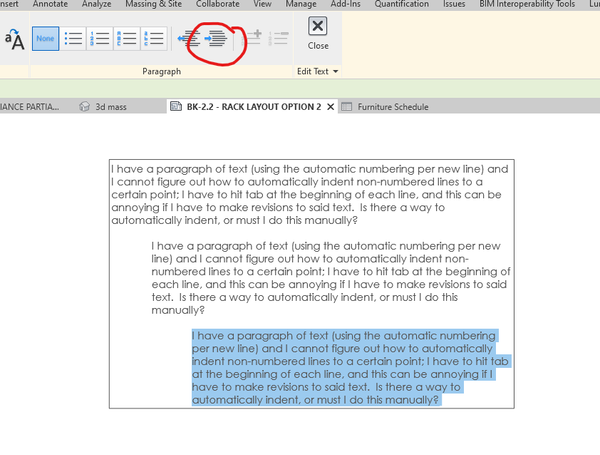
I have a paragraph of text (using the automatic numbering per new line) and I cannot figure out how to automatically indent non-numbered lines to a certain point; I have to hit tab at the beginning of each line, and this can be annoying if I have to make revisions to said text.  Is there a way to automatically indent, or must I do this manually?


I am running Revit MEP 2012, and thanks in advance!

0 Likes
Accepted solutions (1)
7,146 Views
10 Replies
Replies (10)
Message 2 of 11

Anonymous
Not applicable
Accepted solution

Since Revit has no word proccesser you must do this manually unfortunately.

Message 3 of 11

abulla
Collaborator
Collaborator

Just don't resize your text box, it will screw up all that indenting. Neat huh?

Message 4 of 11

Anonymous
Not applicable

Have you tried the "Text Generator" tool in the Autodesk Extensions add-in from the subscription site? That allows you to import externally created text and provides a little more word processing power thatn the usual text editor. That may help.

0 Likes
Message 5 of 11

Anonymous
Not applicable

I have downloaded and installed the REVIT 2013 extensions, but I haven't a clue as to how to use them.  Can someone please direct me to a help link?

0 Likes
Message 6 of 11

Seychellian
Advocate
Advocate


@Anonymous wrote:

I have a paragraph of text (using the automatic numbering per new line) and I cannot figure out how to automatically indent non-numbered lines to a certain point; I have to hit tab at the beginning of each line, and this can be annoying if I have to make revisions to said text.  Is there a way to automatically indent, or must I do this manually?


I am running Revit MEP 2012, and thanks in advance!


Any updates on this one 8yrs down the line?

Message 7 of 11

j_em_doubleu76
Explorer
Explorer

Not that I've found - crazy (and now 10 years down the line)

0 Likes
Message 8 of 11

ToanDN
Consultant
Consultant

@j_em_doubleu76 wrote:

Not that I've found - crazy (and now 10 years down the line)


ToanDN_0-1652921106856.png


Message 9 of 11

j_em_doubleu76
Explorer
Explorer

In my example I need to hit TAB at the start of each line - not ideal in large bits of text, and not intuitive if text is edited.

j_em_doubleu76_1-1652921559842.png


0 Likes
Message 10 of 11

ToanDN
Consultant
Consultant

@j_em_doubleu76 wrote:

In my example I need to hit TAB at the start of each line - not ideal in large bits of text, and not intuitive if text is edited.

j_em_doubleu76_1-1652921559842.png


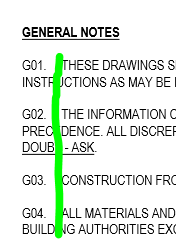
I see.  If you want unconventional numbering then use a noteblock schedule.

0 Likes
Message 11 of 11

j_em_doubleu76
Explorer
Explorer
Ok thanks, one day in the future I may have time to look into that properly. A quick look was not enough to understand how to use them - same with adding a quick text table.
0 Likes