Message 1 of 3
Panel Schedule Template Circuit Numbering

- Mark as New
- Bookmark
- Subscribe
- Mute
- Subscribe to RSS Feed
- Permalink
- Report
Hi,
did anyone had trouble editing default circuit numbers format in the template for panel schedules to something more customized.
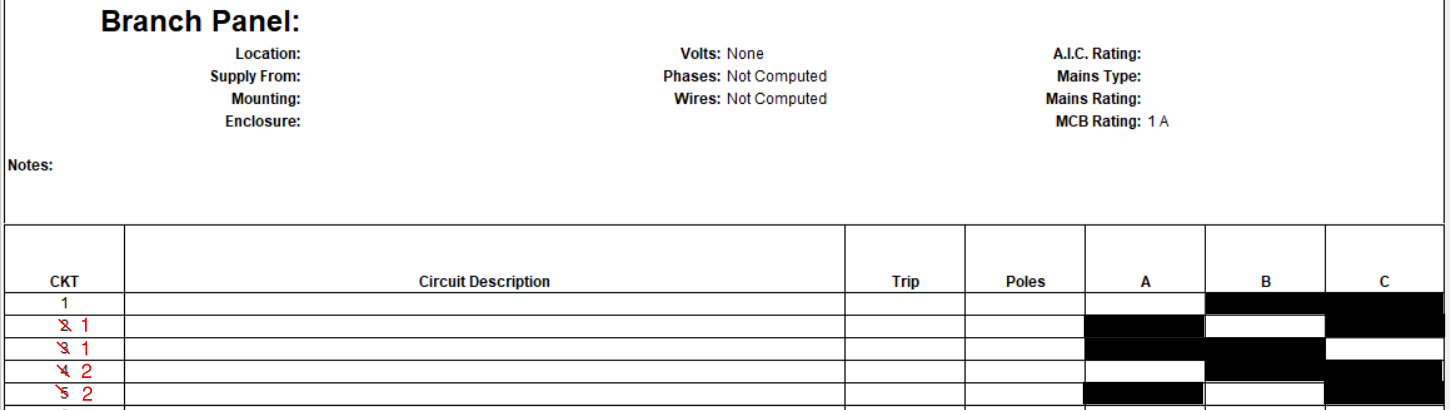
I would need to make something like this shown in the picture I attached, so three rows for breaker number 1, 2 etc where each row would be for one of the phases and the circuits would be 1A, 1B , 1C , 2A , 2B etc for single phase circuits. In these default panel schedule templates it seems like they all are numbered per number of single pole breakers.
If anyone has an idea how to edit this to achieve something like in the picture I would really appreciate the help