Missing options for light fixtures: vertical face/plan/work plane.

Missing options for light fixtures: vertical face/plan/work plane.

Anonymous
Not applicable
4,441 Views
9 Replies
Message 1 of 10

Missing options for light fixtures: vertical face/plan/work plane.

Anonymous
Not applicable

I'm adding a continuous linear fixture up a wall, across a ceiling, and down another wall. When I go to place the fixture Revit v2017 doesn't give me the option to choose between vertical face/plane/work plane. I have to place it on the associated level and change the elevation to get it into the ceiling. What am I missing in my family that isn't allowing me to choose what I place it on?


Thanks in advance,


-P

0 Likes
Accepted solutions (1)
4,442 Views
9 Replies
Replies (9)
Message 2 of 10

RobDraw
Mentor
Mentor

You are using a non-hosted family.


Rob

Drafting is a breeze and Revit doesn't always work the way you think it should.
Message 3 of 10

Scott_D_
Advisor
Advisor

If you check the family settings it should be a Face Hosted type, this can be attached to anything.


If you have a Face Based family and are working in Plan it will try and attach to the floor, you need to work in an RCP to attach to the ceiling.

Message 4 of 10

fabiosato
Mentor
Mentor
Accepted solution

Hello,


If your family is on-hosted, you can check Workplane Based, then your family will be possible to place in any plan. May solve your problem.

Fábio Sato
Did you find this post helpful? Feel free to Like this post.
Did your question get successfully answered? Then click on the ACCEPT SOLUTION button.

EESignature

Message 5 of 10

sara
Enthusiast
Enthusiast

Hi all,

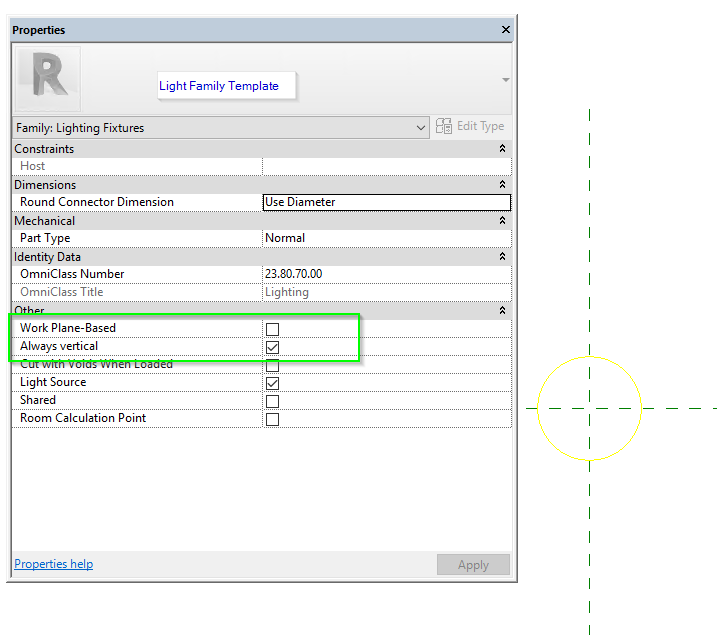
What I see is a "Face" hosted light in the family editor, is missing some of the other attributes found in the Light Fixture Family Template. Namely: Work Plane-Based and Always Vertical.

Is there a workflow to retrieve this? (Other than rebuild?) and is this evidence the family was started under a different category?Light Fam Cat Settings.pngLight Fam Template.png


Thanks so much!

0 Likes
Message 6 of 10

ToanDN
Consultant
Consultant

Create it from a Generic template with the host of your choosing then change the category to Light Fixture.

0 Likes
Message 7 of 10

sara
Enthusiast
Enthusiast

AH! Yes. The Manufacturer created the family starting with a Generic family, which does not have those features. 


0 Likes
Message 8 of 10

ToanDN
Consultant
Consultant
I think you misunderstood my point. A face based family does not have Work-plane Based and Always Vertical tick boxes. Period. It does not matter if the family is Generic or Lighting Fixture or anything else.
To get those two boxes, you need to create the family from the Generic Model family template, then change it to Lighting Fixture category from the same dialog.
Message 9 of 10

sara
Enthusiast
Enthusiast

Period! Period. 😉


@ToanDNwrote:
I think you misunderstood my point. A face based family does not have Work-plane Based and Always Vertical tick boxes. Period. It does not matter if the family is Generic or Lighting Fixture or anything else.
To get those two boxes, you need to create the family from the Generic Model family template, then change it to Lighting Fixture category from the same dialog.

I will bring the light fixture into a light fixture template. Seen below:

Light Fixture family template.png

These are the options in a Generic Face-Base family.

generic face base family options.png

My query was how to get the workplane hosted and always vertical options. I have brought the light into a Light Fixture template. Rocking and rolling. Thank you, 


0 Likes
Message 10 of 10

ToanDN
Consultant
Consultant
Good. Actually my statement earlier is not entirely correct but it does
not matter now.
0 Likes