Get Pipe Accessories to Attach to Equipment

Get Pipe Accessories to Attach to Equipment

ben
Collaborator Collaborator
2,670 Views
11 Replies
Message 1 of 12

Get Pipe Accessories to Attach to Equipment

ben
Collaborator
Collaborator

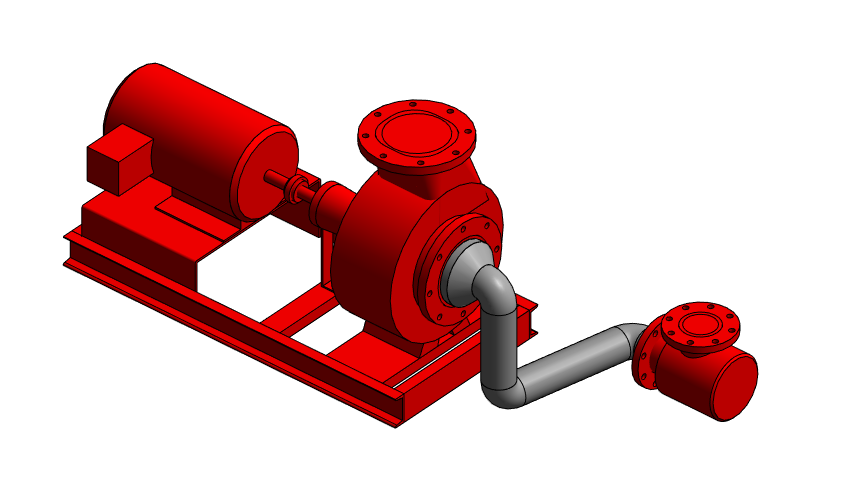
I have my system pumps in the model and I would like to be able to click to add my suction defuser, and get the outlet side to "snap" to the inlet side of the pump, sorry for the CAD terminology. I know its not a snap in Revit, probably host or work plane or something. If someone can make a screencast showing me how to make this happen I would appreciate it because I'd also like to do the same thing with my flex connectors and triple duty valves.


I attached the families incase you want to use the exact ones that I'm using. All of the pump models are in that family but the specific model number is: 40304x3x8125lb184TCTEFC


And the suction defuser is: SG-44-125lb


Revit lives in the land of perfect and doesn't understand what construction is.

0 Likes
Accepted solutions (1)
2,671 Views
11 Replies
Replies (11)
Message 2 of 12

Secttor
Collaborator
Collaborator

hi @ben

you wish to attach (in project) one-to-another based on their flanges? 

Revit MEP - Electrical Certified Professional
Revit MEP - Mechanical Certified Professional

Draftworks.wordpress.com
0 Likes
Message 3 of 12

ben
Collaborator
Collaborator

@Secttor wrote:

hi @ben

you wish to attach (in project) one-to-another based on their flanges? 


Yes sir


Revit lives in the land of perfect and doesn't understand what construction is.

0 Likes
Message 4 of 12

ben
Collaborator
Collaborator

@Secttor

Yes, that's exactly what I am trying, and failing, to do.


Revit lives in the land of perfect and doesn't understand what construction is.

0 Likes
Message 5 of 12

ToanDN
Consultant
Consultant

Like below?  You have to drag the connector grip and place it onto the other equipment's connector.  


Capture.PNG

0 Likes
Message 6 of 12

Secttor
Collaborator
Collaborator

I quess he want to attach one to another without intermediary pipe. This can be done with different category of equipments.

Revit MEP - Electrical Certified Professional
Revit MEP - Mechanical Certified Professional

Draftworks.wordpress.com
0 Likes
Message 7 of 12

ben
Collaborator
Collaborator

@ToanDN @Secttor


Without the piping in the middle. One flange face bolted right to the other flange face.


Like this:


 P&SD.jpg


Revit lives in the land of perfect and doesn't understand what construction is.

0 Likes
Message 8 of 12

Secttor
Collaborator
Collaborator

make it nested and place it in the host family in your desired location. Want all it's information to be scheduled? Make it shared. You don't need it always..assign a visibility parameter.

easy!

Revit MEP - Electrical Certified Professional
Revit MEP - Mechanical Certified Professional

Draftworks.wordpress.com
0 Likes
Message 9 of 12

ben
Collaborator
Collaborator

Image result for confused emojiImage result for confused emoji


Mind sharing a quick screencast on how to do that?


Revit lives in the land of perfect and doesn't understand what construction is.

0 Likes
Message 10 of 12

ToanDN
Consultant
Consultant
Accepted solution

See below.


Capture.PNG

0 Likes
Message 11 of 12

ben
Collaborator
Collaborator

So if I want to make an entire pump setup I have to do that in the family editor instead of in the project? For Instance if I want to make my entire pup setup with the pump, suction diffusers, triple duty valves, butterfly valves I have to do that all in the family editor?


Revit lives in the land of perfect and doesn't understand what construction is.

0 Likes
Message 12 of 12

ben
Collaborator
Collaborator

Also, when I import or nest families into families how come it wont let me change the size of something? Luckily I had a 4" flex connector already in my project, went to edit, check shared, then load and it came in fine. I lined everything up. work great again for the vic starter flange and the vic cplg, but when I try to put a butterfly valve in it comes in as 2" and wont let me change it to 4" in either the properties or type selector. Before I went off the flex connector already in the project I just opened that family through the R dropdown menu and when I loaded it in into the pump project it did the same thing and showed up as a smaller size.


Revit lives in the land of perfect and doesn't understand what construction is.

0 Likes