Message 1 of 6

- Mark as New
- Bookmark
- Subscribe
- Mute
- Subscribe to RSS Feed
- Permalink
- Report
how can all those heavy files (different revit apps) be deleted from ya pc,
cant even identify some....
Solved! Go to Solution.

 Enthusiast
how can all those heavy files (different revit apps) be deleted from ya pc,
cant even identify some....
Solved! Go to Solution.

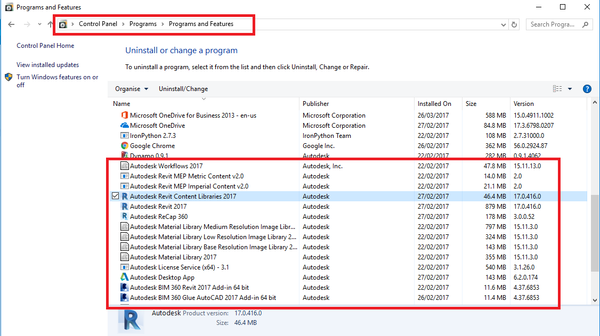
For Uninstalling the programs, go to Control Panel/ Programs/ Programs and features and uninstalled all the ones you do not want to have.
If you find my post is interesting, I will Appreciate it if you give a Kudo.
If it solves your problem, please click Accept Solution.
This might be overkill, but this is my favorite way to get rid of ALL of the Autodesk software installed on a PC:
http://prosoftaec.blogspot.com/2013/08/uninstall-multiple-autodesk-products.html
i think this is the best way thanks.
I've been wrestling with cleanly uninstalling (and trying to get a good install of) Revit 2018 all day today. Currently using the WMIC tool to uninstall everything and try again, but I'd already used it, seeming to hang during uninstallation of "Revit Content Libraries 2018". Next, I resorted to Microsoft Fixit, which seemed to work for most packages, yet I was never able to uninstall "Revit Content Libraries 2018".
Next, I tried to to a fresh install of Revit, which completed quickly, but still left me unable to launch. I think I can say without a doubt this is the most trouble I've ever had installaing a piece of software.
So, now I'm back to hanging during the uninstall of "Revit Content Libraries 2018". What can I try next?
Hello @eilliwofficial
Using Autodesk Uninstall Tool to remove the installed applcations, is a much more simpler and reliable way.
This tool gets installed along with the Revit installer. From the StartMenu, type "Uninstall Tool" and this tool will be listed. Click the shortcut for the tool and the tool launches. This tool lists all the installed Autodesk products in the users machine.
We can select the products to uninstall and click "Uninstall" button. We can see that all these products gets removed sequentially.
Please give it a try.
Here, I have provided a sample of this tool's output