Alexandra -
I have tried several further approaches to see if the file is corrupted in a way that can be fixed by a user. Alas, none of these solved your problem, but here's what I did for your future reference or conversations with whatever tech support might become available to you:
1) Audited the model when loading it. Saved it. Closed and restarted Revit, opened file. Cloud rendering problem persists.
2) Ran Manage > Purge Unwanted on the audited project. Kept doing that until there was nothing left to purge. Saved file, restarted Revit, and opened file. Problem persists.
Those two approaches would have preserved your views, sheets, etc. The following ones, which tried to put your architectural elements in a new Revit file, would not have preserved them.
3) In the audited model, in the Site Plan view, made everything except Site elements visible and selectable and unpinned. Copied everything to the clipboard and pasted into a new file, Aligned to Current View, also Site Plan. Ran into several alert messages in the bottom right corner, and clicked on whatever the required course of action was. Like this:
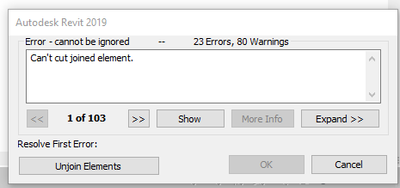
Would select the available course of action, like "Unjoin Elements," until eventually hit an alert whose only option was "Cancel" which made everything disappear.
4) In a new clean architectural project, purged all unused everything so that your families would not be ignored in favor of ones already in the clean file. Linked the audited and purged model of your project with Insert > Link Revit, Origin to Origin. To make it editable, enabled Select Links, and used Modify > Bind Link, checking Levels and Grids. Waited a while for anything to happen. Hit a few alert messages as above, but eventually ended up with your geometry in a new clean file. Ungrouped the insert and then...
Set up a new camera view -- since yours are gone in this model -- and the results weren't much better than before. See attached renderings done in Standard and Final quality modes. The Final one was super washed-out and had to be darkened a great deal to be legible.
Both renderings look very promising when they start, but just get worse and worse instead of better and better.
So, I have no idea how to fix your cloud-rendering issue. The only thing I can think of is that some material or family is somehow messing things up. Beyond my diagnostic abilities.
- Bill





