Hi all, Im an absolute newbie and im having a problem.
Is there a way to create a Sectional-Perspective in Revit that allows me to have the Section part TO-SCALE whilst still having the Back part of it being PERSPECTIVE and diminishing?
Thank you very much ![]()
Something like this:
Gelöst! Gehe zur Lösung
Gelöst von pearlofsadness. Gehe zur Lösung
Gelöst von ToanDN. Gehe zur Lösung
Hi @pearlofsadness, I believe Perspective views does not currently support annotations (dimension, text, etc). Here is a LINK to a similar suggestion submitted in the Ideas page where you can make your vote count.
If this resolves your issue, please click ACCEPT AS SOLUTION to enhance the forum.
a way to achieve your purpose could be:
https://knowledge.autodesk.com/community/screencast/0678577e-7521-48b9-aed2-421898e35ae7
https://knowledge.autodesk.com/community/screencast/8e13b13b-db02-4ebe-b04d-b1cdb8e6e090
Constantin Stroescu
Hi,
I just want to add that I found out just awhile ago that since 2019.1 update in Revit, they now support Sectional Perspective Cuts.
2- EASIER WAY TO CREATE A SECTION-PERSPECTIVE
Autodesk made many changes to the perspective settings to make them easier to use. The most helpful change is the automatic creation of a matching section box when you orient a perspective to a section. In the image below, we want to create a section-perspective matching the section. First, go to plan view to create a section.
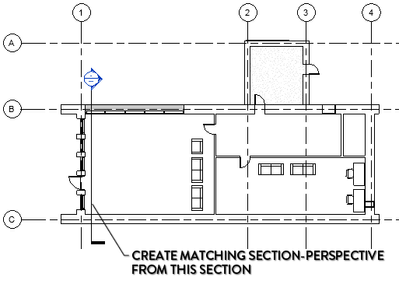
Then, enter any perspective view. Right-click the view cube and select the option Orient to View - Sections. Pick the correct section.
Here is the new part from Revit 2019.1: the view will not only be aligned to the section, but a section box will also be created to match the section cut plane and extents. This makes the process of creating a section-perspective much easier.
My comments:
But ofcourse we still have to align the Sectional-Perspective to a Section to make sure both are to-scale, since Perspectives are naturally Not-To-Scale. But it is still a much simpler step than to overlap them like previously. ![]()
Source:
https://revitpure.com/blog/top-5-best-new-features-in-revit-20191
... hi @pearlofsadness
... this way you found is cool ... section perspective
... everyday you learn something new
.... you can pan in any direction and the section doesn't change .... nice...
... thanks
aRcHiTeCt.JM
REVIT EXPERT ELITE
➪ ➪ ➪ ➪ ➪ ➪ ➪ ➪ ➪ ➪ ➪ ➪ ➪ ➪ ➪ ➪ ➪ ➪ ➪ ➪ ➪ ➪ is it working for you ? ➪ ⇩ 'Accept as solution' ⇩ ⇦
For making a perspective section,
I aligned my section in 3D view after adjusting the section box, but the perspective option can't be chosen... why so?
Sie finden nicht, was Sie suchen? Fragen Sie die Community oder teilen Sie Ihr Wissen mit anderen.



