Revit toposurface points not visible (connection)

Revit toposurface points not visible (connection)

Anonymous
Not applicable
6,314 Views
3 Replies
Message 1 of 4

Revit toposurface points not visible (connection)

Anonymous
Not applicable

HI,

So i went a head an sort dowing out my site white toposurface. But because my site is one a slope under sea level is needed to use negative numbers like -1000. What will he my problem i guess. Because of the numbers that are above sea level do are visible.

A already went a head and changed my View range to unimete on all point but is not changing the visibility problems.

Are there other properties that i need to change in order to mage the other point connect and visible? thank u from before


toporange.pngtopopoints.png

0 Likes
6,315 Views
3 Replies
Replies (3)
Message 2 of 4

Chonghyuk.Lee
Autodesk
Autodesk

Hi @Anonymous,


Thank you for visiting Autodesk Forum and your inquiry.

I believe that you will be able to sort out this issue if you take a look at the help page as following.

https://knowledge.autodesk.com/support/revit-products/learn-explore/caas/CloudHelp/cloudhelp/2016/EN...

I don't think you have an issue with view range as I checked your screenshot. Please check with Depth Clipping option in the view that you wanted see.

Hope this helps.

Please feel free to let me know if there are any concerns.

Thank you again. Have a great day!

Chonghyuk Lee

Product Support Specialist


Chonghyuk Lee

0 Likes
Message 3 of 4

rjohnson
Explorer
Explorer

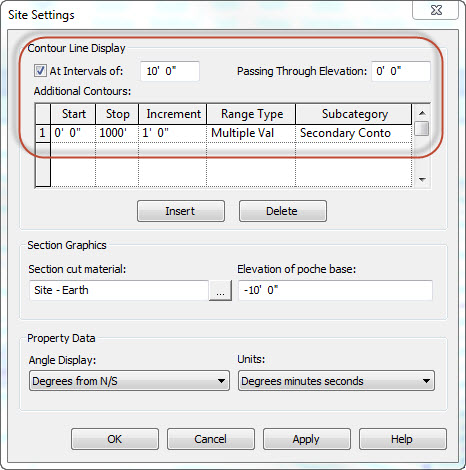
Had a similar problem and thought I could share my solution. Check your Site Settings. Set the Start elevations for the topo lines to a negative number and your topo lines will show up.


in this example, change the Start 0' 0" to something like -100' 0" 


http://revitoped.blogspot.com/2012/05/five-minutes-with-toposurface.html


Message 4 of 4

Anonymous
Not applicable

Thanks @rjohnson, that solved this issue for me. I've only had this occurrence in Revit 2017.

0 Likes