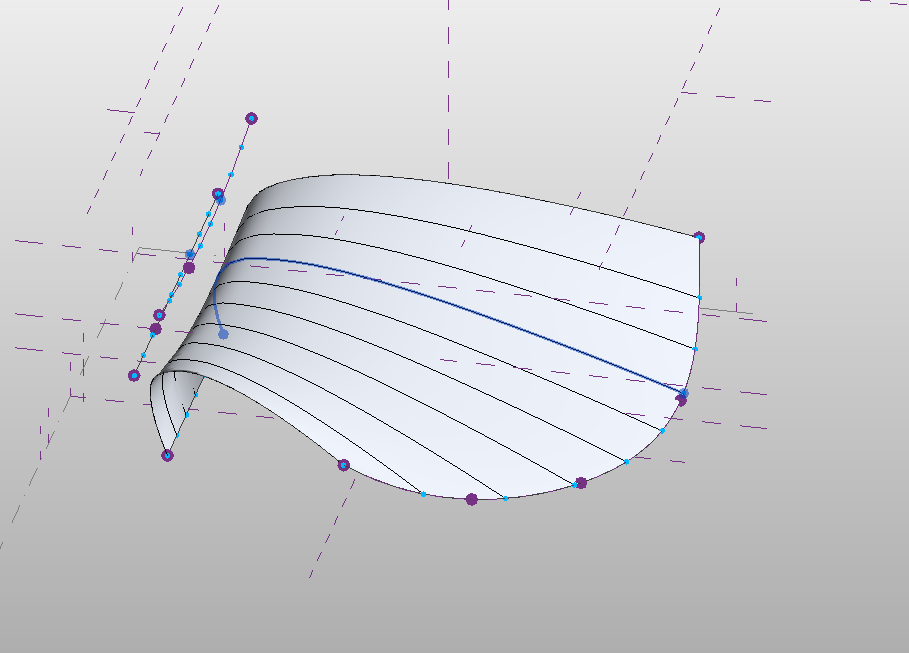
Revit Mass - Loft from Adaptive Profile contains only Mesh Geometry

Revit Mass - Loft from Adaptive Profile contains only Mesh Geometry

Anonymous
Not applicable
1,883 Views
3 Replies
Message 1 of 4

Revit Mass - Loft from Adaptive Profile contains only Mesh Geometry

Anonymous
Not applicable

Hi, 

I am working on my University Degree final Project and I am trying to create a Mass to host my roof too. I have managed to create a Loft from an adaptive profile after watching several videos however when I load my mass into my main Revit file I get the error;

" Mass contains only mesh geometry, which cant be used to compute Mass floors, volume or surface area" 

It also wont allow me to select the mass to place a roof type too. 

I guess I am missing a step but as I am new to all this I am stuck trying to fix it. Any advice or help with this will be greatly apreciated. 


Im working in Revit 2019


Thanks 

0 Likes
Accepted solutions (1)
1,884 Views
3 Replies
Replies (3)
Message 2 of 4

barthbradley
Consultant
Consultant
Accepted solution

Try loading it into an In-Place Massing session with the Project. Then close out (ignore warning) and see if you can apply Wall by Face.   


...it's not usual that Roof by Face could fail.  Have you tried Wall by Face. Just load it a 3D view as you normally would load a family and try Wall by Face on it.  

0 Likes
Message 3 of 4

constantin.stroescu
Mentor
Mentor
  1. Revit file I get the error;" Mass contains only mesh geometry, which cant be used to compute Mass floors, volume or surface area" 
  2. It also wont allow me to select the mass to place a roof type too. 


  1. The Revit message is correct as long as you do not use closed profile for loft - you will not have a volume but a surface with no thicknes
  2. Anyway this surface can be used , once in Project for Roof or Wall by Face. As BarthBradley suggest , if Roof by face doesn't work try Wall by Face - many times it works better especially when you have vertical parts of the surface...

Constantin Stroescu

EESignature

0 Likes
Message 4 of 4

Anonymous
Not applicable

Hi Thanks for your reply. 


I did manage to host a wall to the face however as I wanted to be able to host a wall to the underside of the surface it needed to be a roof. I managed to get round this by splitting my surface along the vertical section which allowed me to host a wall to the vertical and a roof to the horizontal. 

Thanks 

0 Likes