Revit Architecture Forum
Welcome to Autodesk’s Revit Architecture Forums. Share your knowledge, ask questions, and explore popular Revit Architecture topics.
abbrechen
Suchergebnisse werden angezeigt für 
Anzeigen  nur  | Stattdessen suchen nach 
Meintest du: 

Perforation Hatch Pattern (Model) Request

21 ANTWORTEN 21
GELÖST
Antworten
Nachricht 1 von 22
gpktm
33672 Aufrufe, 21 Antworten

Perforation Hatch Pattern (Model) Request

Hi all


I am looking for one hour now online to find a model perforation pattern but for some reason, I'm unable to. Does anyone have one?


I'm not looking for a specific size at the moment, whatever you guys have available will do for now as I am in a hurry.


Thanks in advance.

21 ANTWORTEN 21
Nachricht 2 von 22
hugha
als Antwort auf: gpktm

Hi Greg,


could you please post a sketch of what you want?


best,

Hugh


Nachricht 3 von 22
Sahay_R
als Antwort auf: gpktm

What kind of component is it that you are trying to model? What kind of perforations are there? Is it in a solid, sheet metal, etc? Unless we know exactly what it is that you are trying to achieve, then we cannot provide / suggest / point out a solution.


Rina Sahay
Autodesk Expert Elite
Revit Architecture Certified Professional

If you find my post interesting, feel free to give a Kudo.
If it solves your problem, please click Accept to enhance the Forum.
Nachricht 4 von 22
gpktm
als Antwort auf: Sahay_R

Sheet metal panel on balustrade. I don't want to model it. All i need is a fill pattern 
Nachricht 5 von 22
barthbradley
als Antwort auf: gpktm

Why not use a material with a cutout?


...See the material asset "Brass - Satin Screen" and look at it's cutout. 

Nachricht 6 von 22
Sahay_R
als Antwort auf: gpktm

I'm with @barthbradley. Create a material and give it a cutout. Open any one of the Brass assets. Duplicate, rename.


Switch metal type and finish, check Cutouts, select the Type, size and spacing.


Capture.PNG 


Capture.PNG


Rina Sahay
Autodesk Expert Elite
Revit Architecture Certified Professional

If you find my post interesting, feel free to give a Kudo.
If it solves your problem, please click Accept to enhance the Forum.
Nachricht 7 von 22
Sahay_R
als Antwort auf: Sahay_R

A caveat to the solution posted in my previous post - the cutouts will only be visible in a realistic view. If you would like to see it in a hidden line view, then you would need to add a fill pattern to the surface pattern for the material.


Capture.PNG


Rina Sahay
Autodesk Expert Elite
Revit Architecture Certified Professional

If you find my post interesting, feel free to give a Kudo.
If it solves your problem, please click Accept to enhance the Forum.
Nachricht 8 von 22
gpktm
als Antwort auf: Sahay_R

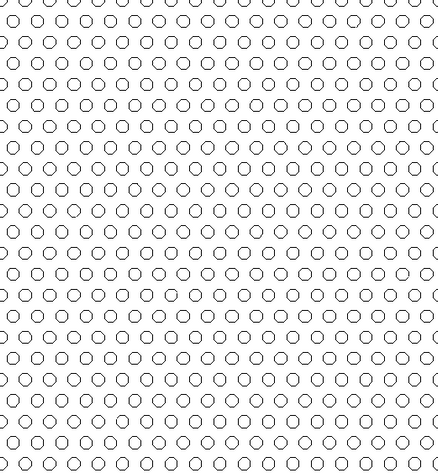
This is actually what I'm looking for. I need it for producing drawings, not 3D renders. So Hidden Line is what I use. The only difference that instead of hexagons I'm looking a pattern with circles.

Nachricht 9 von 22
barthbradley
als Antwort auf: gpktm

Interesting. I've never seen a hatch pattern with circles. That would be a real booger it write. If you find one though; please post it here.  


...check out Hatchkit @ https://apps.autodesk.com/RVT/en/Detail/Index?id=3030278704485778018&appLang=en&os=Win64

Nachricht 10 von 22
Sahay_R
als Antwort auf: gpktm

Here you are. I have attached a RVT with the hatch applied to a wall for research. You can apply that material to whatever you need it for, and a PAT file. 


Rina Sahay
Autodesk Expert Elite
Revit Architecture Certified Professional

If you find my post interesting, feel free to give a Kudo.
If it solves your problem, please click Accept to enhance the Forum.
Nachricht 11 von 22
barthbradley
als Antwort auf: Sahay_R

@Sahay_R: Tease! Those aren't circles! Smiley (zwinkernd)

Nachricht 12 von 22
Sahay_R
als Antwort auf: barthbradley

Capture.PNGCapture.PNG

Circular enough for me - beats nothing.

Unlike you, @barthbradley - I am easy to please.....


Rina Sahay
Autodesk Expert Elite
Revit Architecture Certified Professional

If you find my post interesting, feel free to give a Kudo.
If it solves your problem, please click Accept to enhance the Forum.
Nachricht 13 von 22
barthbradley
als Antwort auf: Sahay_R

@Sahay_R: You beat me to it. I just did this one in Hatchkit in a couple of minutes. 


Circles.jpg

Nachricht 14 von 22
barthbradley
als Antwort auf: Sahay_R

Difficult to please? Moi?


...check out this pat file for one circle. Ain't Hatchkit grand.

Nachricht 15 von 22
gpktm
als Antwort auf: barthbradley

Hatchkit did the job. thanks mate.

Nachricht 16 von 22
Anonymous
als Antwort auf: Sahay_R

@Sahay_R


I'm using your perforation model fill-pattern. Thanks for posting. I've generated a perspective view with hidden line in Revit. The perforations display as a black mass and no individual perforations can be distinguished. I've tried re-scaling the 3D view to make it very large but still no detail can be made out. Is there a solution to this problem? Thanks. 

Nachricht 17 von 22
Sahay_R
als Antwort auf: Anonymous

Hi @Anonymous - can you share a trimmed down file with a piece of geometry that shows this behavior?


If you look at all my previous posts in this thread, you will see that the pattern needs to be applied to the material as a surface pattern, and that the required cutouts will only be visible in Realistic view. If these steps don't work for you, then please share a file to be looked at.


Rina Sahay
Autodesk Expert Elite
Revit Architecture Certified Professional

If you find my post interesting, feel free to give a Kudo.
If it solves your problem, please click Accept to enhance the Forum.
Nachricht 18 von 22
Anonymous
als Antwort auf: Sahay_R

Hi again @Sahay_R


Thanks for your reply. I have applied the hexagons to a floor as a surface pattern. They do display nicely in realistic view. They display in hidden line in plan view too (at 1:10, and zoomed in close). In perspective and hidden line they display as a black mass. My question is to whether it is possible to have them display in hidden line view in perspective. Do you know of any way I can achieve this or something similar? 


Attached is a trimmed file. Please see the 3D view named "Perspective". 

Thanks again, I really appreciate your time. 


Luke

Nachricht 19 von 22
Pattycake_Kyle
als Antwort auf: Anonymous

@Anonymous 


Revit will automatically turn off model hatch patterns if they become too dense in a view. What you tried, (scaling up the 'real world' dimensions of the perspective view) is the correct way to combat this, but the size needed for your PAT file size won't resolve this (the view would have to be huge). This is simply cause the hexagons are 16mm across... this is incredibly tiny. You can test this by  loading in a larger pattern then seeing it show up.


Not much help, just how it is :enttäuschtes_Gesicht:

www.pattycake.io
Web based & real time .PAT creator. The largest collection of free PAT files! Over 700+ Pat files ready to download
No plugins or add-ins to install, and Revit compliant!
Nachricht 20 von 22
delmar_richardson
als Antwort auf: Sahay_R

KUDO!!!

Sie finden nicht, was Sie suchen? Fragen Sie die Community oder teilen Sie Ihr Wissen mit anderen.

In Foren veröffentlichen  

Autodesk Design & Make Report