Revit Architecture Forum
Welcome to Autodesk’s Revit Architecture Forums. Share your knowledge, ask questions, and explore popular Revit Architecture topics.
abbrechen
Suchergebnisse werden angezeigt für 
Anzeigen  nur  | Stattdessen suchen nach 
Meintest du: 

modify bar missing

12 ANTWORTEN 12
GELÖST
Antworten
Nachricht 1 von 13
Anonymous
6124 Aufrufe, 12 Antworten

modify bar missing

I don't know exactly what said bar is called but it is green and is supposed to show up below the ribbon whenever I select a wall or roof or such to set how long an overhang is or what direction a slope goes but all I see is a thin green line where it is supposed to be. I can't select it or make it bigger and this only happened a few days ago though I've used Revit for at least a year. I think it is called the modify bar since it says that in the name but I'm not quite sure. version is Revit 2017 Educational Version

12 ANTWORTEN 12
Nachricht 2 von 13
Alan.johnson1970
als Antwort auf: Anonymous

Can you attach a screen shot?


AJ.
Nachricht 3 von 13

Its hard to understand what exactly that you are missing.

Thanks

AJ.
Nachricht 4 von 13
Anonymous
als Antwort auf: Alan.johnson1970

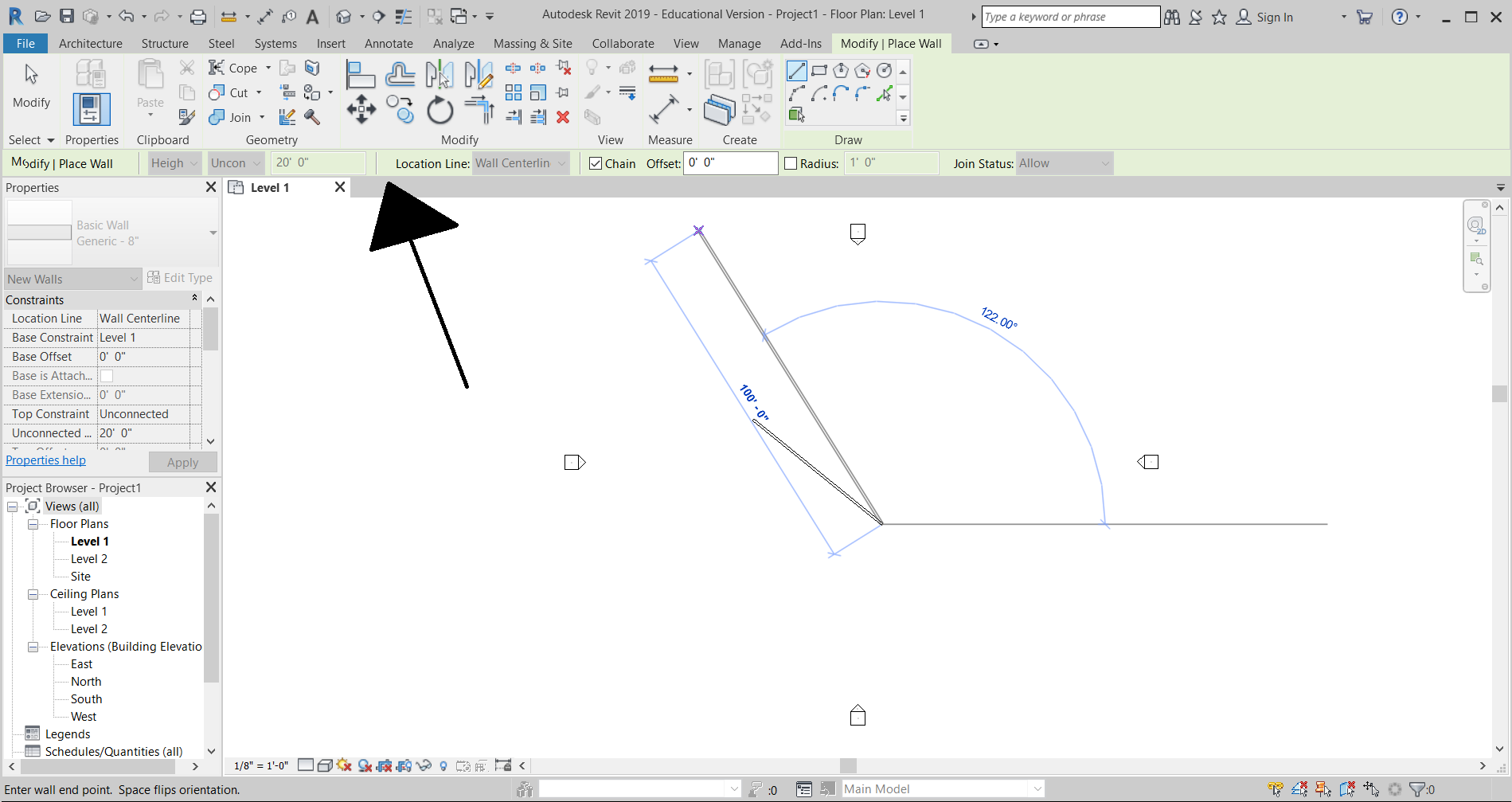
Here's a screenshot of a 2019 version of Revit with the bar present when I tried to make a wall. The black arrow is pointing towards it. It isn't present in 2017 version I have on the computer I work on. 

Nachricht 5 von 13
Anonymous
als Antwort auf: Alan.johnson1970

Here's a screenshot of a 2019 version of Revit with the bar present when I tried to make a wall. The black arrow is pointing towards it. It isn't present in 2017 version I have on the computer I work on. 

Nachricht 6 von 13
Anonymous
als Antwort auf: Alan.johnson1970

Here's a screenshot of a 2019 version of Revit with the bar present when I tried to make a wall. The black arrow is pointing towards it. It isn't present in 2017 version I have on the computer I work on. 

Nachricht 7 von 13
Anonymous
als Antwort auf: Anonymous

All your pictures uploaded are the same....how about a picture of your 2017 version?  

Nachricht 8 von 13
barthbradley
als Antwort auf: Anonymous

I think you are talking about the Options Bar.  Are you saying that the Options Bar is not visible when you draw a Wall or Roof?  

Nachricht 9 von 13
Anonymous
als Antwort auf: barthbradley

If that is what it is called then yes. How do I get it back?

Nachricht 10 von 13
barthbradley
als Antwort auf: Anonymous

First, verify that it is actually missing.  Create a new roof. It should appear in sketch mode.  

Nachricht 11 von 13
nicholas_seibert
als Antwort auf: barthbradley

Check on the bottom, it can be docked in both places.  The bottom would be just above the status bar - check out this link


https://knowledge.autodesk.com/support/revit-products/getting-started/caas/CloudHelp/cloudhelp/2016/...


If you really can't find it, you could try resetting the UI.  This link has instructions on how to rename the file, and a new one will be recreated on start up. It will reset you Revit UI back to defaults, and hopefully bring back your options bar :leicht_lächelndes_Gesicht:


https://knowledge.autodesk.com/support/revit-products/troubleshooting/caas/sfdcarticles/sfdcarticles...


Hope this helps.


Nicholas Seibert

Principal Revit QA
Nachricht 12 von 13
Anonymous
als Antwort auf: Anonymous

 the second link did not work like it says :
"we cant seem to find that page" please help i have to finish a whole house by midnight tonight and its already 8:heftig_weinendes_Gesicht:

Nachricht 13 von 13
nicholas_seibert
als Antwort auf: Anonymous

Sie finden nicht, was Sie suchen? Fragen Sie die Community oder teilen Sie Ihr Wissen mit anderen.

In Foren veröffentlichen  

Autodesk Design & Make Report