Lock elements each other and export the all elements of product

Lock elements each other and export the all elements of product

yasinbal
Participant Participant
1,406 Views
4 Replies
Message 1 of 5

Lock elements each other and export the all elements of product

yasinbal
Participant
Participant

Hi everyone,


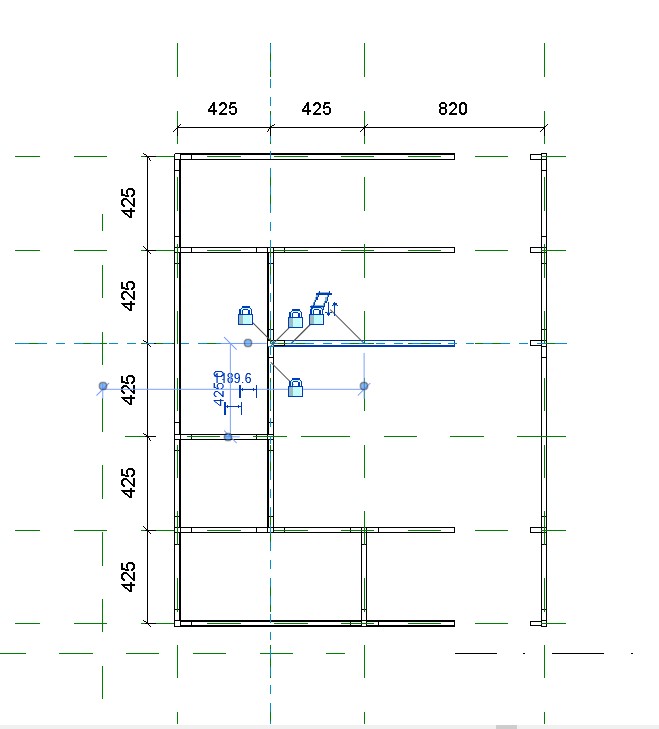
I have been working on a product for a while. My aim is to make the product redesign-configurable in Revit. -image 0- in this product user can move every rail through the x and y-axis and after that, we going to export what have they using for this product.


-image 1-  this product basically the same but more detailed. I've locked each rail and connector with each other except r5 and r4. when I am trying to lock them each other and move one of them it goes wrongly -image 2-. I tried to make them group; it works with each other but in this scenario, I can not control their dimension on x-axis.


The second question is I want to set up a length limit for rails. (400-425-800-825...) The user should use one length which  I decided. when we move a rail to one axis the dimension would be one of those dimensions.


After all these things we are going to export rails and connector types and amount.


Hope I express myself well, if you have any question please don't hesitate. if anyone want to see the file I can share.

Thanks for all your help.

0 Likes
1,407 Views
4 Replies
Replies (4)
Message 2 of 5

barthbradley
Consultant
Consultant

post the file itself.  

0 Likes
Message 3 of 5

yasinbal
Participant
Participant

@barthbradley please find the file here.

0 Likes
Message 4 of 5

barthbradley
Consultant
Consultant

Sorry, but there's a lot of work to be done here if your aim it to build this into a synergetic, parametric assembly. I thought you were having a small issue I could easily resolve for you.  I see now, you are just starting.  Generally, we save of the modeling and assembly of the geometries to a last, and first concentrate on building a parametric framework using Ref. Lines and Ref. Planes.  Then afterwards, host and constrain the model geometries to the work planes of the parametric framework.  In this case, I would suggest modeling a lot of the assembly's components in their own families - making sure they properly flex parametrically in their own Families - and then nest them into the Host/Parent Family, place them where they need to be on the framework and then associate their Family Parameters to Host/Parent Family Parameters.

0 Likes
Message 5 of 5

yasinbal
Participant
Participant

hi @Anonymous actually I made what you said before but the problem on that way is rails are family and I can not control their size via reference plane. What I want to achieve is when I move a reference plane the rail family should turn 400 to 800. Please find my file attachment. 


Many thanks for your time.

0 Likes