Issue changing baluster color. Please help.
Nonetheless, changing rail color is simple. Select rail > Edit Type > Edit Rail Structure > Material
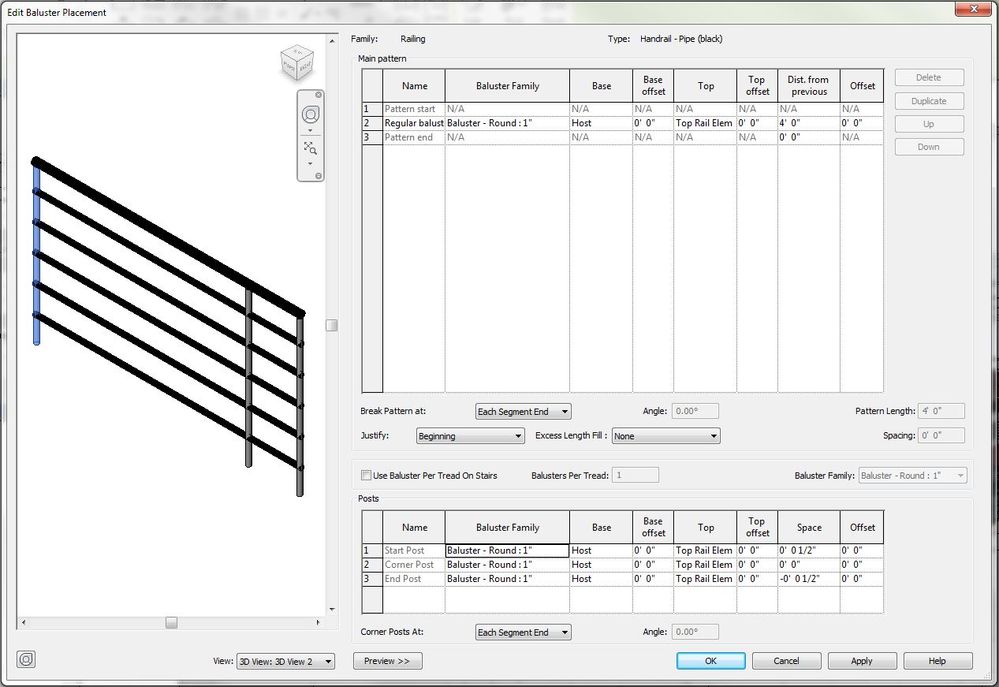
I wish changing the baluster color was this simple. There's an "Edit Baluster Placement" tab; however, this does not give me the option to actually change the baluster color unlike the "Edit Rail Structure tab".
Gelöst! Gehe zur Lösung
Gelöst von barthbradley. Gehe zur Lösung
Right click on the Baluster in the Project Browser and select Type Properties and change its Material in the Type Properties .
It wont allow me to exclusively select the baluster. I've used TAB to highlight it but no luck.
@barthbradley wrote:Right click on the Baluster in the Project Browser and select Type Properties and change its Material in the Type Properties .
No. Could you please show me step by step how you got to the screen?
@barthbradley wrote:The baluster isn't listed in the Project Browser???
@Anonymous wrote:No. Could you please show me step by step how you got to the screen?
I did it exactly the way I described in my very first post; through the Project Browser.
Ok, tried it again and it worked! Thanks!
I was mistaken about what the Project Browser actually was haha! I was looking in the wrong place.
Project Browser > Families > Railings > Baluster - Round > 1" > Baluster Material
@barthbradley wrote:
@Anonymous wrote:No. Could you please show me step by step how you got to the screen?
I did it exactly the way I described in my very first post; through the Project Browser.
Sie finden nicht, was Sie suchen? Fragen Sie die Community oder teilen Sie Ihr Wissen mit anderen.
