Is there a way to find out the author or maker of a project/ revit file?

Is there a way to find out the author or maker of a project/ revit file?

Anonymous
Not applicable
16,582 Views
12 Replies
Message 1 of 13

Is there a way to find out the author or maker of a project/ revit file?

Anonymous
Not applicable

Hi, 


Is there a way to find out who the maker or the author is of a revit file/project?

I would like to know this because someone stole my work. He submitted my work and got credits from it.

I want to change this.  😞 


0 Likes
Accepted solutions (1)
16,583 Views
12 Replies
Replies (12)
Message 2 of 13

davidwilliamedwards
Advocate
Advocate

You can add project information, but that can always be changed. Revit does not feature the Password-based protection that "other" applications have. This is one area we've been "wish listing" for a while - having a password so that Families cannot be extracted, etc.


David William Edwards
Dave Edwards Consulting
0 Likes
Message 3 of 13

BalajiHTI
Advocate
Advocate
Accepted solution

Hello,


If it is a Project (*.rvt) File, you can use Show History in Collaborate Tab which will show the Given Revit Username in the Revit Menu Options.


Show File History


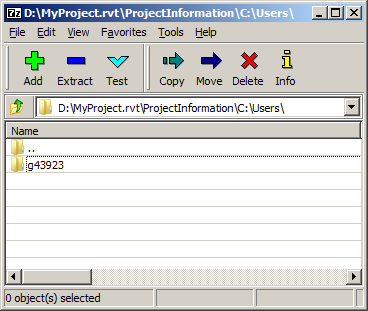
Or you can go further advanced and Open the Project file in 7-Zip File Manager. It will show which user created the project in the Computer.

File Owner


But none of this are fail proof methdos. The thief can change his Revit User name and Link your project and bind them.

Best way to safeguard your files, is to use Programs like Safe House and password-protecting your files. Its ready to use and doesn't require installation.

0 Likes
Message 4 of 13

Anonymous
Not applicable

Thxxx! 


Fortunately the person who stole my work hasnt modified of changed anything.

From now on ill safeguard my files, just to be sure. 


0 Likes
Message 5 of 13

Anonymous
Not applicable

In Windows File Explorer, you can identify the creator (owner) of any file:

     Right-click on the file > Properties > Security > Advanced.

0 Likes
Message 6 of 13

BalajiHTI
Advocate
Advocate
That is the user who copied the certain file in the folder. If anyone
copies to another folder or another system, Windows will just show the
username of the Windows; Not the Revit User who created the file.

Balaji Balagurusami
0 Likes
Message 7 of 13

Anonymous
Not applicable

is there any way to change the author name from the show history

0 Likes
Message 8 of 13

BalajiHTI
Advocate
Advocate
Not possible in my experience.
0 Likes
Message 9 of 13

chrisplyler
Mentor
Mentor

I'm pretty sure I could prove I created content just by knowing more about it than the thief.


"Hey, what shared parameter has been added to doors in this file?" Pretty sure only the creator is going to be able to answer something like that without looking.


Plus the thief would have to do a lot of work to edit all my families and resave them with file names that don't have my initials in them, reload them all, then purge out the ones that have my initials on them.


Stupid thief.

Message 10 of 13

BalajiHTI
Advocate
Advocate
Nice ending though! 😄
0 Likes
Message 11 of 13

BIMAbhi
Advisor
Advisor

How to know the original owner of the Revit Family File [.rfa] and the date created?

Thanks & Regards
BIMAbhi
0 Likes
Message 12 of 13

BalajiHTI
Advocate
Advocate
No idea. But in future I wish to see DRM enabled BIM Objects preserve copyright. Would be a nice addition to use files only as read only or Use only. It should request password to fill in when you try to open and edit the families. It had implications on OpenBIM standards though.
Message 13 of 13

khabailiukGKLUP
Community Visitor
Community Visitor

I help companies that use, or want to use, Revit to execute high-quality projects without the need to hire additional engineers—by creating customized Revit content. 


@khabailiukGKLUP - this post is being edited to remove PII.

0 Likes