How to eliminate the view number and scale in view

How to eliminate the view number and scale in view

Anonymous
Not applicable
7,769 Views
8 Replies
Message 1 of 9

How to eliminate the view number and scale in view

Anonymous
Not applicable

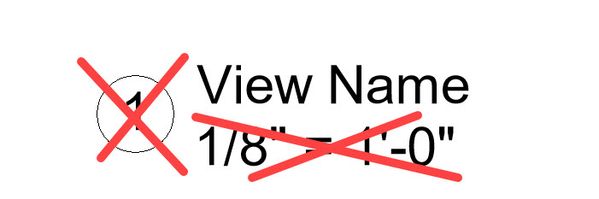
Hi, Does anyone know how to eliminate the view number and scale in the view name as I showed in the attached file?

0 Likes
Accepted solutions (1)
7,770 Views
8 Replies
Replies (8)
Message 2 of 9

ToanDN
Consultant
Consultant
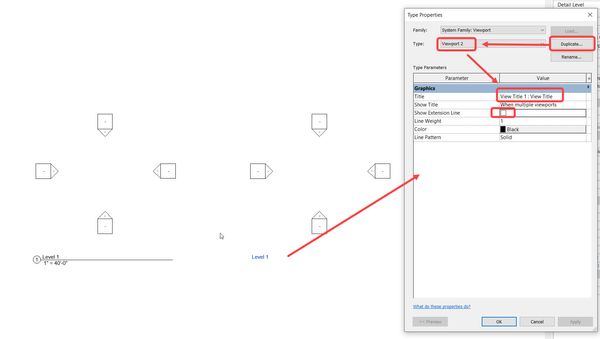
Edit the view title assigned to the viewport type, save as to a new family and delete the number and scale labels. Load it to the project, duplicate the viewport gtype to a new type and assign the new view title type to it. then use this viewport type for the views you don't want number and scale.
0 Likes
Message 3 of 9

Anonymous
Not applicable

How to get rid of the circle?

Message 4 of 9

barthbradley
Consultant
Consultant

Create another View Title Family to use in those instances where you need to show that way. 


Open your View Title Family, delete the circle, number and view scale lable you don't wnat to see and then save it under a new name and load it into the Project.  


View Name 1.jpg


0 Likes
Message 5 of 9

Anonymous
Not applicable

Please find the screen shots 

0 Likes
Message 6 of 9

Anonymous
Not applicable

I do not have a circle in View Title Family in order to delete it. But it is showing up inside the file ( please see attached).

Message 7 of 9

barthbradley
Consultant
Consultant
Accepted solution

I'm not sure how that is possible. Maybe you have more than one in the Project and opened the wrong one to edit. 


FWIW: 


View Title BB.jpg


0 Likes
Message 8 of 9

barthbradley
Consultant
Consultant

...maybe your View Title has other TYPES defined within it that have visibility parameters pre-set for the circle and labels for each TYPE?   

0 Likes
Message 9 of 9

m.ewy
Observer
Observer

I have the same issue. Circle is deleted from Anno_view_title family, and when I make changes in that family and load it back to project - everything changes as I changed it in Family - except the Circle. I am using Revit 2022 with BIM 360 and a lot of different models from external sources linked. I am mentioning this only because I am pretty sure I used to modify this family in different projects with different versions of Revit and back then everything worked as I remember this.

0 Likes