Revit Architecture Forum
Welcome to Autodesk’s Revit Architecture Forums. Share your knowledge, ask questions, and explore popular Revit Architecture topics.
abbrechen
Suchergebnisse werden angezeigt für 
Anzeigen  nur  | Stattdessen suchen nach 
Meintest du: 

How to add a section into an existing detailed section view in Revit?

6 ANTWORTEN 6
Antworten
Nachricht 1 von 7
fabouchardcoteS66GH
2491 Aufrufe, 6 Antworten

How to add a section into an existing detailed section view in Revit?

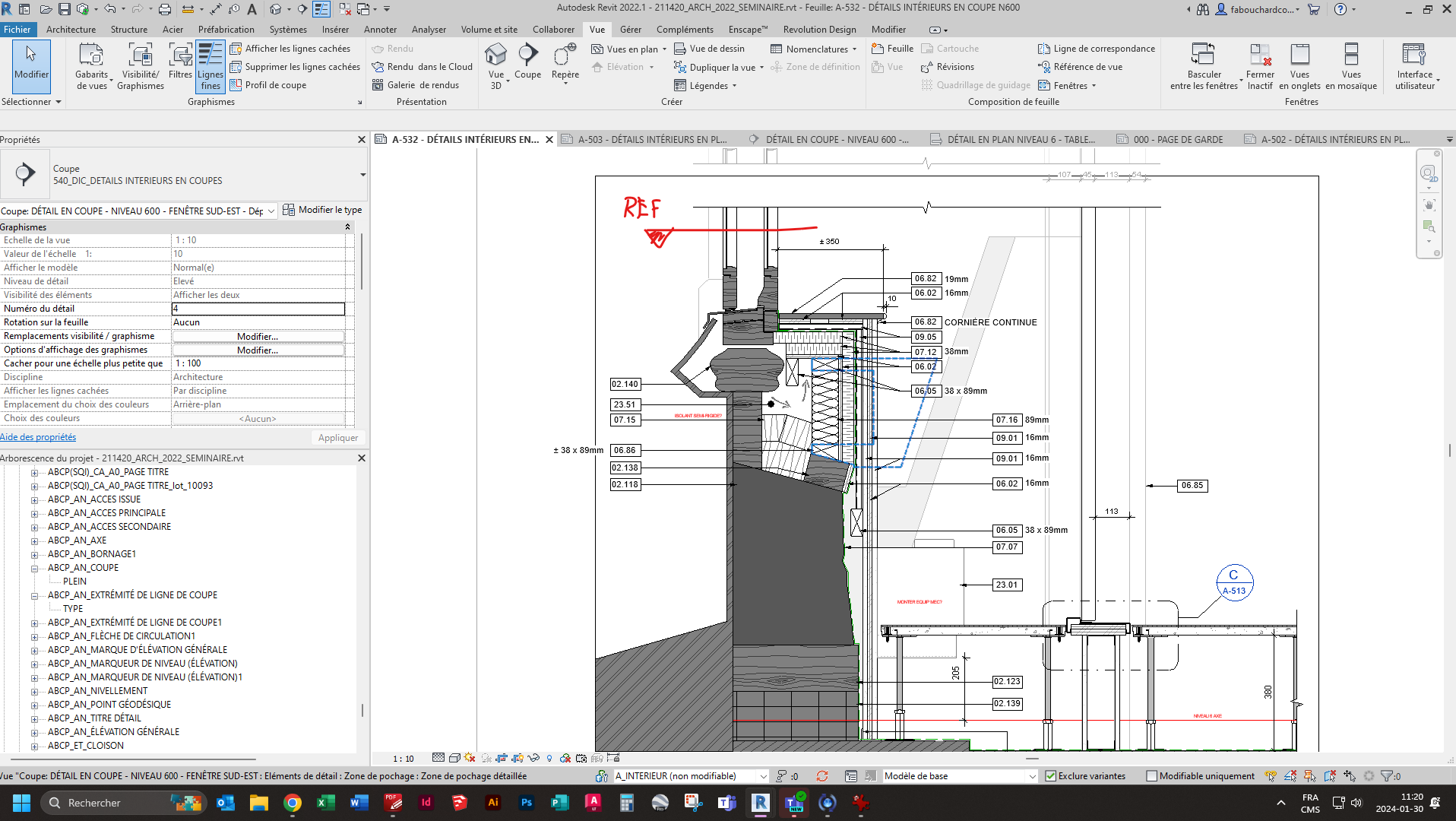
Hi, I'm new to Revit and I'm wondering if there is a way to create a section in an already existing detailed section in Revit. 


My point being that I need to show a detail plan view of that section, but when I use the section tool, nothing appears. I thought at first that it was a template visibility issue but I don't think so. I've looked it up, annotation section box is checked and there's no filter that would jeoperdize the visibility that comes to my mind. It might be because it's impossible to cut into 2D's elements. 


I found that it was possible to use reference view tool, it works but I only have acces to a particular triangular label. I guess it's possible to load the section tag that we use in our project into that reference view tool, but I can't find any tutorials about that. 


Is anyone have better ideas to acheive that? 


The section was created using the section tool, than I added 2d components to create the detail

The plan view was created in a drafting view (vue de dessin) in french. 

Beschriftungen (4)
6 ANTWORTEN 6
Nachricht 2 von 7

To create a view reference symbol that looks like a section reference:

1) View > View reference > place a view reference.

2) Select the view reference > Edit type > Duplicate > name as the new view reference type, for example: View Ref as Section, type A > close window.

3) Select the view reference again > Edit family > draw the graphics, (lines, filled region) then save as (use a different folder because the default folder is protected) name it such as "View Reference as section, type A" > Load into Project and Close.

4) Select the view reference > Edit type > change the value of "View Reference Tag" to be the new loadable family "View Reference as section, type A"


Alfredo_Medina_0-1706634731147.png


I say "type A" because you might need different types, for left, right, or other orientations.


Alfredo Medina _________________________________________________________________ ______
Licensed Architect (Florida) | Freelance Instructor | Profile on Linkedin
Nachricht 3 von 7

That is so helpful man. Thank you very much. Turns out it was a template visibility issue but the view reference explanation is more than welcome!
Nachricht 4 von 7
Mike.FORM
als Antwort auf: fabouchardcoteS66GH

You can also use the reference other view checkbox when making a new section. There will be a list of all the views including drafting views in the project to select from.

The checkbox and view selection has to be done before drawing the section line. It cannot be done to existing callouts.

Also if you want the section to be horizontal in a section you have to make sure you are creating a plan detail if it is set to section or anything else that is a vertical orientation type callout it wont work.

MikeFORM_0-1706904128547.png


Nachricht 5 von 7
Mike.FORM
als Antwort auf: fabouchardcoteS66GH

Also the "Sim" text you see on my callout is defined in the type properties parameter "Reference Label" of the callout.

MikeFORM_1-1706904396604.png


Nachricht 6 von 7
fabouchardcoteS66GH
als Antwort auf: Mike.FORM

Ok thanks!
Nachricht 7 von 7

Have you tried View Tab > Create Panel > Section > Detail 


jay_colcombe_0-1707476918530.png


This will create a Plan Section through a Vertical Section or vice-versa (you can also reference another view if required from the Contextual Tab)


Jay Colcombe

Autodesk Certified Instructor
Revit Architecture & Structure Certified Professional
AutoCAD Certified Professional
B.Sc. Hons Civil & Structural Engineering

If you find my post interesting, feel free to give a Kudo.
If it solves your problem, please click Accept to enhance the Forum.

Sie finden nicht, was Sie suchen? Fragen Sie die Community oder teilen Sie Ihr Wissen mit anderen.

In Foren veröffentlichen  

Autodesk Design & Make Report