HELP WITH ASSEMBLY SPLIT SEGMENT SECTION

HELP WITH ASSEMBLY SPLIT SEGMENT SECTION

Anonymous
Not applicable
391 Views
1 Reply
Message 1 of 2

HELP WITH ASSEMBLY SPLIT SEGMENT SECTION

Anonymous
Not applicable

When i use assemblies in a 3D view of a model and create a split segment section, the software create the right section but strangely rotat its view in horizontal and i can't get it in a sheet because it's uncorrect.

It is like that Revit when i split the segment generate a different section property but i can't find a solution.

How can i find a solution to this issue?Split segment section.jpg

0 Likes
Accepted solutions (1)
392 Views
1 Reply
Reply (1)
Message 2 of 2

protikkayal
Enthusiast
Enthusiast
Accepted solution

Yah, I can see it is happening,  don't know why. Its happening only when you creates section views directly from the assembly views.

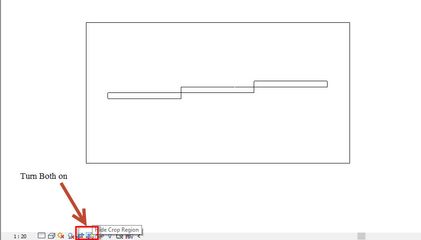
Step-1: One thing you can do now that go to your desire section view after split segment.

Step-2: Turn on the "Crop view and Crop Region visible".

R1.jpg

Step-3: Select the crop region and rotate it.

** You have to rotate the region in opposite direction, in which direction you want to rotate the view.

R2.jpg

It is not a proper solution, but hope your problem will solve.