Message 1 of 11

- Mark as New
- Bookmark
- Subscribe
- Mute
- Subscribe to RSS Feed
- Permalink
- Report
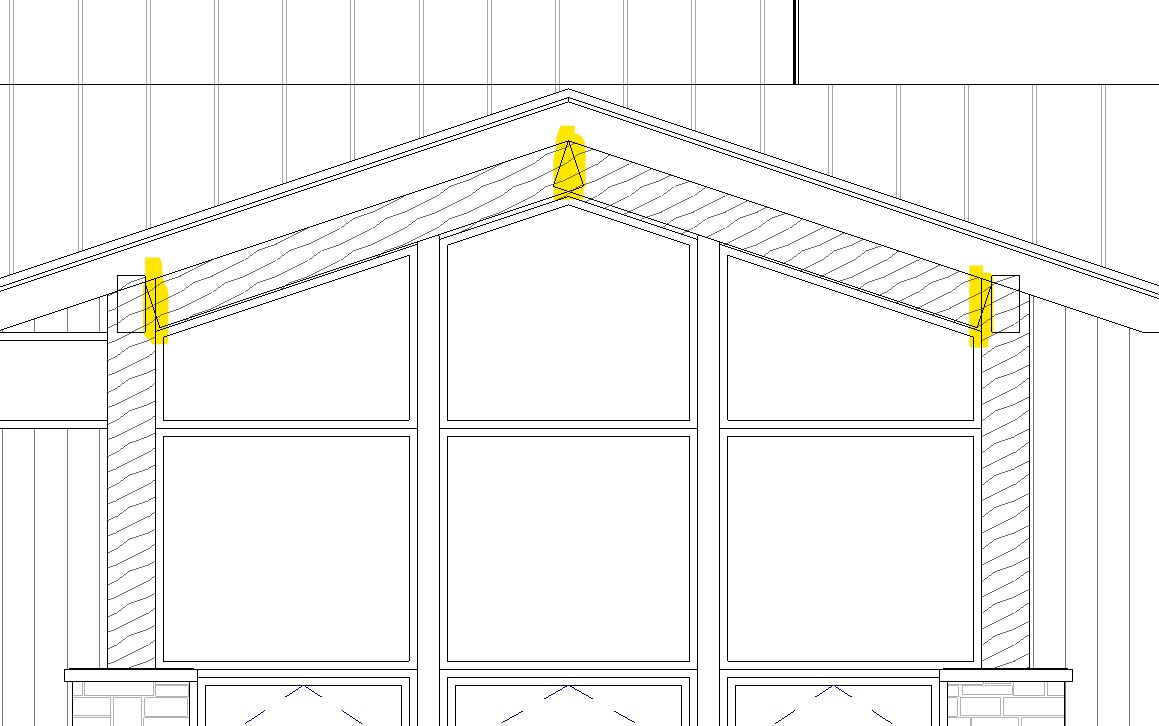
Is there a way to clean up the joins between the beams I highlighted? They are actual structural beams and columns.
Solved! Go to Solution.

 Advocate
Is there a way to clean up the joins between the beams I highlighted? They are actual structural beams and columns.
Solved! Go to Solution.
I think I am missing something. When I cope the beams it cuts like this. When I adjust the coping to 0" I get an error saying it can't cut the beams. I am looking to get a simple vertical miter between the 2 beams.
Draw a Ref. Plane at the apex, stretch the Beams to overlap and then use Cut Geometry tool to cut each Beam against the Ref. Plane.
Before Cut:
@leahmbell wrote:
I think I am missing something. When I cope the beams it cuts like this. When I adjust the coping to 0" I get an error saying it can't cut the beams. I am looking to get a simple vertical miter between the 2 beams.
You can play with the coping arrows to get the final result.
https://knowledge.autodesk.com/community/screencast/00e97217-5857-46f3-840e-38f3419f5425
I usually just use the join tool and those lines will disappear. If it doesn't look good in section then I use the fill region tool and hide the model.
@leahmbell wrote:
I think I am missing something. When I cope the beams it cuts like this. When I adjust the coping to 0" I get an error saying it can't cut the beams. I am looking to get a simple vertical miter between the 2 beams.
Is this not what you are after?
That is exactly what I am after, but I am not getting that result/ options when I do it. I think it's because the person who created this created those beams as a part of a beam system. I have disassociated the beams with the system but it still isn't working. I am going to try to recreate it as just a beam and see if I can get it to work that way.
So the issue was because the beam was created as apart of a beam system. As soon as I recreated the beam as a single member it mitered as expected. Thanks for the help!
Have a look at www.hsbcad.com