Failed to Load Material Library in Revit

Failed to Load Material Library in Revit

IMCornish
Collaborator Collaborator
4,227 Views
7 Replies
Message 1 of 8

Failed to Load Material Library in Revit

IMCornish
Collaborator
Collaborator

Have never noticed this problem before but for some reason my Material Libraries are playing up.  Having been working on a project all day I wanted to change a wall material and also save some paint materials included in a downloaded Revit file.  

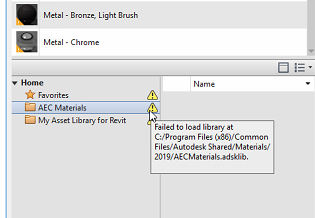
Having clicked my 'Materials' button and opened the 'Material Browser' dialog I found that warning signs were showing in the Library pane.  See Fig 1.


Materials 1.png Fig 1.


I tried several times to relocate the libraries and found them, however nothing happened and the situation did not change.  Each Folder with the mouse pointer hovering displayed the message that the library had failed to load!  See Fig 2.


Materials 2.png Fig .2


Anyone know why this behavior occurs please?

Andrew Robertson
Chartered Architect
Robertson Partnership
Truro. UK
0 Likes
Accepted solutions (1)
4,228 Views
7 Replies
Replies (7)
Message 2 of 8

L.Maas
Mentor
Mentor

Never experienced this kind of behaviour myself but....

It looks to me that the libraries are locked up somehow.

In between work did something got installed/updated (virusscanners etc)?

Are you the only user working with these library files or might another user have approached these files?

Might also be a glitch. Restart Revit or even better restart your computer.

Louis

EESignature

Please mention Revit version, especially when uploading Revit files.

0 Likes
Message 3 of 8

loaynali
Explorer
Explorer

I have same problem at Revit 2019 

0 Likes
Message 4 of 8

cbcarch
Advisor
Advisor
Message 5 of 8

Viveka_CD
Alumni
Alumni

Hi @loaynali 


Can you please make a separate post and share the link here?


Regards,


0 Likes
Message 6 of 8

petebalf
Enthusiast
Enthusiast

Do a revit restart. Most times this will work. 

0 Likes
Message 7 of 8

Viveka_CD
Alumni
Alumni
Accepted solution

Hi @IMCornish 


Issue:

When trying to load material into Revit, the following message appears with a yellow triangle (yield sign): 

"Failed to load the library at C:/Program Files (x86)/Common Files/Autodesk Shared/Materials/2019/AECMaterials.adkslib." 
 
Yellow triangle in Materials Browser showing 'Library failed to load' in Revit
 
The materials will not load.

Causes:

The material libraries may have been created in an older version or different versions of Revit are accessing the same material library.
 
Solution:
To successfully load the material library, try the following:
  1. Close all versions of Revit to release the lock on the library,
  2. Reopen Revit to use it
  3. Test if the library can be accessed when running Revit in a Windows User Account with administrator rights
  4. If it works, log off and log in with the "regular" Windows User Account
  5. Run Revit again with the proper Autodesk credentials
  6. Copy the library to a support path only Revit will access.

See Also:

 
Regards,
 
0 Likes
Message 8 of 8

radimtkadlec
Contributor
Contributor

Sorry to revive an old thread.

I'm having the same issue transitioning from Revit 2024 to 2025. When I tried to open the library in 2025, it showed the yield sign and since then it won't open in 2024 either. I tried your solution, but I am not sure if I fully understand it, as I only have 1 windows account on my pc. I have been exclusively using this account and it has the admin rights. I even tried running Revit as an admin, but it won't let me to access the library anyway. Not sure, what to try next? Any help would be appreciated.