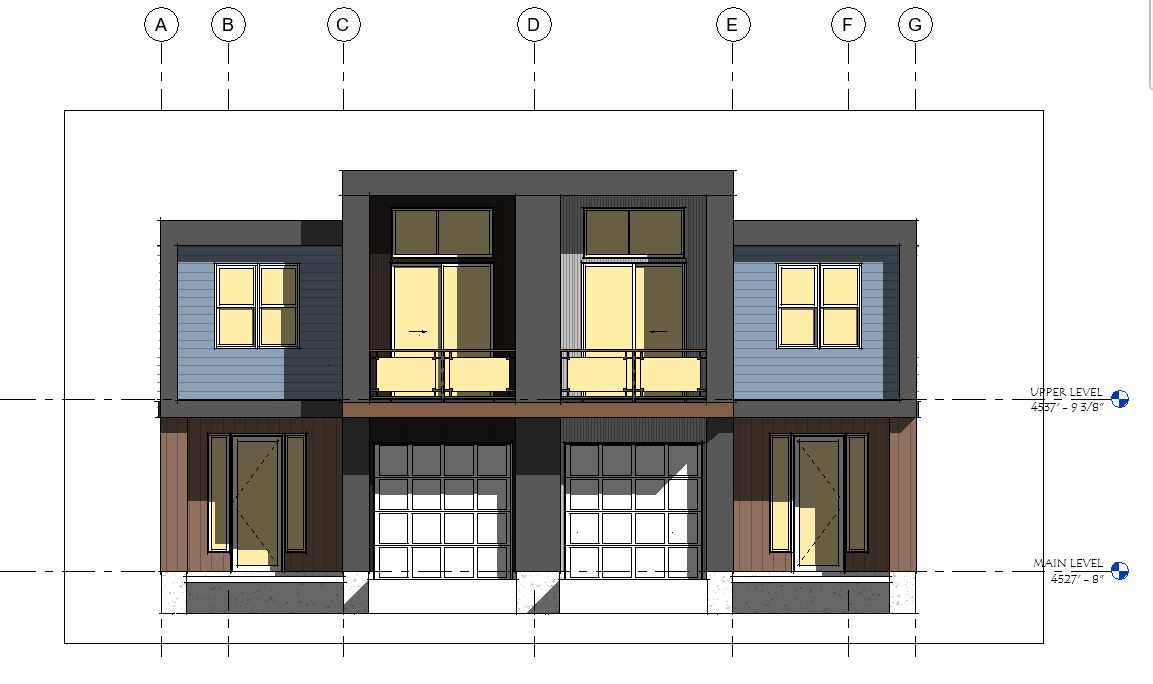
Elevation View is missing annotations and filled regions after being linked.

Elevation View is missing annotations and filled regions after being linked.

775cforsyth
Contributor Contributor
1,326 Views
5 Replies
Message 1 of 6

Elevation View is missing annotations and filled regions after being linked.

775cforsyth
Contributor
Contributor

Hello all,


I've linked a model and then setup the elevation views but after selecting 'By Linked View' and choosing the corresponding view none of the annotations such as dimensions, text, symbols or filled regions appear.


What's odd is that the floor plan views came in with their respective annotations.


I've included screen shots of the source file and then the linked view.

0 Likes
1,327 Views
5 Replies
Replies (5)
Message 2 of 6

Anonymous
Not applicable

It may be that the two elevations are not parallel - they have to be to display annotation objects from the linked view.

Message 3 of 6

BBV90
Enthusiast
Enthusiast

Check the project coordinates of both projects

0 Likes
Message 4 of 6

Sahay_R
Mentor
Mentor

Check the view template controlling the elevations of the host project. Are there any annotation categories turned off in the host view? Also check them for the linked view.


Rina Sahay
Autodesk Expert Elite
Revit Architecture Certified Professional

If you find my post interesting, feel free to give a Kudo.
If it solves your problem, please click Accept to enhance the Forum.
0 Likes
Message 5 of 6

ToanDN
Consultant
Consultant

I am thinking along the line with @Anonymous .

0 Likes
Message 6 of 6

775cforsyth
Contributor
Contributor
Thank you for your input.

My mistake was in forgetting to link both models into each other. I had
only linked the second building into the main file.

Ugh, these late nights are taking its toll.
0 Likes