Revit Architecture Forum
Welcome to Autodesk’s Revit Architecture Forums. Share your knowledge, ask questions, and explore popular Revit Architecture topics.
abbrechen
Suchergebnisse werden angezeigt für 
Anzeigen  nur  | Stattdessen suchen nach 
Meintest du: 

Custom Scale

19 ANTWORTEN 19
GELÖST
Antworten
Nachricht 1 von 20
Anonymous
25449 Aufrufe, 19 Antworten

Custom Scale

Hello,


Firs time poster - long time Revit user

Downloaded Revit 2017 and want to be able to rename a custom scale. In previous versions I thought a dialog box popped up and we were able to rename the scale that way. I don's see this option in 2017.

Any help would be appreciated.


Cheers, Alex

19 ANTWORTEN 19
Nachricht 2 von 20
L.Maas
als Antwort auf: Anonymous

No renaming scales. Always set the scale to custom for your view and enter an value

Scale.png


Or are talking about some different scale settings?


Louis

EESignature

Please mention Revit version, especially when uploading Revit files.

Nachricht 3 von 20
Anonymous
als Antwort auf: L.Maas

We're on the right track.

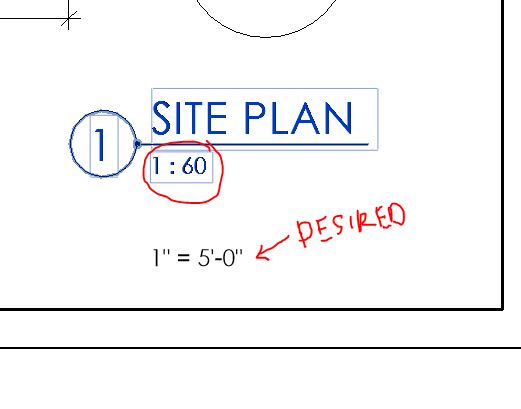
If I add a custom scale of say 1:60 but want the view to read 1"=5'-0", I always thought there was a way to rename the scale..

Nachricht 4 von 20
L.Maas
als Antwort auf: Anonymous

What you are showing is a view title family. That, by default, reads the value from the view (as shown in my post above).

In the view title family it uses a label to read the view scale parameter. You could change your project to inches to see scales in inch formats.


Scale.png


Otherwise it would be editing the view title family, remove the view scale label and add your own parameter.


Scale2.png


However you would have manually enter it in each view as it does not read the existing view scale.

Louis

EESignature

Please mention Revit version, especially when uploading Revit files.

Nachricht 5 von 20
loboarch
als Antwort auf: Anonymous

When you choose "custom" from the scale list you get a dialog where you can specify a display name for the scale if you wish.


custom_scale.png


Jeff Hanson
Principal Content Experience Designer
Revit Help |
Nachricht 6 von 20
L.Maas
als Antwort auf: loboarch

Good one. Apparently never used the custom scale from that loacation, so never seen that dialog box

Louis

EESignature

Please mention Revit version, especially when uploading Revit files.

Nachricht 7 von 20
Anonymous
als Antwort auf: loboarch

Which version of Revit is this? I'm using 2017 and I choose custom it does not give me a dialogue box.

Nachricht 8 von 20
L.Maas
als Antwort auf: Anonymous

It should be Ok. I am using Revit 2017 too. However, I never noticed it before, because normally I change scales in the properties window.

But to get this dialog box you have to do it from the view window (see screenshot, Revit 2017)


Scale.png

Louis

EESignature

Please mention Revit version, especially when uploading Revit files.

Nachricht 9 von 20
Anonymous
als Antwort auf: L.Maas

Is there a way to add a custom scale to the line weights manager, or better yet to the entire project?  We are using 1:400 for our drawings and only 1:200 or 1:500 can be selected.  The lineweights do not seem to adjust accordningly ie it does not interpolate the values between the 1:200 and 1:500 when defining the 1:400 weights - and ends up looking much thicker than the 1:500?

Nachricht 10 von 20
lionel.kai
als Antwort auf: Anonymous

related Revit idea: additional custom scale for Revit


Lionel J. Camara
BIM Manager at KAI Hawaii, Inc. - Structural and Forensic Engineers
Autodesk Certified Professional
Nachricht 11 von 20
RobDraw
als Antwort auf: lionel.kai

Why respond with the same post in three different threads when one thread of your own making would have been more than enough?


Thanks for the spam with my breakfast.


Rob

Drafting is a breeze and Revit doesn't always work the way you think it should.
Nachricht 12 von 20
antonjubani
als Antwort auf: Anonymous

Hi Is it possible to create a 1:1.5 scale or a scale to fit?

Nachricht 13 von 20
rafael.pAGMAL
als Antwort auf: antonjubani

did you find the way? I'm looking for the same thing. I want to show details of a flashing profile in 2:1 or similar "larger than life" scales but seems to be impossible. 

Nachricht 14 von 20
rafael.pAGMAL
als Antwort auf: Anonymous

Not only it's impossible to use a "larger than life" scale like 2:1 but I also find it impossible to have a viewport in 9" = 1'-0", midway between  6" = 1'-0" and 12" = 1'-0" Apparently "custom scale" means something different for Revit programmers. 


I try to input 9' - 1'-0" in the properties bar or in the scale button, and get "Enter and integer." message. Which BTW, it's completely unfriendly. Doesn't provide an example or even asks Please. Feels like an 80's interface instruction.

Nachricht 15 von 20
RobDraw
als Antwort auf: rafael.pAGMAL


@rafael.pAGMAL wrote:

I try to input 9' - 1'-0" in the properties bar or in the scale button, and get "Enter and integer." message. Which BTW, it's completely unfriendly. Doesn't provide an example or even asks Please. 


Did you look up integer? Revit is telling you that is the only valid input. Trying anything else is futile.


Rob

Drafting is a breeze and Revit doesn't always work the way you think it should.
Nachricht 16 von 20
rafael.pAGMAL
als Antwort auf: RobDraw

Of course I know what an integer is and of course I understand that Revit won't let me use anything else, that's why I'm complaining, because it's a terrible idea. the "1" prefix shouldn't be fixed. If I could type 2=1 as a custom scale, they could have their beloved integer and we'll all be happy.


If I type "-2" as in Scale 1=-2 (note that -2 is an integer) then the error message conveniently changes to "Please enter an integer between 1 and 24000". (note the different tone) Why not using the same error message as default? this program is ridiculous.


If they're limiting us to a short list of scales, it's not "custom scale". 

Nachricht 17 von 20
RobDraw
als Antwort auf: rafael.pAGMAL

That's a matter of opinion. Have you tried posting your thoughts in the IDEAS forum?


Rob

Drafting is a breeze and Revit doesn't always work the way you think it should.
Nachricht 18 von 20
lionel.kai
als Antwort auf: RobDraw

Some related ideas:


Lionel J. Camara
BIM Manager at KAI Hawaii, Inc. - Structural and Forensic Engineers
Autodesk Certified Professional
Nachricht 19 von 20
lionel.kai
als Antwort auf: rafael.pAGMAL

@rafael.pAGMAL I'm just curious what version of Revit you're using? When I tried testing the -2, it doesn't give me any error message (just closes when I click OK in the Custom Scale dialog) but doesn't accept the change (keeps the original value). I tested 2018, 2020, and 2022. I also tried 25000 and 50000 (in 2020) and it seems to be fine with that...


Lionel J. Camara
BIM Manager at KAI Hawaii, Inc. - Structural and Forensic Engineers
Autodesk Certified Professional
Nachricht 20 von 20
rbasirat-wbi
als Antwort auf: L.Maas

I have a question. How we can add a custom scale to dropdown menu in Revit? 

Sie finden nicht, was Sie suchen? Fragen Sie die Community oder teilen Sie Ihr Wissen mit anderen.

In Foren veröffentlichen  

Autodesk Design & Make Report