Cut Family Instance from intersecting Objects, BoundingBoxIntersectsFilter

Cut Family Instance from intersecting Objects, BoundingBoxIntersectsFilter

Anonymous
Not applicable
2,950 Views
5 Replies
Message 1 of 6

Cut Family Instance from intersecting Objects, BoundingBoxIntersectsFilter

Anonymous
Not applicable

Hello there, 

I have a "maybe" easy problem, but I cannot figure out where my problem consists in. I have a list of objects that i want to cut out of the objects they intersect, using RPW. I thought I create a bounding box of my cutting object and use this as a filter for my FilteredElementCollector.


Anyhow, if I run the code it tries to cut out objects which are far away from the cutting object and meanwhile giving me the error that "connected objects" cannot be separated.


My code looks like that:


for i in idList:
cutobj = doc.GetElement(i)
bb = cutobj.get_BoundingBox(None)
outline = Outline(bb.Min, bb.Max)
intersectFilter = BoundingBoxIntersectsFilter(outline)
intersector_collector = FilteredElementCollector(doc).OfCategory(
BuiltInCategory.OST_GenericModel).WherePasses(intersectFilter)

if intersector_collector != None:

for item in intersector_collector:

SolidSolidCutUtils.AddCutBetweenSolids(doc, item, cutobj)


Any help would be greatly appreciated!


0 Likes
2,951 Views
5 Replies
Replies (5)
Message 2 of 6

Anonymous
Not applicable

Hello Alessandra,


Perhaps Revit itself doesn't allow you to cut such elements, so Revit API cannot as well.


For instance, have you tried to delete yourself the elements that throw the errors? Start with simple examples and then build from that to more complicated ones. There might be elements that cannot be stretched or moved without affecting other elements, and that could cause an error, I believe.


All in all, and as far as I've understood, API will not always be the solution you're looking for. It is not a miracle maker.


So, could you please post a practical example of what is happening (why the error is cause and which elements are affected)?


Cheers and good luck!

Ruben

0 Likes
Message 3 of 6

Anonymous
Not applicable

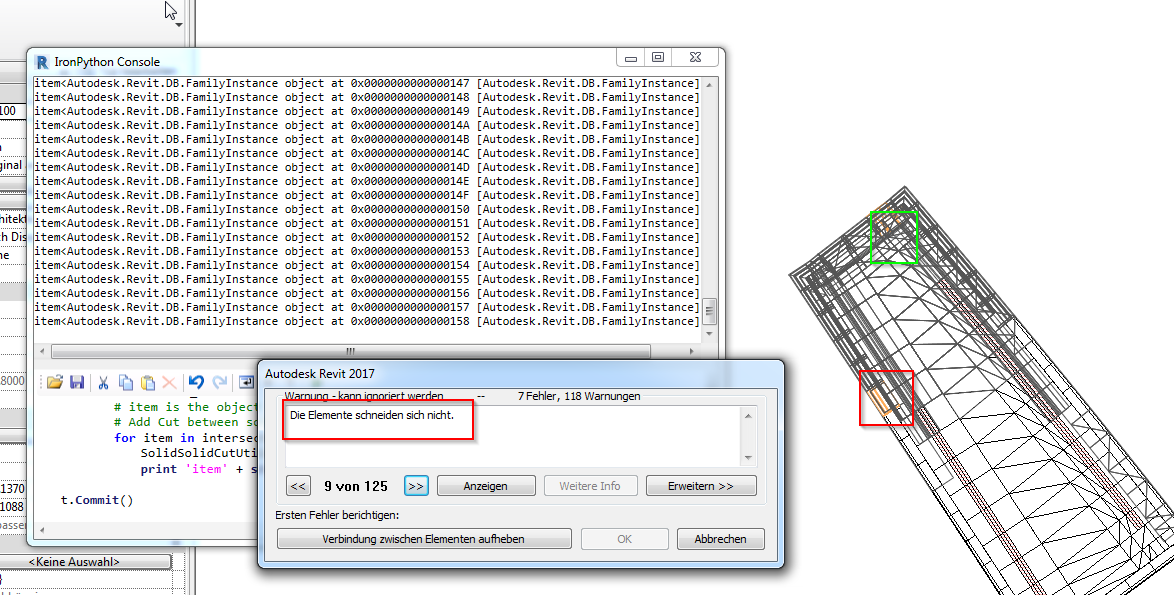
Hey Ruben, thanks a lot for your Input. yes true API is no Magic but I tested on small scale having only three attaching elements and everything worked fine. Now on larger scale it seems Revit finds intersecting objects which actually do not intersect. Since I read a lot about Troubles with bounding boxes especially using Python I was thinking whether it might be relied to the code. Attached please find a screenshot you see in green my object to cut out with the error warning "elment cannot be cut" but signing to a complete different Location of object.

I hope that makes my Problem clearer...

0 Likes
Message 4 of 6

BobbyC.Jones
Advocate
Advocate

The first time I ever tried the BoundingBoxIntesectsFilter I was surprised at some of the elements returned as intersecting my element.  After closely reading the docs it dawned on me what was happening.  That filter returns items whose bounding boxes intersect, not elements who intersected my element's bounding box.  Notice in the attached image that the green elements clearly do not intersect, but their red bounding boxes do.  The BoundingBoxIntersectsFilter therefore will capture these elements.


boundingBoxIntersection.PNG

--
Bobby C. Jones
Message 5 of 6

Anonymous
Not applicable

Hey Bobby, thanks a lot for your input, although not the nicest conclusion for my purpose...=( That definitely clarifies the objects I am finding... But did you find a way /another filter to avoid this problem? Would be really greatful for any hint!

0 Likes
Message 6 of 6

BobbyC.Jones
Advocate
Advocate

You certainly have options.  The ElementIntersectsSolidFilter is perfect for finding true element to element intersections (note that it's a slow filter, although slow is a very relative term).  You can use actual solids derived from the element, or generate proxy solids, depending on your needs.  Here's an article from Jeremy's blog touching on the subject:


http://thebuildingcoder.typepad.com/blog/2015/07/intersect-solid-filter-avf-and-directshape-for-debu...


I have also used a ReferenceIntersector with great success to determine relationships between elements.


https://knowledge.autodesk.com/search-result/caas/CloudHelp/cloudhelp/2016/ENU/Revit-API/files/GUID-...


From what you have described here, I would lean towards trying the ElementIntersectsSolidFilter first, but you know your requirements much better than I.

--
Bobby C. Jones
0 Likes