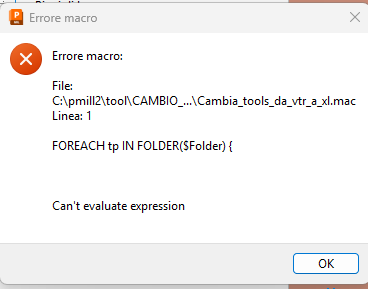
One of my macros doesn't work any more. Is there some one that can help me?

- Mark as New
- Bookmark
- Subscribe
- Mute
- Subscribe to RSS Feed
- Permalink
- Report
A macro to changes tools automatically from one machine to another machine.
example: machine A (called VTR) tools, were changed with machine B (called ZEPHYR) tools one by one.
Now it doesn't work.
it starts the calculation queue instead of queuing the tool changing.
I don't know how to do.
Is there anybody that can recognize the cause please? I really don't understand why it was working and now no more.
thanks in advance to everyone for helping
here is the my macro with the only first couple of tools. It contains both the tools of two machines among which, if present, the tools will be replaced
here is the first part of the macro:
DIALOGS MESSAGE ON
DIALOGS ERROR ON
Function Main() {
ECHO OFF DCPDEBUG UNTRACE COMMAND ACCEPT
STRING $FolderName = active_folder()
IF $FolderName == '' {
} else {
STRING LIST $Split = {}
$Split = TOKENS($FolderName, "\")
IF $Split[0] != "Toolpath" {
MACRO PAUSE "vuoi attivare una cartella ?"
}
}
$FolderName = active_folder()
if $FolderName == '' {
$FolderName = "Toolpath"
}
//
FOREACH $tp IN FOLDER($FolderName) {
IF $tp.tool.name == "42R1_VTR" {
ACTIVATE TOOLPATH $tp.Name
EDIT TOOLPATH ; RECYCLE
ACTIVATE TOOL "42R1_ZEPHYR"
EDIT TOOLPATH ; QUEUE
}
IF $tp.tool.name == "12R1_VTR" {
ACTIVATE TOOLPATH $tp.Name
EDIT TOOLPATH ; RECYCLE
ACTIVATE TOOL "12R1_ZEPHYR"
EDIT TOOLPATH ; QUEUE
}
IF $tp.tool.name == "63R0_VTR" {
ACTIVATE TOOLPATH $tp.Name
EDIT TOOLPATH ; RECYCLE
ACTIVATE TOOL "63R0_ZEPHYR"
EDIT TOOLPATH ; QUEUE
}
}
DIALOGS MESSAGE ON
DIALOGS ERROR ON