Integrate Dynamo with Autocad

Integrate Dynamo with Autocad

Yonas89
Collaborator Collaborator
50.111 Vistas
51 Respuestas
Mensaje 1 de 52

Integrate Dynamo with Autocad

Yonas89
Collaborator
Collaborator

Hello,


I am not sure which forum to choose for my question, thus I hope I have chosen the right one. I have read and watched about Dynamo compatibility with Revit and it looks just amazing. However I use Civil 3d in my daily process which is AutoCAD based and though it's  challenging  to combine Dynamo with AutoCAD, I know it's possible, but I don't know how. I would like to discuss with you guys, maybe you have some experience with it or some thoughts to share. I have found this short video here: https://www.youtube.com/watch?v=oiz76GTN-8Y. Sorry that it's in Russian, don't understand Russian but I get the point that AutoCAD objects could be controlled from Dynamo.

Soluciones aceptadas (1)
50.112 Vistas
51 Respuestas
Respuestas (51)
Mensaje 2 de 52

Alexander.Rivilis
Mentor
Mentor

@Anonymous

It is a question for you.


@Yonas89

You can ask @Anonymous in PM about Dynamo & AutoCAD.

Відповідь корисна? Клікніть на "ВПОДОБАЙКУ" цім повідомленням! | Do you find the posts helpful? "LIKE" these posts!
Находите сообщения полезными? Поставьте "НРАВИТСЯ" этим сообщениям!
На ваше запитання відповіли? Натисніть кнопку "ПРИЙНЯТИ РІШЕННЯ" | Have your question been answered successfully? Click "ACCEPT SOLUTION" button.
На ваш вопрос успешно ответили? Нажмите кнопку "УТВЕРДИТЬ РЕШЕНИЕ"


Alexander Rivilis / Александр Ривилис / Олександр Рівіліс
Programmer & Teacher & Helper / Программист - Учитель - Помощник / Програміст - вчитель - помічник
Facebook | Twitter | LinkedIn
Expert Elite Member

Mensaje 3 de 52

Anonymous
No aplicable

Hello. You're right, Dynamo can integrate with AutoCAD. Say what you want to solve the problem and I'll show you a solution.

Mensaje 4 de 52

Yonas89
Collaborator
Collaborator

Hello, thanks a lot for tagging the author of the video. This is great.

Mensaje 5 de 52

Yonas89
Collaborator
Collaborator

Hello @Anonymous, 

I do not have any specific task yet actually, I am just trying to understand the limits of Dynamo  implementation in civil engineering.  I think that Civil 3D with Subassembly composer is okay for making dynamic road. However I am thinking to use Dynamo for making some infrastructure elements such as intersections, roundabouts, driveways or culverts to make it parametric as much as possible.

0 Me gusta
Mensaje 6 de 52

Anonymous
No aplicable
Solución aceptada

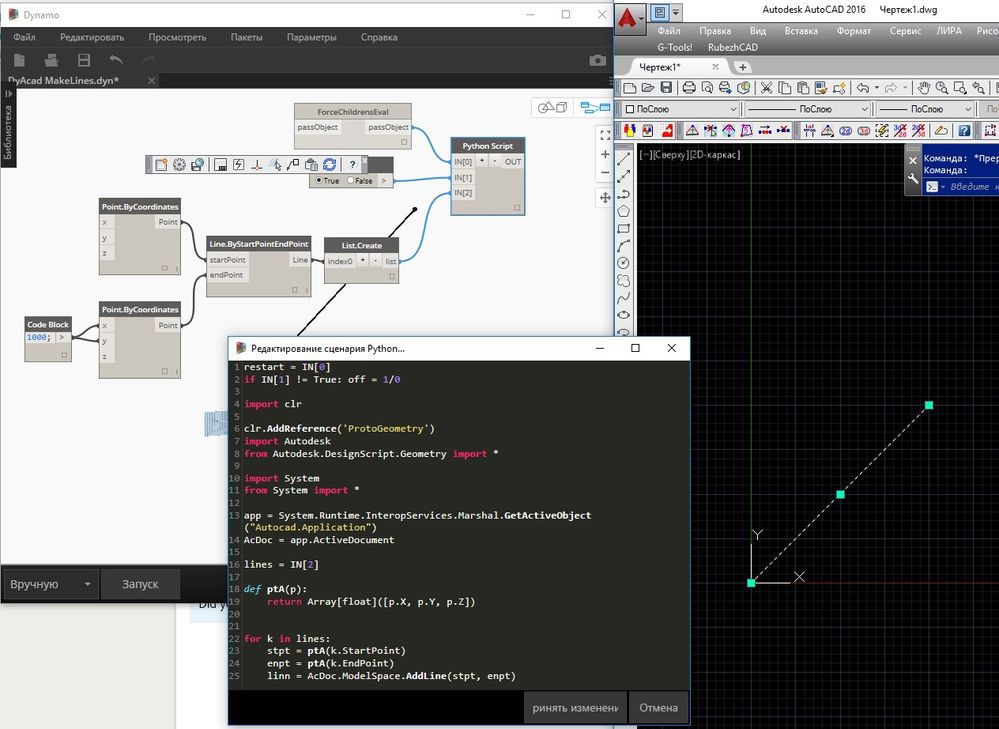
Well, if you do not have a specific task, then I'll show you how to build the line in the open AutoCAD file.

DyAcad MakeLines.jpg


restart = IN[0]
if IN[1] != True: off = 1/0

import clr

clr.AddReference('ProtoGeometry')
import Autodesk
from Autodesk.DesignScript.Geometry import *

import System
from System import *

app = System.Runtime.InteropServices.Marshal.GetActiveObject("Autocad.Application")
AcDoc = app.ActiveDocument

lines = IN[2]

def ptA(p):
	return Array[float]([p.X, p.Y, p.Z]) 


for k in lines:
	stpt = ptA(k.StartPoint)
	enpt = ptA(k.EndPoint)
	linn = AcDoc.ModelSpace.AddLine(stpt, enpt)


Mensaje 7 de 52

Anonymous
No aplicable

Download Dynamo file https://yadi.sk/d/TEdi5lwcyHmn6

Mensaje 8 de 52

Anonymous
No aplicable

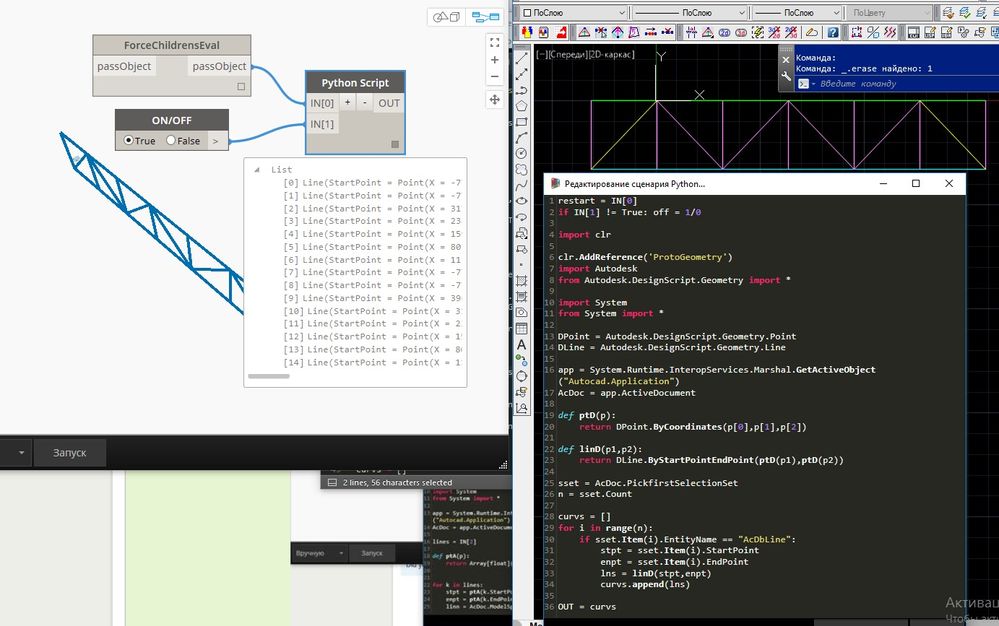
This inverse problem. Get a dedicated line from AutoCAD

DyAcadTakeLines.jpg


restart = IN[0]
if IN[1] != True: off = 1/0

import clr

clr.AddReference('ProtoGeometry')
import Autodesk
from Autodesk.DesignScript.Geometry import *

import System
from System import *

DPoint = Autodesk.DesignScript.Geometry.Point
DLine = Autodesk.DesignScript.Geometry.Line

app = System.Runtime.InteropServices.Marshal.GetActiveObject("Autocad.Application")
AcDoc = app.ActiveDocument

def ptD(p):
	return DPoint.ByCoordinates(p[0],p[1],p[2])

def linD(p1,p2):
	return DLine.ByStartPointEndPoint(ptD(p1),ptD(p2))

sset = AcDoc.PickfirstSelectionSet
n = sset.Count

curvs = []
for i in range(n):
	if sset.Item(i).EntityName == "AcDbLine":
		stpt = sset.Item(i).StartPoint
		enpt = sset.Item(i).EndPoint
		lns = linD(stpt,enpt)
		curvs.append(lns)

OUT = curvs


download Dynamo file https://yadi.sk/d/xDnbn2EHyHtdK

Mensaje 9 de 52

Slawomir_
Advisor
Advisor

Hi,


I can't find "ForceChildrensEval" on the web. Where can I find this or how can I make this in Dynamo?

0 Me gusta
Mensaje 10 de 52

Anonymous
No aplicable

This node from Prorubim DS Common Kit package 

Mensaje 11 de 52

Slawomir_
Advisor
Advisor

Thanks! Is it free for commercial use?

0 Me gusta
Mensaje 12 de 52

Anonymous
No aplicable

its free

Mensaje 13 de 52

Slawomir_
Advisor
Advisor

I'm stuck. Did complete sample You have shown but now I don't know how to display this Python text window.


Dynamo 0.9.1

0 Me gusta
Mensaje 14 de 52

Anonymous
No aplicable

Double click to Python Script node

Mensaje 15 de 52

Slawomir_
Advisor
Advisor

It's working! Thanks a lot!

0 Me gusta
Mensaje 16 de 52

Anonymous
No aplicable

Guiño

0 Me gusta
Mensaje 17 de 52

Anonymous
No aplicable

is it possible to import information from Excel to property set data in Autocad Architecture?


Mensaje 18 de 52

Yonas89
Collaborator
Collaborator
Hmm, I think with Dynamo it would be possible but difficult. I think the better option would be to create custum plugin for it.
0 Me gusta
Mensaje 19 de 52

Anonymous
No aplicable

That's possible.

0 Me gusta
Mensaje 20 de 52

Anonymous
No aplicable

Of course it would be good to write a plugin, but in what programming language? In Dynamo there are nodes to work with Excel, it is already good